Search packages, repositories and app categories

Package detailsv0.0.7

multiselect_dropdown_flutter

A simple multiselect dropdown with select all and search options. Works with a simple list and a list of maps.

AndroidiOSWebmacOSWindowsLinux
30-day downloads
2.6K
Likes
30
Pub points
150

Install package

flutter pub add multiselect_dropdown_flutter

Package Overview

Package selection guidance compiled from public package information, community data, and project usage.

A Flutter package that provides a customizable multiselect dropdown with search and 'Select All' functionality. It supports both simple lists and lists of maps, making it easy to integrate into forms or filters. The dropdown is compatible across all major platforms including Android, iOS, Web, macOS, Windows, and Linux. Ideal for applications requiring efficient selection of multiple items from a large dataset.

Use cases

  • Form inputs with multiple choices
  • Filtering data with multiple criteria
  • User preference selection
  • Dynamic list selection in dashboards
  • Enhancing user experience in data entry forms

Key features

  • Searchable dropdown
  • Select all option
  • Supports simple lists and maps
  • Cross-platform compatibility
  • Customizable UI
  • Easy integration with Flutter

Suitable for

  • Developers building forms with multiple selections
  • Apps needing filter interfaces
  • Projects requiring lightweight dropdown components
  • Teams using Flutter for multi-platform apps
  • Users wanting minimal setup for multiselect features

Considerations

  • May require custom styling for complex designs
  • Limited built-in validation
  • Performance may degrade with very large datasets
  • No built-in error handling for empty selections
  • Depends on external state management for value updates
Original README

Original README snapshot from the linked source repository. Visit the repository for the latest content.

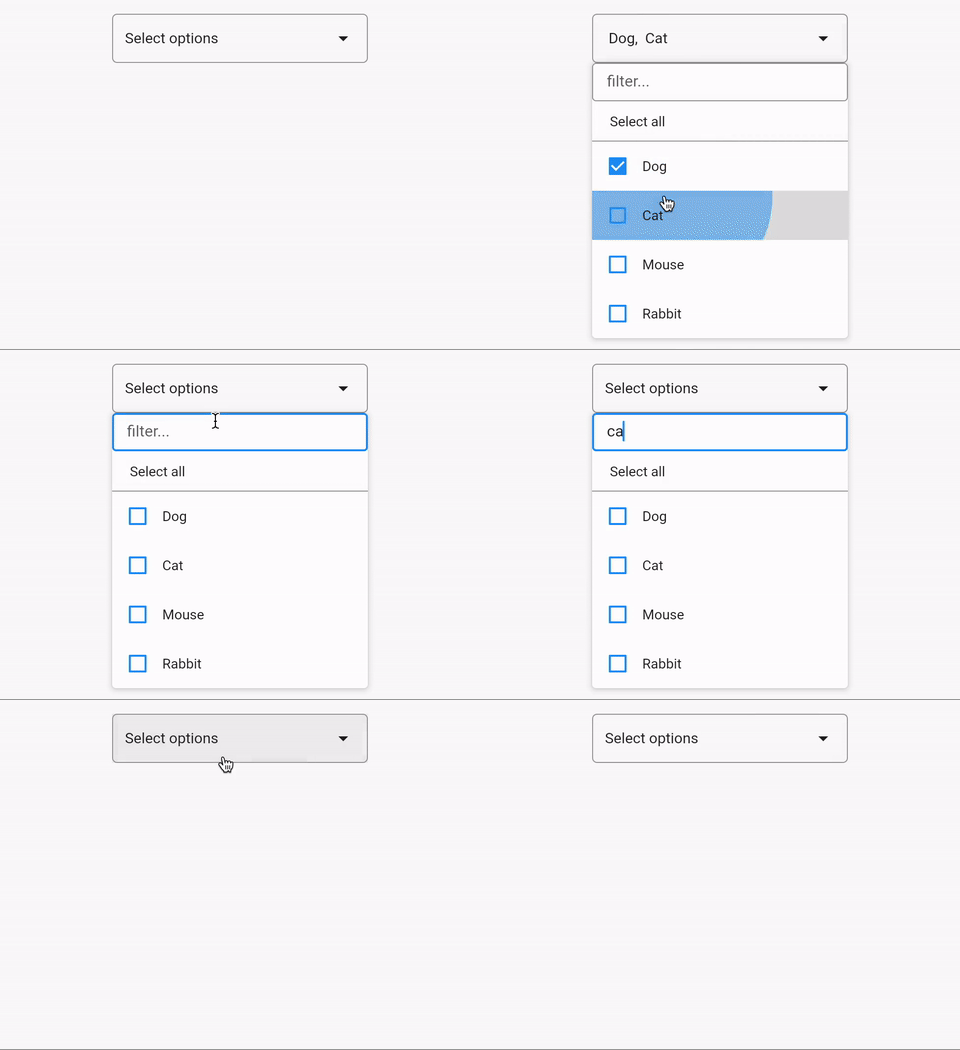
  • A simple multiselect dropdown which has Select All and Search options.
  • You can use a simple list or a list of maps.

Features

MultiSelect Dropdown demo

  • Use MultiSelectDropdown for list of maps.
  • Use MultiSelectDropdown.simpleList for a simple list.

Getting started

  • Add the package in your flutter project.
  • Import the package import 'package:multiselect_dropdown_flutter/multiselect_dropdown_flutter.dart';.

Usage

class MultiSelectExample extends StatelessWidget {
  const MultiSelectExample({super.key});

  final List myList2 = const ['Dog', 'Cat', 'Mouse', 'Rabbit'];

  final List myList = const [
    {'id': 'dog', 'label': 'Dog'},
    {'id': 'cat', 'label': 'Cat'},
    {'id': 'mouse', 'label': 'Mouse'},
    {'id': 'rabbit', 'label': 'Rabbit'},
  ];

  @override
  Widget build(BuildContext context) {
    return Scaffold(
      body: Column(
        children: [
          MultiSelectDropdown(
            list: myList,
            initiallySelected: const [],
            onChange: (newList) {
              // your logic
            },
          ),
          const SizedBox(height: 50),
          MultiSelectDropdown.simpleList(
            list: myList2,
            initiallySelected: const [],
            onChange: (newList) {
              // your logic
            },
            includeSearch: true,
            includeSelectAll: true,
          ),
        ],
      ),
    );
  }
}

Parameters

Parameter Name Description
list List of options to select from
label label key in a Map to show as an option. Defaults to 'label'
id id key in a Map to identify an item. Defaults to 'id'
onChange onChange callback, passes new list as argument
numberOfItemsLabelToShow Number of items to show as text, beyond that it will show n selected
initiallySelected Initially selected list
boxDecoration Decoration for anchor element
isLarge Dropdown size
width Anchor and modal width
whenEmpty Text to show when nothing is selected
includeSelectAll Includes a select all button when true
includeSearch Includes a search option when true
textStyle TextStyle? for the text on anchor element
duration Duration? for debounce in search option. Defaults to 300 milliseconds.
checkboxFillColor checkbox fill color
splashColor splash color on list tile
listTextStyle text style for text on list tile


I will keep adding more functionalities.
You can raise an issue/feature request on github.
Please leave a like if you find this package useful.

Categories

Source repository

Projects using this package

No data available yet.