Search packages, repositories and app categories

number_pagination cover
Package detailsv1.1.6

number_pagination

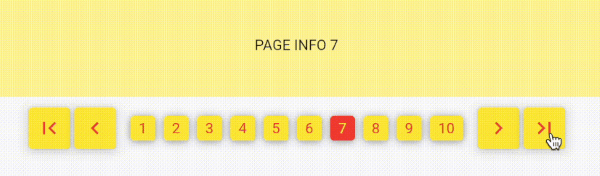
Pagination using numbers, similar to the classic web-style pagination. Explore pages by numbers, not infinite scrolling!

AndroidiOSWebmacOSWindowsLinux
30-day downloads
4.6K
Likes
74
Pub points
160

Install package

flutter pub add number_pagination

Package Overview

Package selection guidance compiled from public package information, community data, and project usage.

NumberPagination is a Flutter package that provides a traditional, number-based pagination interface, ideal for applications requiring page navigation via discrete numbered links. It mimics classic web-style pagination, allowing users to jump directly to specific pages instead of relying on infinite scrolling. The package supports multiple platforms including Android, iOS, Web, macOS, Windows, and Linux, making it versatile for cross-platform apps. It offers a clean, customizable UI with built-in support for page range display, first/last page buttons, and configurable styling. Perfect for data-heavy interfaces where precise navigation is essential.

Use cases

  • Displaying large datasets in a structured way
  • Creating user-friendly navigation in dashboards
  • Implementing search result pagination
  • Building admin panels with page controls
  • Enabling direct page jumps in content lists

Key features

  • Numbered page buttons
  • Support for first/last page navigation
  • Customizable styling options
  • Cross-platform compatibility
  • Configurable page range display
  • Responsive design for all screen sizes

Suitable for

  • Developers building web-like pagination
  • Apps needing structured data navigation
  • Projects prioritizing usability over infinite scroll
  • Teams targeting multi-platform deployment
  • Users wanting simple, intuitive page controls

Considerations

  • May require additional styling for custom themes
  • Not ideal for very large datasets without performance optimization
  • Limited to numeric navigation (no infinite scroll)
  • Requires manual handling of page data loading
  • Best suited for scenarios with known total page count

Original README

Original README snapshot from the linked source repository. Visit the repository for the latest content.

preview

number_pagination flutter flutter test package

ko-fi

Implementing Flutter Number Pagination using a Popular Web Approach.

This package is very simple. Without depending on other packages.

Its usage is also simple and easy.

document

NumberPagination

A customizable pagination widget for Flutter applications.

Overview

NumberPagination is a Flutter widget that provides an intuitive and flexible way to implement pagination in your applications. It displays page numbers and navigation controls, allowing users to easily navigate through multiple pages of content.

Features

  • Page number buttons
  • Navigation controls (first, previous, next, last)
  • Customizable appearance
  • Responsive design

Installation

Add this to your package's pubspec.yaml file:

dependencies:
  number_pagination: ^1.1.0

Customization Options for NumberPagination Widget

The NumberPagination widget offers a wide range of customization options to tailor its appearance and behavior to your needs. Below is a comprehensive list of these options:

Page Display

Option Type Description Default
visiblePagesCount int Number of page numbers to display at once 10
currentPage int Currently displayed page number Required
totalPages int Total number of pages available Required

Text Styling

Option Type Description Default
fontSize double Font size for the page numbers 15
fontFamily String? Font family for the page numbers null

Button Styling

Option Type Description Default
buttonElevation double Elevation of the buttons 5
buttonRadius double Radius of the buttons 0
controlButtonSize Size Size of the control buttons Size(48, 48)
numberButtonSize Size Size of the number buttons Size(48, 48)

Colors

Option Type Description Default
selectedTextColor Color Text color for the selected page button Colors.white
unSelectedTextColor Color Text color for unselected page buttons Colors.black
selectedButtonColor Color Background color of the selected page button Colors.black
unSelectedButtonColor Color Background color of unselected page buttons Colors.white
controlButtonColor Color Background color of control buttons Colors.white

Icons

Option Type Description Default
firstPageIcon Widget Icon for the "first page" button Icon(Icons.first_page)
previousPageIcon Widget Icon for the "previous page" button Icon(Icons.keyboard_arrow_left)
nextPageIcon Widget Icon for the "next page" button Icon(Icons.keyboard_arrow_right)
lastPageIcon Widget Icon for the "last page" button Icon(Icons.last_page)

Spacing

Option Type Description Default
navigationButtonSpacing double Spacing between navigation buttons 4.0
sectionSpacing double Spacing between navigation buttons and page number buttons 10.0
betweenNumberButtonSpacing double Spacing between individual number buttons 3

Callback

Option Type Description
onPageChanged Function(int) Callback function triggered when the page changes

These customization options allow you to fine-tune the appearance and behavior of the NumberPagination widget to seamlessly integrate with your app's design and functionality.

Categories

Source repository

Projects using this package