
Overview
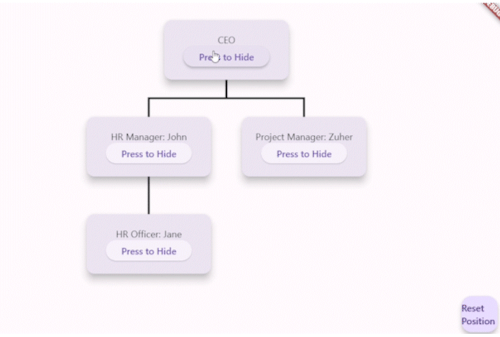
The org_chart package enables developers to create interactive organizational charts in Flutter applications. It supports drag-and-drop reordering, zooming and panning for large charts, search functionality to locate nodes, and dynamic collapse/expand features for better navigation. The package is highly customizable, allowing easy adaptation of node appearance and layout. Built with performance and usability in mind, it works across all major platforms including Android, iOS, Web, macOS, Windows, and Linux.
Use cases
- Interactive team structure visualization
- Dynamic HR dashboards
- Project management tools
- User onboarding flows
- Collaborative workspace planning
Key features
- Drag and drop node reordering
- Zoom and pan for large charts
- Search and filter nodes
- Collapse and expand hierarchy
- Customizable node styling
- Cross-platform compatibility
Suitable for
- HR and team management apps
- Enterprise software
- Educational platforms
- Internal collaboration tools
- Applications requiring hierarchical data display
Considerations
- May require performance optimization for very large datasets
- Custom styling requires familiarity with Flutter widgets
- Initial setup may need time for complex layouts
- Limited built-in animations beyond basic transitions
- Depends on external dependencies for advanced interactions