Search packages, repositories and app categories

page_animator cover
Package detailsv1.0.1

page_animator

A Flutter package that provides smooth page transitions and animations with customizable effects. Perfect for creating engaging user interfaces with horizontal page navigation.

AndroidiOSWebmacOSWindowsLinux
30-day downloads
14
Likes
9
Pub points
160

Install package

flutter pub add page_animator

Package Overview

Package selection guidance compiled from public package information, community data, and project usage.

PageAnimator is a Flutter package designed to deliver smooth, customizable page transitions and animations for horizontal navigation. It enhances user interfaces with fluid visual effects, making app navigation more engaging and intuitive. Ideal for apps requiring dynamic screen changes, such as onboarding flows, dashboards, or multi-step processes. The package supports all major platforms including Android, iOS, Web, macOS, Windows, and Linux, ensuring consistent performance across devices.

Use cases

  • Onboarding screens
  • Dashboard navigation
  • Multi-step forms
  • Interactive tutorials
  • Swipeable content
  • Animated tab transitions

Key features

  • Customizable transition effects
  • Smooth horizontal page animations
  • Cross-platform compatibility
  • Easy integration with PageView
  • Support for gesture-based navigation
  • Configurable duration and curve

Suitable for

  • Developers seeking animated navigation
  • Apps with swipeable interfaces
  • Design-focused UI implementations
  • Mobile and web applications with rich interactions
  • Teams prioritizing user experience

Considerations

  • May impact performance with complex animations
  • Requires careful tuning for optimal UX
  • Limited built-in presets (customization required)
  • Not ideal for simple static pages
  • Best suited for moderate animation complexity

Original README

Original README snapshot from the linked source repository. Visit the repository for the latest content.

Page Animator

A Flutter package that provides smooth page transitions and animations with customizable effects. Perfect for creating engaging user interfaces with horizontal page navigation.

Features

  • Multiple animation types for page transitions, switchable in realtime
  • Infinite scrolling in both directions, with ability to set bounds in realtime
  • Animated switcher - tap on a page, and it will zoom out, similar to Kindle reader
  • Immersive mode support

Animation Types

The package supports various animation types through PageAnimatorType. Here's a comprehensive list of all available animations:

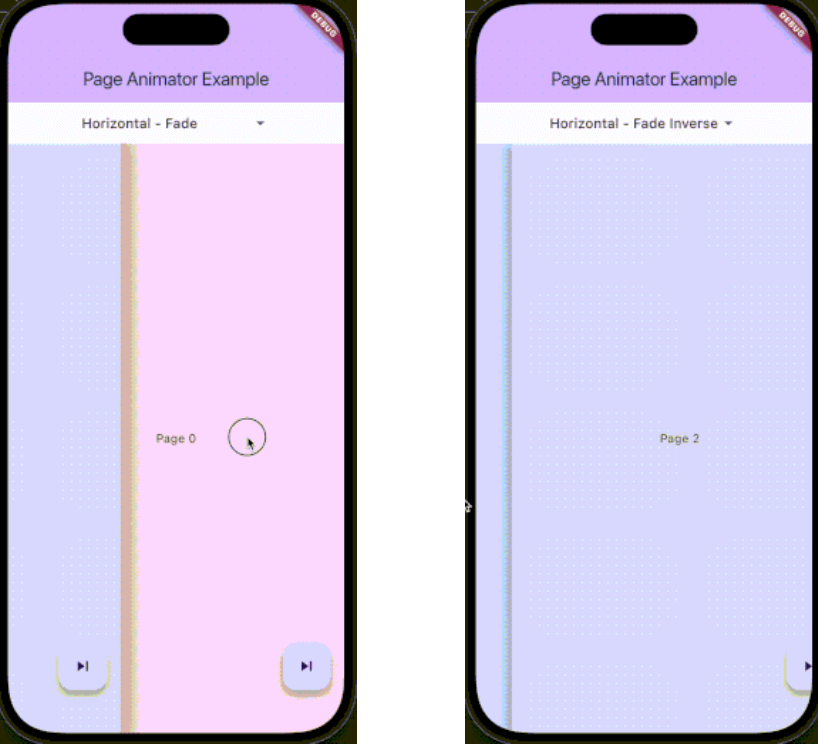
Preview Preview Preview
Uncompressed gif
animatedSwitcher - Animated switcher transition
Uncompressed gif
noAnimation - No animation effect, instant page switch
Uncompressed gif
horizontalSimple - Simple horizontal slide transition
Uncompressed gif
horizontalFade - Horizontal slide with fade effect
Uncompressed gif
horizontalFadeInverse - Horizontal slide with inverse fade effect
Uncompressed gif
verticalSimple - Simple vertical slide transition
Uncompressed gif
verticalFade - Vertical slide with fade effect
Uncompressed gif
verticalFadeInverse - Vertical slide with inverse fade effect

You can change the animation type dynamically using the controller:

pageAnimatorController.type.value = PageAnimatorType.verticalFade;

Installation

Add this to your package's pubspec.yaml file:

dependencies:
  page_animator: ^1.0.0

Usage

  1. Import the package:
import 'package:page_animator/page_animator.dart';
  1. Create a PageAnimatorController:
final pageAnimatorController = PageAnimatorController(
  type: PageAnimatorType.horizontalFade,
);
  1. Use the PageAnimator widget:
PageAnimator(
  controller: pageAnimatorController,
  onPageChanged: (int currentPage) {
    print('Page offset: $currentPage');
  },
  leftMostIndex: -3,
  rightMostIndex: 3,
  children: [
    // Your page widgets here
  ],
  enableImmersiveSwitch: true,
)
Page Bounds

The PageAnimator widget allows you to set bounds for page navigation using leftMostIndex and rightMostIndex parameters:

  • leftMostIndex: The minimum page offset that can be reached by swiping left
  • rightMostIndex: The maximum page offset that can be reached by swiping right

These bounds can be changed in realtime, allowing you to dynamically control the navigation range. For example:

// Initially allow navigation indefinitelly
PageAnimator(
  leftMostIndex: null,
  rightMostIndex: null,
  // ... other parameters
)

// Later, you can update the bounds
PageAnimator(
  leftMostIndex: -3,
  rightMostIndex: 3,
  // ... other parameters
)

When a bound is reached, the page will stop scrolling in that direction, providing a natural end to the navigation.

Example

Here's a complete example showing how to use the package:

class MyPage extends StatefulWidget {
  @override
  State<MyPage> createState() => _MyPageState();
}

class _MyPageState extends State<MyPage> {
  final pageAnimatorController = PageAnimatorController(
    type: PageAnimatorType.horizontalFade,
  );

  @override
  Widget build(BuildContext context) {
    return Scaffold(
      body: PageAnimator(
        controller: pageAnimatorController,
        onPageChanged: (int currentPage) {
          print('Page offset: $currentPage');
        },
        leftMostIndex: -3,
        rightMostIndex: 3,
        children: [
          for (final page in List.generate(3, (index) => index))
            _buildPage(page),
        ],
        enableImmersiveSwitch: true,
      ),
    );
  }

  Widget _buildPage(int page) {
    return Scaffold(
      body: Center(
        child: Text('Page $page'),
      ),
      floatingActionButton: FloatingActionButton(
        onPressed: () => pageAnimatorController.animateToOffset(1),
        child: const Icon(Icons.skip_next),
      ),
    );
  }
}

Controller Methods

The PageAnimatorController provides several methods to control page transitions:

  • animateToOffset(int offset): Animate to a specific page offset
  • type: Change the animation type dynamically
  • switcherActive: Control the page switcher state

Contributing

Contributions are welcome! Please feel free to submit a Pull Request.

License

This project is licensed under the MIT License - see the LICENSE file for details.

Parameters

  • children: List of widgets to display as pages
  • onPageChanged: Callback when page is changed
  • leftMostIndex: The first page user can go to
  • rightMostIndex: The last page user can go to
  • controller: PageAnimatorController instance
  • enableImmersiveSwitch: Optional boolean that controls whether to enable immersive mode while switcher is inactive, and automatically disable it when user enters switcher. If not specified, defaults to true.
  • onDragStart: Optional callback when drag starts
  • onDragEnd: Optional callback when drag ends
  • onDragAnimationStart: Optional callback when animation starts
  • onDragAnimationEnd: Optional callback when animation ends

Categories

Dependencies

Dependency list 1 items

Source repository

Projects using this package

No data available yet.