Search packages, repositories and app categories

Package detailsv0.3.1+1

parallax_image

A Flutter widget that paints an image and moves it at a slower speed than the main scrolling content.

30-day downloads
15
Likes
94
Pub points
40

Install package

flutter pub add parallax_image

Package Overview

Package selection guidance compiled from public package information, community data, and project usage.

Parallax_image is a Flutter widget that creates a parallax scrolling effect by moving an image at a slower rate than the surrounding content. This visual technique adds depth and engagement to scrollable interfaces, making it ideal for immersive experiences like cover flows or carousels. The widget seamlessly integrates with ListView and other scrollable components, allowing developers to enhance user interaction through subtle motion. It's lightweight and designed for performance, ensuring smooth animations even on lower-end devices.

Use cases

  • Creating immersive carousel interfaces
  • Enhancing app onboarding screens
  • Adding depth to product showcase pages
  • Improving user engagement in scroll-based content
  • Designing visually dynamic landing pages

Key features

  • Smooth parallax scrolling effect
  • Easy integration with ListView
  • Customizable parallax speed
  • Lightweight and performant
  • Supports both static and animated images

Suitable for

  • App designers seeking visual depth
  • Developers building interactive carousels
  • Teams focusing on user experience enhancement
  • Projects requiring subtle animation effects
  • Mobile apps with rich visual storytelling

Considerations

  • May impact performance on low-end devices
  • Requires careful tuning of parallax speed
  • Limited to scrollable contexts
  • Not suitable for complex animations
  • Best used with high-quality images

Original README

Original README snapshot from the linked source repository. Visit the repository for the latest content.

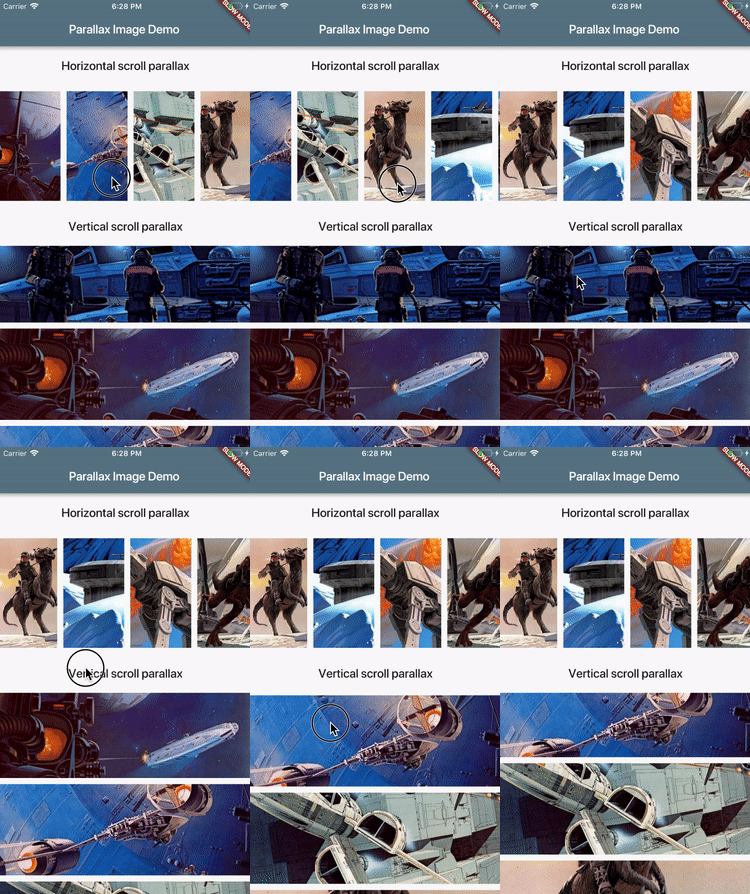
A Flutter widget that paints an image and moves it at a slower speed than the main scrolling content.

demo.gif

Installation

Add dependency to your pubspec.yaml:

dependencies:
  parallax_image: [latest version]

Usage

ParallaxImage can be used with any Scrollable (ListView for instance). When created, it subscribes to scroll updates on nearest Scrollable ancestor. It is also possible to specify custom ScrollController in which case this widget subscribes to updates on ScrollController.position (assumes that controller is attached to only one Scrollable).

class MyWidget extends StatefulWidget {
  @override
  MyWidgetState createState() => new MyWidgetState();
}

class MyWidgetState extends State<MyWidget> {
  final _controller = new ScrollController();

  @override
  Widget build(BuildContext context) {
    return new ListView(controller: _controller, children: [
      new ParallaxImage(
        image: new AssetImage('images/january.jpg'),
        // Extent of this widget in scroll direction.
        // In this case it is vertical scroll so extent defines
        // the height of this widget.
        // The image is scaled with BoxFit.fitWidth which makes it
        // occupy full width of this widget.
        // After image is scaled it should normally have height greater
        // than this value to allow for parallax effect to be
        // visible.
        extent: 100.0,
        // Optionally specify child widget.
        child: new Text('January'),
        // Optinally specify scroll controller.
        controller: _controller,
      ),
      // ...add more list items
    ]);
  }
}

See example/ folder for a complete demo.

Features and bugs

Please file feature requests and bugs at the issue tracker.

Categories

Source repository

Projects using this package