Search packages, repositories and app categories

pick_color cover
Package detailsv0.0.4

pick_color

A Flutter package which allow you to extract color and hexcode from image with simple touch.

AndroidiOSWebmacOSWindowsLinux
30-day downloads
35
Likes
29
Pub points
140

Install package

flutter pub add pick_color

Package Overview

Package selection guidance compiled from public package information, community data, and project usage.

Pick Color is a Flutter package that enables users to extract dominant colors and their hex codes from images with a simple touch interaction. It leverages image processing to analyze pixel data and return accurate color representations, making it ideal for design tools, theme generators, or apps requiring dynamic color extraction. The package supports multiple platforms including Android, iOS, Web, macOS, Windows, and Linux, ensuring broad compatibility. With minimal setup via pub add, developers can integrate color picking functionality seamlessly into their applications.

Use cases

  • Design tool color sampling
  • Theme generator based on images
  • Color palette creation
  • Image-based UI customization
  • Interactive art applications

Key features

  • Touch-based color extraction
  • Hex code output
  • Cross-platform support
  • Simple integration
  • Real-time color analysis
  • Image pixel analysis

Suitable for

  • UI/UX designers
  • Mobile app developers
  • Creative application builders
  • Color theme generators
  • Prototyping tools

Considerations

  • Requires image input for color extraction
  • Performance may vary with large images
  • Limited to dominant colors per image
  • No color history persistence
  • Depends on platform-specific image rendering

Original README

Original README snapshot from the linked source repository. Visit the repository for the latest content.

Pick_Color

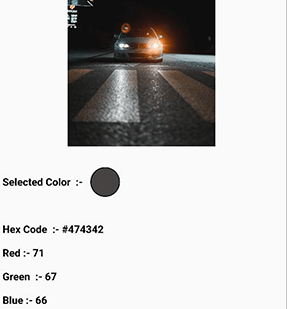
Pick_Color allows you to sample specific colors from an image and obtain their hex color code by just dragging over the image area.

pick_color

Add Dependency

pick_color : any

Usage

 Image image = Image.asset("assets/b.jpg");
 ColorPicker(
    child: image, # Your Image widget
    onChanged: (response) {
        String hexcode = response.hexCode;
        // Get Selected Color
        Color color = response.selectionColor;
        // Get Red Channel Color
        int redValue = response.redScale;
        // Get Blue Channel Color
        int blueValue = response.blueScale;
        // Get Green Channel Color
        int greenValue = response.greenScale;  
                  
});    

That's all it takes 😃

Feel Free to contribute or file an issue happy coding.

Categories

Dependencies

Dependency list 1 items

Source repository

Projects using this package

No data available yet.