Search packages, repositories and app categories

pie_chart_sz cover
Package detailsv1.1.1

pie_chart_sz

A Flutter package for creating beautiful Spaced Pie Charts Widget

AndroidiOSWebmacOSWindowsLinux
30-day downloads
88
Likes
10
Pub points
135

Install package

flutter pub add pie_chart_sz

Package Overview

Package selection guidance compiled from public package information, community data, and project usage.

A Flutter package that enables the creation of visually appealing Spaced Pie Charts. It provides customizable, animated pie charts with proper spacing between slices, ideal for data visualization in apps. The package supports multiple platforms including Android, iOS, Web, macOS, Windows, and Linux, making it versatile for cross-platform development. With simple integration via pub add, it offers developers an efficient way to present proportional data in an engaging format.

Use cases

  • Displaying data proportions
  • Creating dashboards
  • Visualizing survey results
  • Presenting financial breakdowns
  • Enhancing app UI with charts

Key features

  • Spaced pie chart design
  • Smooth animations
  • Cross-platform support
  • Customizable colors and labels
  • Easy integration with Flutter

Suitable for

  • Data visualization in mobile apps
  • Dashboard development
  • Educational applications
  • Business analytics tools
  • UI-heavy applications

Considerations

  • Limited to pie chart type
  • May require performance optimization for large datasets
  • No 3D or interactive features
  • Depends on external GitHub repository
  • Minimal documentation available

Original README

Original README snapshot from the linked source repository. Visit the repository for the latest content.

spaced Pie Chart / pie_chart_sz Cirrus CI - Base Branch Build Status GitHub stars GitHub last commit Open Source Love

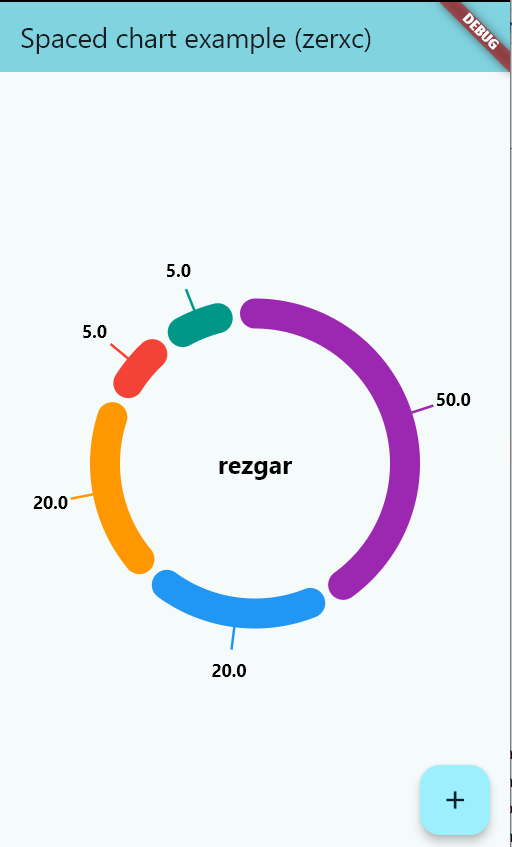
This Flutter package provides a donut Chart Widget

Installation

In the dependencies: section of your pubspec.yaml, add the following line:

Version

dependencies:
  pie_chart_sz: <latest version>

Usage

Import this class
import 'package:pie_chart/pie_chart.dart';
this a simple example code to use this package
PieChart
List<Color>? colors = [
  Colors.purple,
  Colors.blue,
  Colors.orange,
  Colors.red,
  Colors.teal,
];

List<double>? values = [
  50,
  20,
  20,
  5,
  5,
];

PieChartSz(
colors: colors,
values: values,
gapSize: 0.2,
centerText: "center text",
centerTextStyle: TextStyle(
fontSize: 20,
fontWeight: FontWeight.bold,
color: Colors.black,
),
valueSettings: Valuesettings(
showValues: false,
ValueTextStyle: TextStyle(
fontSize: 14,
fontWeight: FontWeight.bold,
color: Colors.black,
),
),
)

Features

show values with 'showValues'
Valuesettings(
showValues: true,
ValueTextStyle: TextStyle(
fontSize: 14,
fontWeight: FontWeight.bold,
color: Colors.black,
),
)
PieChart

Categories

Source repository

Projects using this package

No data available yet.