Search packages, repositories and app categories

Package detailsv0.0.4

plain_notification_token

Get your push notification token via platform way (APNs for iOS / Firebase Clound Messaging for Android)

AndroidiOS
30-day downloads
70
Likes
41
Pub points
130

Install package

flutter pub add plain_notification_token

Package Overview

Package selection guidance compiled from public package information, community data, and project usage.

A lightweight Flutter package that retrieves push notification tokens using platform-specific methods: APNs for iOS and Firebase Cloud Messaging for Android. It abstracts the underlying implementation, allowing developers to easily obtain device tokens for sending notifications. The package is designed for simplicity and reliability, ensuring consistent token access across platforms without requiring complex setup. It integrates seamlessly into apps needing push notification functionality.

Use cases

  • Fetching device tokens for push notifications
  • Integrating with Firebase Cloud Messaging
  • Setting up APNs tokens on iOS
  • Enabling cross-platform notification support
  • Simplifying token retrieval in messaging apps

Key features

  • Platform-specific token retrieval
  • Minimal boilerplate
  • Supports Android and iOS
  • Easy integration with FCM and APNs
  • Lightweight and dependency-free

Suitable for

  • Apps requiring push notifications
  • Developers using FCM or APNs
  • Projects prioritizing simplicity
  • Cross-platform mobile apps
  • Backend services managing device tokens

Considerations

  • Requires proper setup of FCM or APNs
  • Does not handle token refresh automatically
  • No built-in error handling for network issues
  • Limited to token retrieval only
  • Depends on external services for actual messaging
Original README

Original README snapshot from the linked source repository. Visit the repository for the latest content.

plain_notification_token

Get your push notification token via platform way (APNs for iOS / Firebase Clound Messaging for Android)

Getting Started

Android Integration

To integrate your plugin into the Android part of your app, setup Firebase:

  1. Using the Firebase Console add an Android app to your project: Follow the assistant, download the generated google-services.json file and place it inside android/app.
  2. Modify the android/build.gradle file and the android/app/build.gradle file to add the Google services plugin as described by the Firebase assistant.

(Please see this tutorial if you want.)

iOS Integration

To integrate your plugin into the iOS part of your app, follow these steps:

  1. Generate the certificates from Apple developer center for receiving push notifications. (Please see this article if you want the tutorial.)
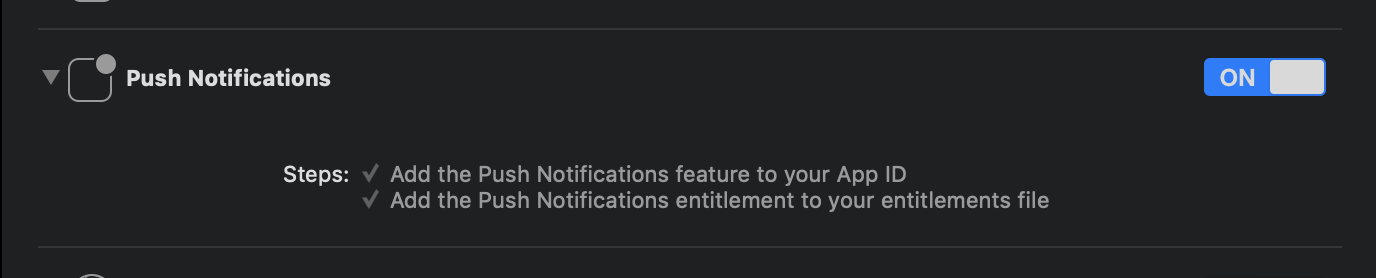
  2. Enable Push Notification in Capabilities tab in Xcode opening your ios/Runner.xcworkspace.

Enabling Push Notification switch

Dart/Flutter Integration

From your Dart code, you need to import the plugin and instantiate it:

import 'package:plain_notification_token/plain_notification_token.dart';

final plainNotificationToken = PlainNotificationToken();

To get token, call getToken():

// (iOS Only) Need requesting permission of Push Notification.
if (Platform.isIOS) {
  plainNotificationToken.requestPermission();
  
  // If you want to wait until Permission dialog close,
  // you need wait changing setting registered. 
  await plainNotificationToken.onIosSettingsRegistered.first;
}

final String token = await plainNotificationToken.getToken();

... and use token on your server!!

Token is Base64 stringified APNs token (in iOS) / Firebase Cloud Messaging (FCM) string token (in Android).

Categories

Dependencies

Dependency list 1 items

Source repository

Projects using this package