Package selection guidance compiled from public package information, community data, and project usage.
Roggle is a simple, colorful, and easily extensible logging package for Dart, inspired by the popular logger library. It provides a clean and intuitive API for outputting logs across multiple platforms, including Android, iOS, Web, macOS, Windows, and Linux. With vibrant color coding and customizable formatting, Roggle enhances debug visibility without adding complexity. Its lightweight design makes it ideal for both development and production use, especially when developers want a visually distinct logging experience with minimal setup. The package integrates seamlessly into Flutter projects via pub.dev.
Use cases
Debugging application flow
Monitoring runtime behavior
Enhancing log readability in development
Cross-platform logging
Quick integration into existing projects
Visual differentiation of log levels
Key features
Colorful console output
Simple and intuitive API
Extensible design
Multi-platform support
Minimal configuration
Log level filtering
Suitable for
Developers seeking visual log clarity
Flutter apps needing lightweight logging
Teams prioritizing developer experience
Projects requiring easy-to-read debug output
Fast prototyping with clear feedback
Simple logging without heavy dependencies
Considerations
Not suitable for high-volume production logging
Limited advanced features compared to full-featured loggers
Color output may not be useful in non-terminal environments
Depends on external logger for core functionality
May require additional configuration for custom formatters
Best used in development or low-throughput scenarios
Original README
Original README snapshot from the linked source repository. Visit the repository for the latest content.
Roggle
Simple, colorful and easy to expand logger for dart.
Inspired by the logger and dependent to the logger.
Getting Started
Just create an instance of Roggle and start logging:
import'package:roggle/roggle.dart';
final logger = Roggle();
logger.d('Roggle is working!');
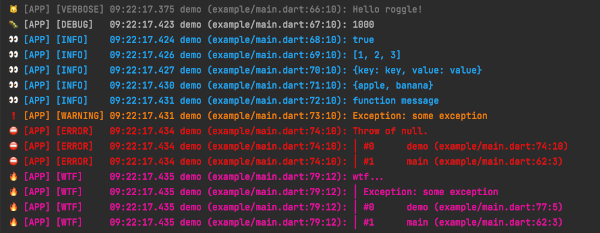
Instead of a string message, you can also pass other objects like List, Map, Set or Function.
Output
Documentation
Roggle's API is almost the same as the logger. See the logger for basic usage.
Difference from the logger
Printer defaults to SinglePrettyPrinter class.
Not try-catch at LogOutput class, because we want to stop the process.
Added some getters in Roggle class.
Changed the log interface dynamic to Object?.
Options
If you use the SinglePrettyPrinter, there are more options:
final logger = Roggle(
  printer: SinglePrettyPrinter(
    loggerName: '[APP]', // Print a logger name for each log message
    colors: true, // Colorful log messages
    printCaller: true, // Print a caller for each log message
    printLocation: true, // Print a location of caller for each log message
    printFunctionName: true, // Print a function name of caller for each log message
    printEmojis: true, // Print an emoji for each log message
    printLabels: true, // Print a level string for each log message
    printTime: true, // Print a timestamp for each log message
    stackTraceLevel:
        Level.error, // The current logging level to display stack trace
    stackTraceMethodCount: 10, // Number of stack trace methods to display
    stackTracePrefix: '>>> ', // Replace stack trace prefix
    levelColors: {}, // Replace level colors map
    levelEmojis: {}, // Replace level emojis map
    levelLabels: {}, // Replace level labels map
    timeFormatter: (now) => DateFormat('yyyy/MM/dd HH:mm:ss.SSS')
        .format(now), // Replace time formatter
  ),
);
You can use the Roggle.crashlytics() to send errors and logs using the FirebaseCrashlytics API in release mode.
final logger = Roggle.crashlytics(
printer: CrashlyticsPrinter(
errorLevel: Level.error, // Logs above this level will call onError
onError: (event) {
// Send an error to Firebase Crashlytics as followsFirebaseCrashlytics.instance.recordError(
event.exception,
event.stack,
fatal: true,
);
},
onLog: (event) {
// Send logs to Firebase Crashlytics as followsFirebaseCrashlytics.instance.log(event.message);
},
loggerName: '[APP]',
printCaller: true, // Print a caller for each log message
printLocation: true, // Print a location of caller for each log message
printFunctionName: true, // Print a function name of caller for each log message
printEmojis: true, // Print an emoji for each log message
printLabels: true, // Print a level string for each log message
levelEmojis: {}, // Replace level emojis map
levelLabels: {}, // Replace level labels map
),
);
Tips
If you want to stop the process at the same time as the error log, do the following.
import'package:roggle/roggle.dart';
final logger = Roggle(
output: AssertionOutput(),
);
classAssertionOutputextendsConsoleOutput{
@overridevoidoutput(OutputEvent event) {
super.output(event);
if (event.level.index >= Level.error.index) {
throwAssertionError('Stopped by logger.');
}
}
}
License
MIT LicenseCopyright (c) 2022KeyberInc.
Permissionis hereby granted, free of charge, to any person obtaining a copy
of this software and associated documentation files (the "Software"), to deal
in the Software without restriction, including without limitation the rights
to use, copy, modify, merge, publish, distribute, sublicense, and/or sell
copies of the Software, and to permit persons to whom the Softwareis
furnished to do so, subject to the following conditions:
The above copyright notice and this permission notice shall be included in all
copies or substantial portions of the Software.
THE SOFTWARE IS PROVIDED "AS IS", WITHOUT WARRANTY OF ANY KIND, EXPRESS OR
IMPLIED, INCLUDING BUT NOT LIMITED TO THE WARRANTIES OF MERCHANTABILITY,
FITNESS FOR A PARTICULAR PURPOSE AND NONINFRINGEMENT. IN NO EVENT SHALL THE
AUTHORS OR COPYRIGHT HOLDERS BE LIABLE FOR ANY CLAIM, DAMAGES OR OTHER
LIABILITY, WHETHER IN AN ACTION OF CONTRACT, TORT OR OTHERWISE, ARISING FROM,
OUT OF OR IN CONNECTION WITH THE SOFTWARE OR THE USE OR OTHER DEALINGS IN THE
SOFTWARE.