Search packages, repositories and app categories

rotated_corner_decoration cover
Package detailsv2.1.0+1

rotated_corner_decoration

RotatedCornerDecoration package was developed to create and apply corner badges. It provides auto rotation of TextSpans.

AndroidiOSWebmacOSWindowsLinux
30-day downloads
118
Likes
113
Pub points
150

Install package

flutter pub add rotated_corner_decoration

Package Overview

Package selection guidance compiled from public package information, community data, and project usage.

RotatedCornerDecoration is a Flutter package designed to create and apply corner badges with automatic text rotation. It enables developers to easily add decorative corner elements—such as ribbons or badges—to widgets, ensuring text labels are properly oriented even when placed in corners. Ideal for UI enhancements like 'New' or 'Sale' tags, it supports multiple platforms including Android, iOS, Web, macOS, Windows, and Linux. The package simplifies the process of aligning text within rotated containers using TextSpan auto-rotation.

Use cases

  • Adding decorative corner badges
  • Creating dynamic ribbon labels
  • Enhancing UI with visual indicators
  • Displaying status tags in corners
  • Customizing widget corner decorations
  • Building promotional banners

Key features

  • Auto-rotates TextSpans
  • Supports multiple platforms
  • Easy integration with existing widgets
  • Flexible corner positioning
  • Minimal boilerplate code
  • Cross-platform compatibility

Suitable for

  • UI designers seeking visual flair
  • Developers building e-commerce apps
  • Teams creating dashboard interfaces
  • Apps needing status indicators
  • Projects with custom badge requirements

Considerations

  • Requires understanding of TextSpan layout
  • May need fine-tuning for complex layouts
  • Limited to corner decoration use cases
  • Not suitable for full-screen overlays
  • Best used with simple text content

Original README

Original README snapshot from the linked source repository. Visit the repository for the latest content.

Pay attention!

If you need a regular (not rotated) text at the corner of widgets please consider to use Stack with Containers and Text widgets.
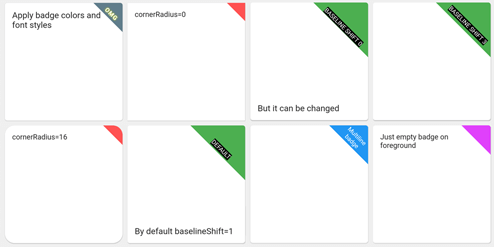
This package was developed to provide auto rotation of TextSpans.

Example

Take a look at the provided example application for how to use the CornerDecoration.

How to use

screenshot1678647469887

Container(
  foregroundDecoration: RotatedCornerDecoration.withColor(
    color: Color(0xffffd700),
    badgeSize: Size(16, 16),
  ),
),

screenshot1678647470825

Container(
  foregroundDecoration: RotatedCornerDecoration.withColor(
    color: Colors.red,
    spanBaselineShift: 4,
    badgeSize: Size(64, 64),
    badgeCornerRadius: Radius.circular(8),
    badgePosition: BadgePosition.topStart,
    textSpan: TextSpan(
      text: 'OMG',
      style: TextStyle(
        color: Colors.white,
        fontSize: 12,
        letterSpacing: 1,
        fontWeight: FontWeight.bold,
        shadows: [
          BoxShadow(color: Colors.yellowAccent, blurRadius: 8),
        ],
      ),
    ),
  ),
),

screenshot1678647471437

Container(
  foregroundDecoration: RotatedCornerDecoration.withColor(
    color: Colors.blue,
    badgeSize: Size(64, 64),
    textSpan: TextSpan(
      text: 'Multiline\nbadge',
      style: TextStyle(fontSize: 10),
    ),
  ),
),

screenshot1678647472293

Container(
  foregroundDecoration: RotatedCornerDecoration.withColor(
    color: Colors.black87,
    badgeSize: Size(64, 64),
    spanBaselineShift: 2,
    textSpan: TextSpan(
      children: [
        TextSpan(
          text: 'LOREM\n',
          style: TextStyle(
            fontSize: 10,
            fontWeight: FontWeight.bold,
            color: Colors.redAccent,
          ),
        ),
        TextSpan(
          text: 'IPSUM',
          style: TextStyle(
            fontSize: 7,
            fontStyle: FontStyle.italic,
            letterSpacing: 5,
            color: Colors.yellow,
          ),
        ),
      ],
    ),
  ),
),

screenshot1678647473029

Container(
  foregroundDecoration: RotatedCornerDecoration.withColor(
    color: Colors.brown,
    badgeSize: Size(112, 56),
    textSpan: TextSpan(
      text: 'WEIRD BADGE',
      style: TextStyle(fontSize: 10),
    ),
  ),
),

screenshot1678647473739

Container(
  foregroundDecoration: RotatedCornerDecoration.withColor(
    color: Colors.blueGrey,
    badgeSize: Size(64, 64),
    textSpan: TextSpan(
      text: 'WOW',
      style: TextStyle(fontSize: 10),
    ),
    spanHorizontalOffset: -12,
  ),
),

screenshot1678647478380

Container(
  foregroundDecoration: RotatedCornerDecoration.withColor(
    color: Colors.green,
    badgeSize: Size(64, 64),
    textSpan: TextSpan(
      text: 'SHIFT 1',
      style: TextStyle(fontSize: 10, backgroundColor: Colors.black),
    ),
  ),
),

screenshot1678647479092

Container(
  foregroundDecoration: RotatedCornerDecoration.withColor(
    color: Colors.green,
    badgeSize: Size(64, 64),
    spanBaselineShift: 3,
    textSpan: TextSpan(
      text: 'SHIFT 4',
      style: TextStyle(fontSize: 10, backgroundColor: Colors.black),
    ),
  ),
),

screenshot1678647479917

Container(
  foregroundDecoration: RotatedCornerDecoration.withGradient(
    gradient: LinearGradient(
      begin: Alignment.topRight,
      end: Alignment.bottomLeft,
      colors: [Colors.blue, Colors.lightGreenAccent],
    ),
    badgeSize: Size(64, 64),
  ),
  decoration: RotatedCornerDecoration.withGradient(
    badgePosition: BadgePosition.topStart,
    gradient: LinearGradient(
      begin: Alignment.topLeft,
      end: Alignment.topRight,
      stops: [0, 0.5, 1],
      colors: [
        Colors.purpleAccent,
        Colors.amber,
        Colors.blue,
      ],
    ),
    badgeSize: Size(64, 64),
  ),
),

screenshot1678647480605

Container(
  foregroundDecoration: RotatedCornerDecoration.withGradient(
    gradient: RadialGradient(
      center: Alignment.topRight,
      radius: 1.5,
      stops: const [0, 0.25, 0.5],
      colors: [
        Colors.redAccent,
        Colors.redAccent.withOpacity(0.5),
        Colors.redAccent.withOpacity(0),
      ],
    ),
    badgeSize: const Size(64, 64),
  ),
  decoration: RotatedCornerDecoration.withGradient(
    badgePosition: BadgePosition.topStart,
    gradient: SweepGradient(
      center: const FractionalOffset(0.27, -0.65),
      colors: List.generate(360, _generator),
    ),
    badgeSize: const Size(64, 64),
  ),
),

screenshot1678647483564

Container(
  foregroundDecoration: RotatedCornerDecoration.withColor(
    color: Colors.lightBlue,
    badgeSize: Size(64, 64),
    badgeShadow: BadgeShadow(color: Colors.black, elevation: 4),
  ),
),

screenshot1678647484300

Container(
  foregroundDecoration: RotatedCornerDecoration.withColor(
    color: Colors.indigo,
    badgeSize: Size(64, 64),
    badgePosition: BadgePosition.bottomStart,
    textDirection: TextDirection.ltr,
  ),
),

screenshot1678647485147

Container(
  foregroundDecoration: RotatedCornerDecoration.withColor(
    color: Colors.indigo,
    badgeSize: Size(64, 64),
    badgePosition: BadgePosition.bottomStart,
    textDirection: TextDirection.rtl,
  ),
),

EXPERIMENTAL FEATURE!

use isEmoji: true to disable span rotating
you can shift span position with spanHorizontalOffset and TextStyle.height parameters screenshot1678649657350

Container(
  foregroundDecoration: RotatedCornerDecoration.withColor(
    color: Colors.purple,
    badgeSize: Size(64, 64),
    isEmoji: true,
    textSpan: TextSpan(
      text: '🤮',
      style: TextStyle(fontSize: 20, height: 1.7),
    ),
  ),
),

Categories

Source repository

Projects using this package

No data available yet.