
Search categories, packages and repositories

Package detailsv0.0.2

scrollable_reorderable_navbar

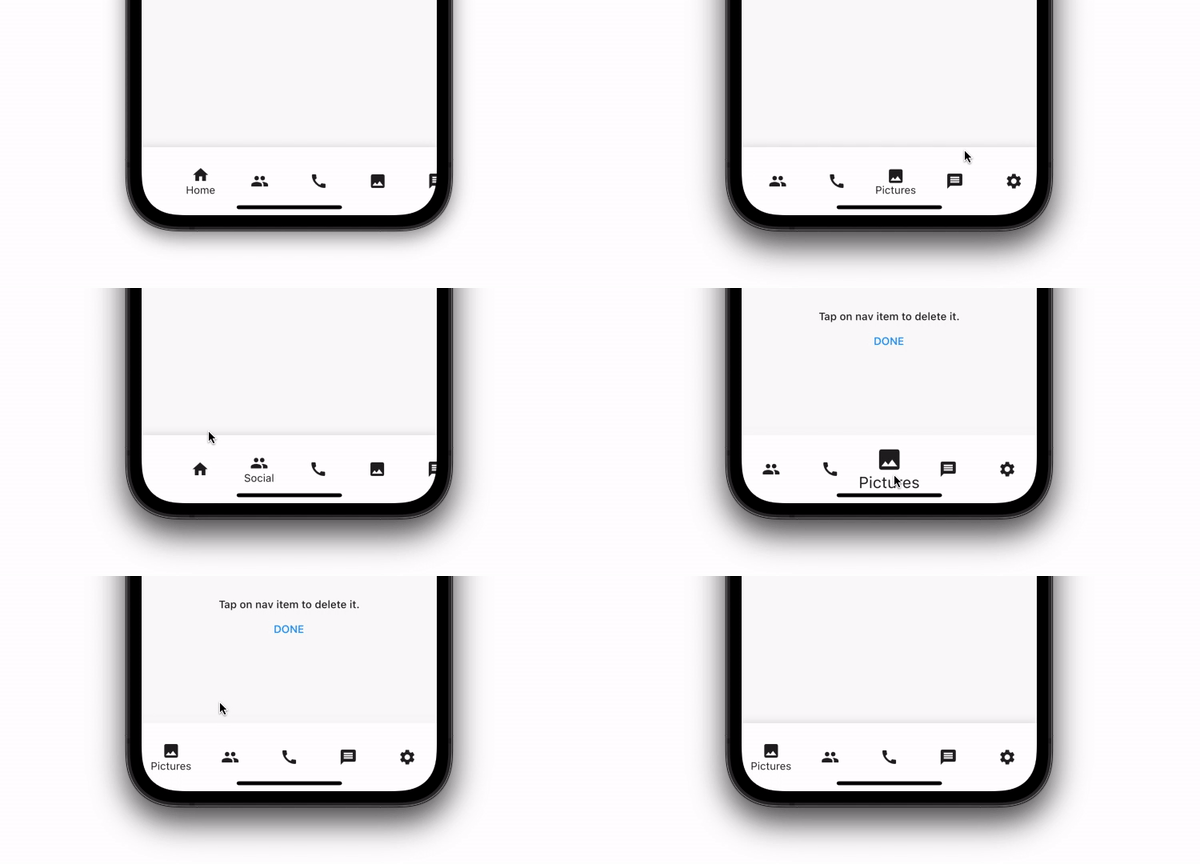
A bottom nav bar that can be scrolled when there are than 5 nav items to display. It also let user swipe items position and item can be deleted from the navbar.

AndroidiOSWebmacOSWindowsLinux
30-day downloads
15
Likes
30
Pub points
140

Install package

flutter pub add scrollable_reorderable_navbar

Package Overview

Package selection guidance compiled from public package information, community data, and project usage.

A scrollable and reorderable bottom navigation bar for Flutter that dynamically adjusts when more than five items are present. Users can swipe to rearrange items and delete them directly from the navbar. Designed for intuitive navigation in apps with many tabs, it enhances usability on both mobile and desktop platforms. The package supports all major platforms including Android, iOS, Web, macOS, Windows, and Linux. It combines smooth scrolling with gesture-based reordering and deletion, offering a flexible interface for managing navigation items.

Use cases

  • Apps with more than 5 navigation items
  • Customizable bottom navigation layouts
  • User-driven tab reordering
  • Dynamic navigation item management
  • Desktop and mobile cross-platform apps

Key features

  • Scrollable when exceeding 5 items
  • Swipe-to-reorder functionality
  • Deletion of navigation items
  • Cross-platform support (Android, iOS, Web, macOS, Windows, Linux)
  • Smooth gesture-based interactions

Suitable for

  • Developers needing flexible bottom nav bars
  • Apps requiring dynamic navigation customization
  • Projects targeting multiple platforms
  • UIs with frequent user interaction on navigation
  • Designers seeking interactive navigation components

Considerations

  • May require additional state management
  • Not ideal for static navigation setups
  • Performance impact with very large item lists
  • Limited to bottom navigation layout
  • Requires careful handling of item deletion UX
Original README

Original README snapshot from the linked source repository. Visit the repository for the latest content.

ScrollableReordableNavbar for Flutter

A flutter plugin for create bottom nav bar that can be scrolled when there are than 5 nav items to display. It also let user swipe items position and item can be deleted from the navbar.

Installing:

In your pubspec.yaml

dependencies:
  scrollable_reorderable_navbar: ^0.0.1
import 'package:scrollable_reorderable_navbar/scrollable_reorderable_navbar.dart';


Basic Usage:

    ScrollableReorderableNavBar(
      onItemTap: (arg) {
        setState(() {
          _selectedIndex = arg;
        });
      },
      onReorder: (oldIndex, newIndex) {
        final currItem = _items[_selectedIndex];
        if (oldIndex < newIndex) newIndex -= 1;
          final newItems = [..._items], item = newItems.removeAt(oldIndex);
          newItems.insert(newIndex, item);
        setState(() {
          _items = newItems;
          _selectedIndex = _items.indexOf(currItem);
        });
      },
    items: _items,
    selectedIndex: _selectedIndex,
    onDelete: (index) => setState(() => _items.removeAt(index)),
    deleteIndicationWidget: Container(
      padding: const EdgeInsets.only(bottom: 100),
      child: Align(
        alignment: Alignment.bottomCenter,
        child: Wrap(
          alignment: WrapAlignment.center,
          crossAxisAlignment: WrapCrossAlignment.center,
          direction: Axis.vertical,
          children: [
            Text("Tap on nav item to delete it.",
              style: Theme.of(context).textTheme.bodyText1,
              textAlign: TextAlign.center),
            TextButton(onPressed: () {}, child: const Text("DONE"))
          ],
        ),
      ),
    ),
  )


Custom usage

There are options that let you custom the navbar:\

Properties Description
List<NavBarItem> items Items composing the navbar, every items should have different names
int selectedIndex The index of the selected NavBarItem
ValueChanged<int> onItemTap Which behaviour should have after the user tap on a NavBarItem
ReorderCallback onReorder Which behaviour should have after user swap 2 NavBarItem
Widget deleteIndicationWidget The Widget displayed on top of the delete overlay to show user that he can tap on NavBarItem to delete them
ValueChanged<int> onDelete Which behaviour should have after user delete a NavBarItem
ReorderItemProxyDecorator? proxyDecorator How the widget should look like on a reorder operation
Color backgroundColor Background color of the navbar
Duration duration Duration of the animations
BoxDecoration? decoration Decoration of the entire navbar. You should use either backgroundColor or this one

Additional information

Don't hesitate to suggest any features or fix that will improve the package!

Categories

Source repository

Projects using this package

No data available yet.