Search packages, repositories and app categories

Package detailsv1.0.2

search_widget

A Flutter package which provides a Search Widget for selecting an option from a data list.

30-day downloads
61
Likes
144
Pub points
40

Install package

flutter pub add search_widget

Package Overview

Package selection guidance compiled from public package information, community data, and project usage.

A Flutter package that offers a customizable search widget for selecting options from a data list. It simplifies the implementation of search functionality by providing an intuitive interface to filter and choose items dynamically. Ideal for apps requiring quick access to large datasets, it supports real-time filtering and integrates seamlessly into existing UIs. The package is lightweight and designed with developer experience in mind.

Use cases

  • Filtering large datasets in forms
  • Searching through user lists
  • Implementing quick-select dropdowns
  • Enhancing navigation with searchable menus
  • Building dynamic autocomplete features

Key features

  • Real-time search filtering
  • Customizable UI components
  • Easy integration with existing widgets
  • Supports async data sources
  • Lightweight and performant

Suitable for

  • Developers building data-heavy apps
  • Apps needing searchable dropdowns
  • UIs with dynamic content selection
  • Teams prioritizing rapid feature development
  • Projects requiring minimal boilerplate

Considerations

  • Limited platform-specific customization
  • No built-in pagination for large datasets
  • Requires manual handling of loading states
  • Not optimized for extremely large datasets without batching
  • Depends on external data source management

Original README

Original README snapshot from the linked source repository. Visit the repository for the latest content.

Search Widget Cirrus CI - Base Branch Build Status GitHub stars Twitter Follow GitHub last commit Website shields.io Open Source Love style: effective dart

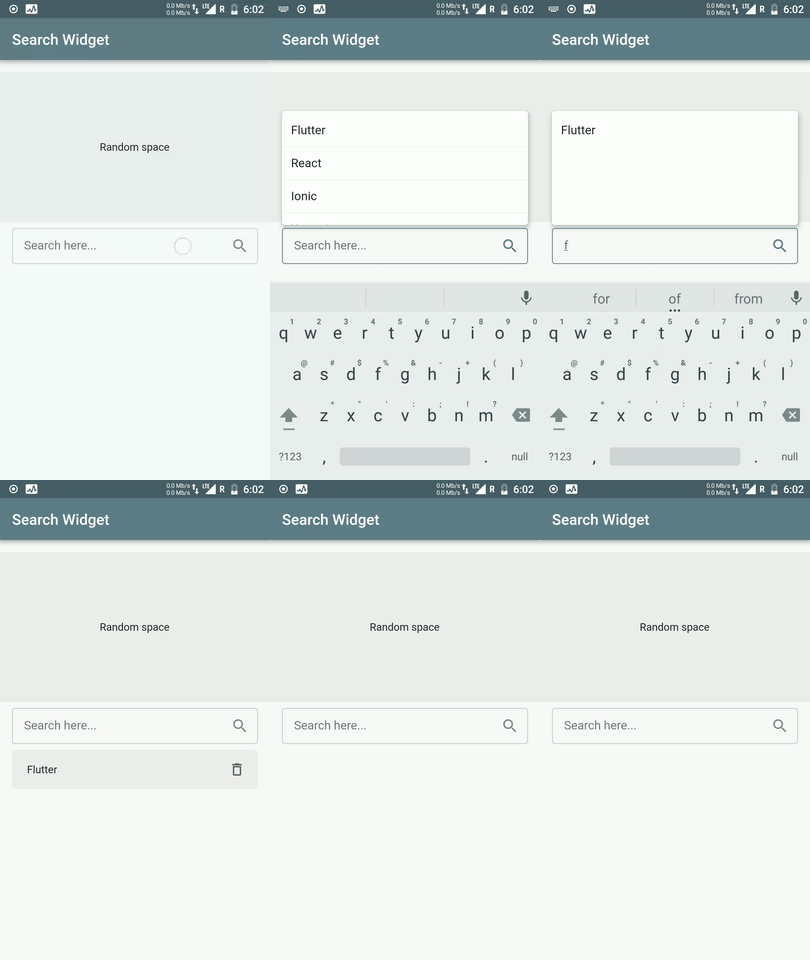
This Flutter package provides a Search Widget for selecting an option from a data list. Provides filtering of items based on the search text.

PieChart

💻 Installation

In the dependencies: section of your pubspec.yaml, add the following line:

Version

dependencies:
  search_widget: <latest version>

❔ Usage

Import this class
import 'package:search_widget/search_widget.dart';
Add Search Widget
  • Accepts data list as input
  • Option for getting selected item. Returns selected item or null if item is deleted
onItemSelected: (item) {
    //Do whatever you would like
    setState(() {
       _selectedItem = item;
    });
 },
  • Option for pop list item builder. This basically returns a widget to show as list item in popup
popupListItemBuilder: (LeaderBoard item) {
   return PopupListItem(item);
 }
  • Option for filtering data list based on search query
queryBuilder: (String query, List<LeaderBoard> list) {
   return list.where((LeaderBoard item) => item.username.toLowerCase().contains(query.toLowerCase())).toList();
 }
  • Option provided for selected list item builder which enables when a user selects an item from pop up list
selectedItemBuilder: (LeaderBoard selectedItem, deleteSelectedItem) {
   return SelectedItem(selectedItem,deleteSelectedItem);
 }
  • Option for providing custom TextField. Accepts TextEditingController and FocusNode as parameter
textFieldBuilder: (TextEditingController controller, FocusNode focusNode) {
    return TextField(
        controller: controller,
        focusNode: focusNode,
        //... Other customizations here
       );
  },
Full Implementation
SearchWidget<LeaderBoard>(
   dataList: list,
   hideSearchBoxWhenItemSelected: false,
   listContainerHeight: MediaQuery.of(context).size.height / 4,
   queryBuilder: (String query, List<LeaderBoard> list) {
     return list.where((LeaderBoard item) => item.username.toLowerCase().contains(query.toLowerCase())).toList();
   },
   popupListItemBuilder: (LeaderBoard item) {
     return PopupListItemWidget(item);
   },
   selectedItemBuilder: (LeaderBoard selectedItem, VoidCallback deleteSelectedItem) {
     return SelectedItemWidget(selectedItem, deleteSelectedItem);
   },
   // widget customization
   noItemsFoundWidget: NoItemsFound(),
   textFieldBuilder: (TextEditingController controller, FocusNode focusNode) {
     return MyTextField(controller, focusNode);
   },
 )
Key Highlights
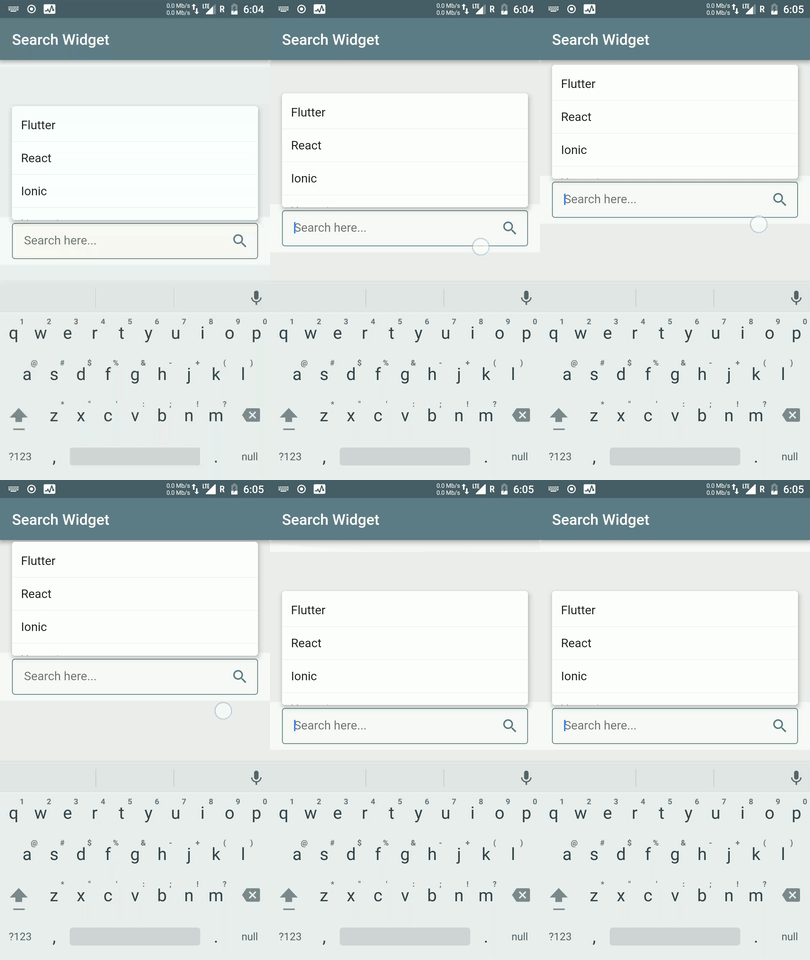
  • Adaptive Popup Position to prevent popup getting hidden behind keyboard

PieChart PieChart

  • Popup to scroll with scroll gesture if this widget is used inside ScrollView
PieChart

TODO

  • [X] Give support for onItemSelected method to return selected item(s) directly
  • [ ] Add support for selecting multiple items
  • [ ] Add visibility bool to show selected item widget

⭐ My Flutter Packages

  • pie_chart GitHub stars Flutter Pie Chart with cool animation.
  • avatar_glow GitHub stars Flutter Avatar Glow Widget with glowing animation.
  • json_table GitHub stars Create Flutter Json Table from json map directly.
  • animating_location_pin GitHub stars Flutter Animating Location Pin Widget providing Animating Location Pin Widget which can be used while fetching device location.

⭐ My Flutter Apps

👍 Contribution

  1. Fork it
  2. Create your feature branch (git checkout -b my-new-feature)
  3. Commit your changes (git commit -m 'Add some feature')
  4. Push to the branch (git push origin my-new-feature)
  5. Create new Pull Request

Categories

Dependencies

Dependency list 1 items

Source repository

Projects using this package

No data available yet.