Search packages, repositories and app categories

searchable_paginated_dropdown cover
Package detailsv1.3.0

searchable_paginated_dropdown

Flutter searchable dropdown widget which can be used also with paginated requests.

AndroidiOSWebmacOSWindowsLinux
30-day downloads
2.2K
Likes
43
Pub points
150

Install package

flutter pub add searchable_paginated_dropdown

Package Overview

Package selection guidance compiled from public package information, community data, and project usage.

A Flutter widget that combines a searchable dropdown with support for paginated data loading. It enables users to filter options dynamically while efficiently handling large datasets through lazy loading. Ideal for forms or interfaces requiring extensive selection lists without performance degradation. The widget integrates seamlessly with asynchronous data sources, making it suitable for API-driven applications. It supports all major platforms including mobile, web, and desktop.

Use cases

  • Large dataset selection
  • API-backed dropdowns
  • Form inputs with filtering
  • Dynamic data loading
  • Searchable lists in mobile apps
  • Web and desktop dropdowns

Key features

  • Searchable input field
  • Paginated data fetching
  • Async data support
  • Cross-platform compatibility
  • Customizable styling
  • Efficient memory usage

Suitable for

  • Developers building forms with large options
  • Apps using remote APIs for dropdown data
  • Projects needing responsive search functionality
  • Multi-platform Flutter applications
  • UIs requiring smooth scrolling and filtering

Considerations

  • Requires async data source setup
  • Needs proper error handling for network requests
  • May need custom UI adjustments for complex designs
  • Performance depends on pagination strategy
  • Limited built-in validation
  • Depends on external package dependencies

Original README

Original README snapshot from the linked source repository. Visit the repository for the latest content.

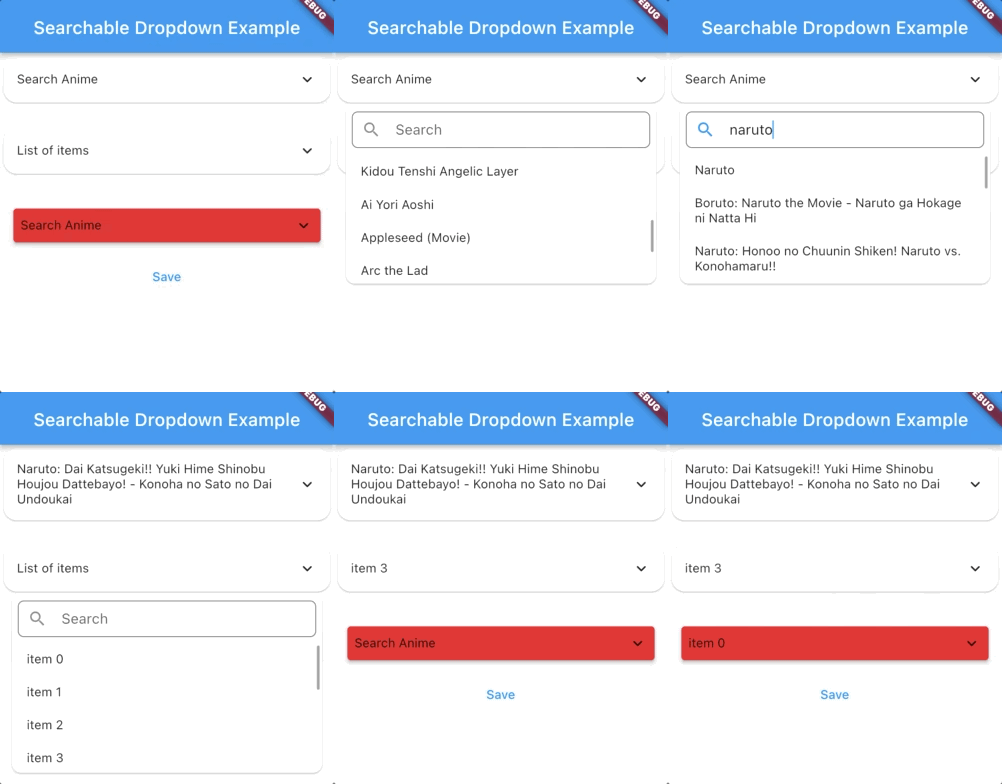
This Flutter package helps create a dropdown which constains a search bar inside. And also provides a feature for compatibility with paginated searchable requests.

Features

  • SearchableDropdown for pre setted item list,
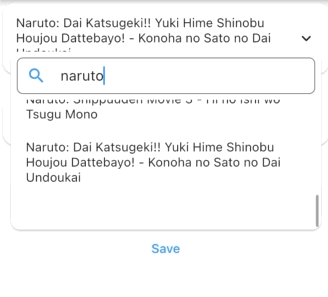
  • SearchableDropdown.paginated for paginated requests.
  • SearchableDropdown.future for normal requests.
  • SearchableDropdownFormfield for compatibility with forms.

Getting started

To use this package, add searchable_dropdown as a dependency in your [pubspec.yaml] file. And add this import to your file.

import 'package:searchable_dropdown/searchable_dropdown.dart';

Usage

Pre setted item list example

SearchableDropdown<int>(
    hintText: const Text('List of items'),
    margin: const EdgeInsets.all(15),
    items: List.generate(10, (i) => SearchableDropdownMenuItem(value: i, label: 'item $i', child: Text('item $i'))),
    onChanged: (int? value) {
        debugPrint('$value');
    },
)

Paginated request example

  • requestItemCount: Paginated request item count which returns in one page, this value is using for knowledge about isDropdown has more item or not.
SearchableDropdown<int>.paginated(
    hintText: const Text('Paginated request'),
    margin: const EdgeInsets.all(15),
    paginatedRequest: (int page, String? searchKey) async {
        final paginatedList = await getAnimeList(page: page, key: searchKey);
        return paginatedList?.animeList
            ?.map((e) => SearchableDropdownMenuItem(value: e.malId, label: e.title ?? '', child: Text(e.title ?? '')))
            .toList();
    },
    requestItemCount: 25,
    onChanged: (int? value) {
        debugPrint('$value');
    },
)

Future request example

SearchableDropdown<int>.future(
    hintText: const Text('Future request'),
    margin: const EdgeInsets.all(15),
    futureRequest: () async {
        final paginatedList = await getAnimeList(page: 1, key: '');
        return paginatedList?.animeList
            ?.map((e) => SearchableDropdownMenuItem(value: e.malId, label: e.title ?? '', child: Text(e.title ?? '')))
            .toList();
    },
    onChanged: (int? value) {
        debugPrint('$value');
    },
)

Example of usage inside a form.

  • backgroundDecoration: Background decoration of dropdown, i.e. with this you can wrap dropdown with Card
Form(
    key: formKey,
    child: SearchableDropdownFormField<int>(
        backgroundDecoration: (child) => Card(
            margin: EdgeInsets.zero,
            color: Colors.red,
            elevation: 3,
            child: Padding(
            padding: const EdgeInsets.all(8.0),
            child: child,
            ),
        ),
        hintText: const Text('Search Anime'),
        margin: const EdgeInsets.all(15),
        items: List.generate(10, (i) => SearchableDropdownMenuItem(value: i, label: 'item $i', child: Text('item $i'))),
        validator: (val) {
            if (val == null) return 'Cant be empty';
            return null;
        },
        onSaved: (val) {
            debugPrint('On save: $val');
        },
    ),
)

License

License

Categories

Dependencies

Dependency list 1 items

Source repository

Projects using this package

No data available yet.