Search packages, repositories and app categories

share_social_network cover
Package detailsv1.2.9

share_social_network

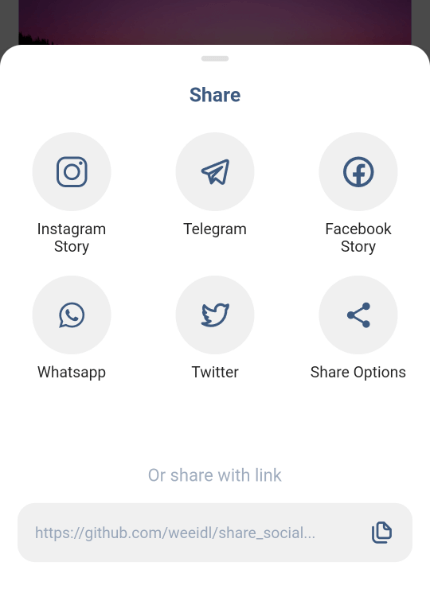
A ready-made platform that provides a wide range of ways to share, you will need to provide access directly to certain popular applications or just share using the built-in default sharing.

AndroidiOS
30-day downloads
16
Likes
26
Pub points
105

Install package

flutter pub add share_social_network

Package Overview

Package selection guidance compiled from public package information, community data, and project usage.

The share_social_network package offers a straightforward way to integrate sharing functionality into Flutter apps, enabling users to share content across popular social platforms or use the system's default sharing options. It simplifies the process of accessing native sharing intents on Android and iOS, reducing boilerplate code. Developers can easily trigger shares with minimal configuration, supporting both direct app-specific sharing and generic system-level sharing. The package is ideal for apps that require quick, reliable sharing capabilities without complex setup.

Use cases

  • Sharing links or text within social media apps
  • Enabling user-generated content distribution
  • Integrating default system sharing dialogs
  • Supporting cross-platform sharing workflows
  • Adding share buttons in app UIs

Key features

  • Simple integration with Flutter
  • Support for Android and iOS
  • Direct access to popular social apps
  • Fallback to system default sharing
  • Minimal configuration required

Suitable for

  • Apps needing basic sharing features
  • Developers seeking quick sharing implementation
  • Cross-platform mobile applications
  • Social media integrations
  • Content-sharing platforms

Considerations

  • Limited customization of sharing interfaces
  • Depends on device's installed social apps
  • No built-in analytics for shares
  • Requires proper permissions on some platforms
  • May not support all niche social networks

Original README

Original README snapshot from the linked source repository. Visit the repository for the latest content.

Share Social Network

pub package

A ready-made platform that provides a wide range of ways to share, you will need to provide access directly to certain popular applications or just share using the built-in default sharing.

Platforms

Works on both platforms Android and iOS

Image Image Image
Video Photo Video

Initial settings

Android Configuration
Paste the following attribute in the AndroidManifest.xml tag in the android/app/src/main/AndroidManifest.xml:
 		`xmlns:tools="http://schemas.android.com/tools"`
For example:
        <manifest xmlns:android="http://schemas.android.com/apk/res/android"
         xmlns:tools="http://schemas.android.com/tools"
         package...
Create a xml file named filepaths.xml in the app/src/main/res/xml folder and paste this code in the file :
<?xml version="1.0" encoding="utf-8"?>
<paths xmlns:android="http://schemas.android.com/apk/res/android">
    <cache-path name="image" path="/"/>
</paths>
Add this code snippet to the very bottom manifest/application in the android/app/src/main/AndroidManifest.xml insert after meta-data:
 		     <provider
            android:name="androidx.core.content.FileProvider"
            android:authorities="${applicationId}.com.weeidl.share_social_network"
            android:exported="false"
            android:grantUriPermissions="true"
            tools:replace="android:authorities">
            <meta-data
                android:name="android.support.FILE_PROVIDER_PATHS"
                android:resource="@xml/filepaths" />
        </provider>
iOS Configuration
Add this to your Info.plist to use share on instagram and facebook story
<key>LSApplicationQueriesSchemes</key>
	<array>
	<string>instagram-stories</string>
	<string>facebook-stories</string>
	<string>facebook</string>
	<string>instagram</string>
	<string>twitter</string>
	<string>whatsapp</string>
 <string>tg</string>
	</array>
Add this if you are using share on facebook. For this you have to create an app on https://developers.facebook.com/ and get the App ID
<key>FacebookAppID</key>
<string>xxxxxxxxxxxxxxx</string>

Getting Started

Add the package to your pubspec.yaml:

   share_social_network: ^1.2.9

In your dart file, import the library:

    import 'package:share_social_network/share_social_network.dart';

Instead of using a ShareSocialNetwork use ShareSocialNetwork.show Widget:

  ShareSocialNetwork.show(
    context: context,
    backgroundColor: Colors.white,
    pillColor: Colors.black12,
    transitionDuration: Duration(milliseconds: 300),
    screenshotController: screenshotController,
    copyToClipboard: "https://github.com/weeidl/share_social...",
    telegram: Telegram(
      content: "Hello World \n https://github.com/weeidl",
    ),
    instagram: Instagram(
      backgroundBottomColor: "#FF7391",
      backgroundTopColor: "#591E78",
      attributionURL: "https://deep-link-url",
      imagePath: imagePath,
    ),
    facebook: Facebook(
      backgroundTopColor: "#ffffff",
      attributionURL: "https://github.com/weeidl",
      backgroundBottomColor: "#000000",
      imagePath: imagePath,
      appId: "xxxxxxxxxxxxx",
    ),
    more: More(
      message: 'Hello World \n https://github.com/weeidl',
    ),
    twitter: Twitter(
      captionText: 'Share twitter',
      hashtags: ["hello", "world", "weeild", "artur"],
      url: 'https://github.com/weeidl',
      trailingText: " \nweeidl",
    ),
    whatsapp: Whatsapp(
      content: 'Hello World \n https://github.com/weeidl',
    ),
  );
 }
Example:

Example of how to send something to instagram:

ScreenshotController screenshotController = ScreenshotController();
void shareSocialNetwork(BuildContext context) async {
  String imagePath = await screenshotController.capture().then((image) async {
    final directory = await getApplicationDocumentsDirectory();
    final file = await File('${directory.path}/temp.png').create();
    await file.writeAsBytes(image!);
    return file.path;
  });
  ShareSocialNetwork.show(
    context: context,
    backgroundColor: Colors.white,
    pillColor: Colors.black12,
    transitionDuration: Duration(milliseconds: 300),
    screenshotController: screenshotController,
    copyToClipboard: "https://github.com/weeidl/share_social...",
    instagram: Instagram(
      backgroundBottomColor: "#FF7391",
      backgroundTopColor: "#591E78",
      attributionURL: "https://deep-link-url",
      imagePath: imagePath,
    ),
  );
}
Follow Me:

instagram Telegram LinkedIn GitHub

Categories

Dependencies

Dependency list 3 items

Source repository

Projects using this package

No data available yet.