Search packages, repositories and app categories

show_up_animation cover
Package detailsv2.1.2

show_up_animation

A flutter package to simplify the implementation of "show up" animation

AndroidiOSWebmacOSWindowsLinux
30-day downloads
1.7K
Likes
175
Pub points
160

Install package

flutter pub add show_up_animation

Package Overview

Package selection guidance compiled from public package information, community data, and project usage.

A Flutter package designed to simplify the creation of 'show up' animations, where widgets smoothly appear on screen with customizable timing and effects. It provides a clean, intuitive API for animating elements into view, ideal for enhancing user experience in apps with dynamic content. The package supports all major platforms, including mobile, web, and desktop, ensuring consistent behavior across devices. Developers can easily apply entrance animations to any widget without writing complex animation logic.

Use cases

  • Onboarding screens
  • Loading content transitions
  • List item reveal animations
  • Modal popup entrances
  • Dynamic UI updates

Key features

  • Simple API for entrance animations
  • Customizable duration and delay
  • Cross-platform compatibility
  • Supports multiple animation types
  • Easy integration with existing widgets

Suitable for

  • Beginner Flutter developers
  • UI/UX designers implementing micro-interactions
  • Apps requiring smooth visual transitions
  • Projects with dynamic content loading
  • Enhancing user engagement through animation

Considerations

  • May impact performance if overused
  • Limited customization beyond basic animations
  • Requires careful timing to avoid jarring effects
  • Not suitable for complex animation sequences
  • Best used sparingly to maintain UX clarity

Original README

Original README snapshot from the linked source repository. Visit the repository for the latest content.

show_up_animation Build Status

A flutter package to simplify the implementation of "show up" animation

Getting Started

Install dependencies

dependencies:
  show_up_animation: ^2.1.2

Then import wherever you want to implement the animation

import 'package:show_up_animation/show_up_animation.dart';
ShowUpAnimation

Wrap any widget you want to animate inside ShowUpAnimation widget and provide a Duration() to delayStart field to control after how much delay the animation fires.

ShowUpAnimation(
  delayStart: Duration(seconds: 1),
  animationDuration: Duration(seconds: 1),
  curve: Curves.bounceIn,
  direction: Direction.vertical,
  offset: 0.5,
  child: YourWidget(),
),
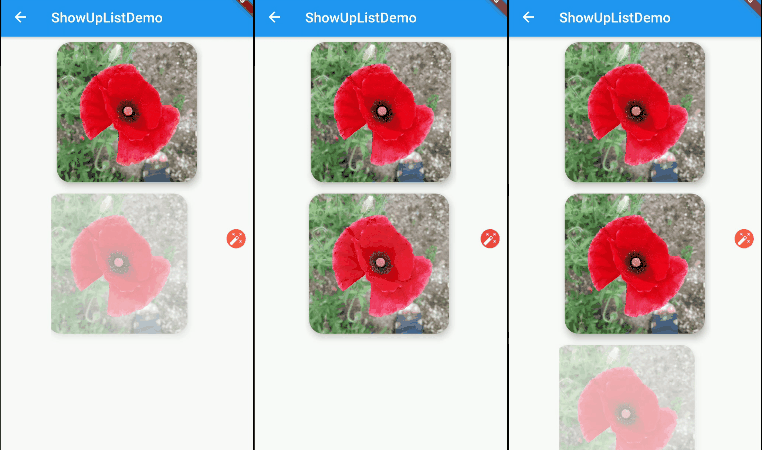
ShowUpList

To create a list of "show up" animations, use ShowUpList and provide your list of widgets to children parameter.

ShowUpList(
  direction: Direction.horizontal,
  animationDuration: Duration(milliseconds: 1500),
  delayBetween: Duration(milliseconds: 800),
  offset: -0.2,
  children: <Widget>[
    Widget1(),
    Widget2(),
    Widget3(),
    Widget4(),
  ],
),

Properties

ShowUpAnimation Properties

You can customize how to do you want to animate your child using the parameters described below.

Property Function
child The widget on which to apply the given ShowUpAnimation
offset The offset by which to slide and [child] into view from [Direction]. Use negative value to reverse animation [direction]. Defaults to 0.2
curve The curve used to animate the [child] into view. Defaults to [Curves.easeIn]
direction horizontal or vertical
delayStart The delay with which to animate the [child]. Takes in a [Duration] and defaults to 0 seconds
animationDuration The total duration in which the animation completes. Defaults to 800 milliseconds
ShowUpList Properties
Property Function
children The list of widgets on which to apply the given ShowUpAnimation
offset The offset by which to slide and [child] into view from [Direction]. Use negative value to reverse animation [direction]. Defaults to 0.2
curve The curve used to animate each [child] into view. Defaults to [Curves.easeIn]
direction horizontal or vertical
delayBetween he delay between animating each [children] into view. Takes in a [Duration] and defaults to 300 milliseconds
animationDuration The total duration in which the animation of each child completes. Defaults to 500 milliseconds

Demo

Text demo Show up list demo

Categories

Source repository

Projects using this package

No data available yet.