Search packages, repositories and app categories

simple_asset_picker cover
Package detailsv1.0.1

simple_asset_picker

A Flutter image picker based on the KakaoTalk image picker UI.

AndroidiOSmacOS
30-day downloads
51
Likes
6
Pub points
130

Install package

flutter pub add simple_asset_picker

Package Overview

Package selection guidance compiled from public package information, community data, and project usage.

A Flutter image picker inspired by KakaoTalk's UI, offering a clean and intuitive interface for selecting images from the device. It supports Android, iOS, and macOS, providing a consistent experience across platforms. The package simplifies asset selection with minimal setup and integrates seamlessly into apps requiring media picking functionality. Built with simplicity and user experience in mind, it’s ideal for chat applications, profile editors, or any feature needing image uploads.

Use cases

  • Chat app media sharing
  • User profile photo selection
  • Content creation tools
  • Social media post upload
  • Image gallery integration

Key features

  • KakaoTalk-inspired UI design
  • Cross-platform support (Android, iOS, macOS)
  • Simple integration with minimal configuration
  • Smooth asset selection experience
  • Lightweight and fast performance

Suitable for

  • Developers seeking a familiar image picker UI
  • Apps focused on messaging or social features
  • Projects requiring quick media selection
  • Teams prioritizing user experience
  • Flutter apps targeting multiple platforms

Considerations

  • Limited customization of picker UI
  • No video selection support
  • Depends on external repository for updates
  • May require additional permissions for file access
  • Not suitable for advanced media management needs

Original README

Original README snapshot from the linked source repository. Visit the repository for the latest content.

simple_asset_picker

카카오톡의 UI를 참고하여 만든 플러터 이미지피커 패키지입니다. 안드로이드와 ios만 지원하고 있으며 photo_manager와 flutter_riverpod, video_player 패키지를 이용했습니다. 사진 및 영상 선택, 사진 및 동영상 촬영, 미리보기 기능을 지원하고 있습니다.

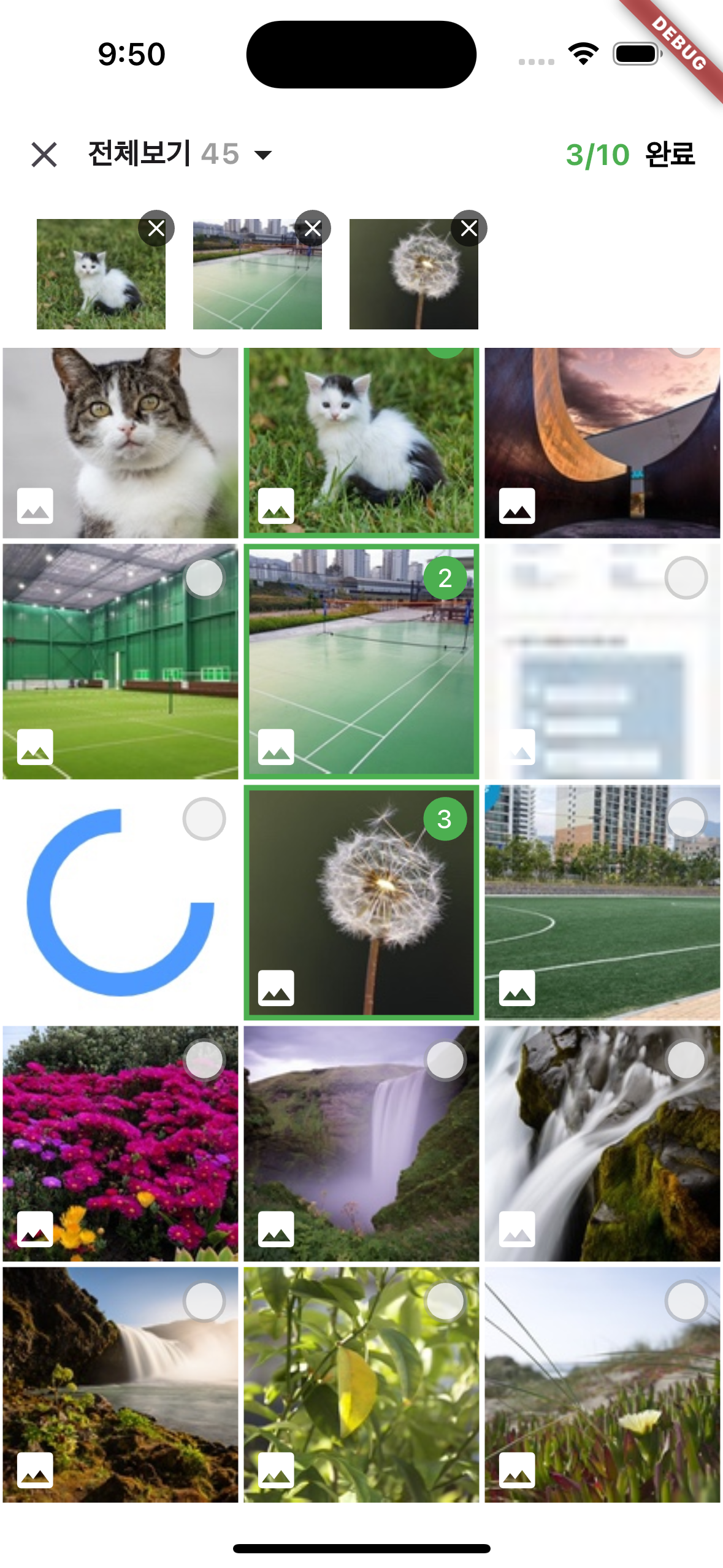
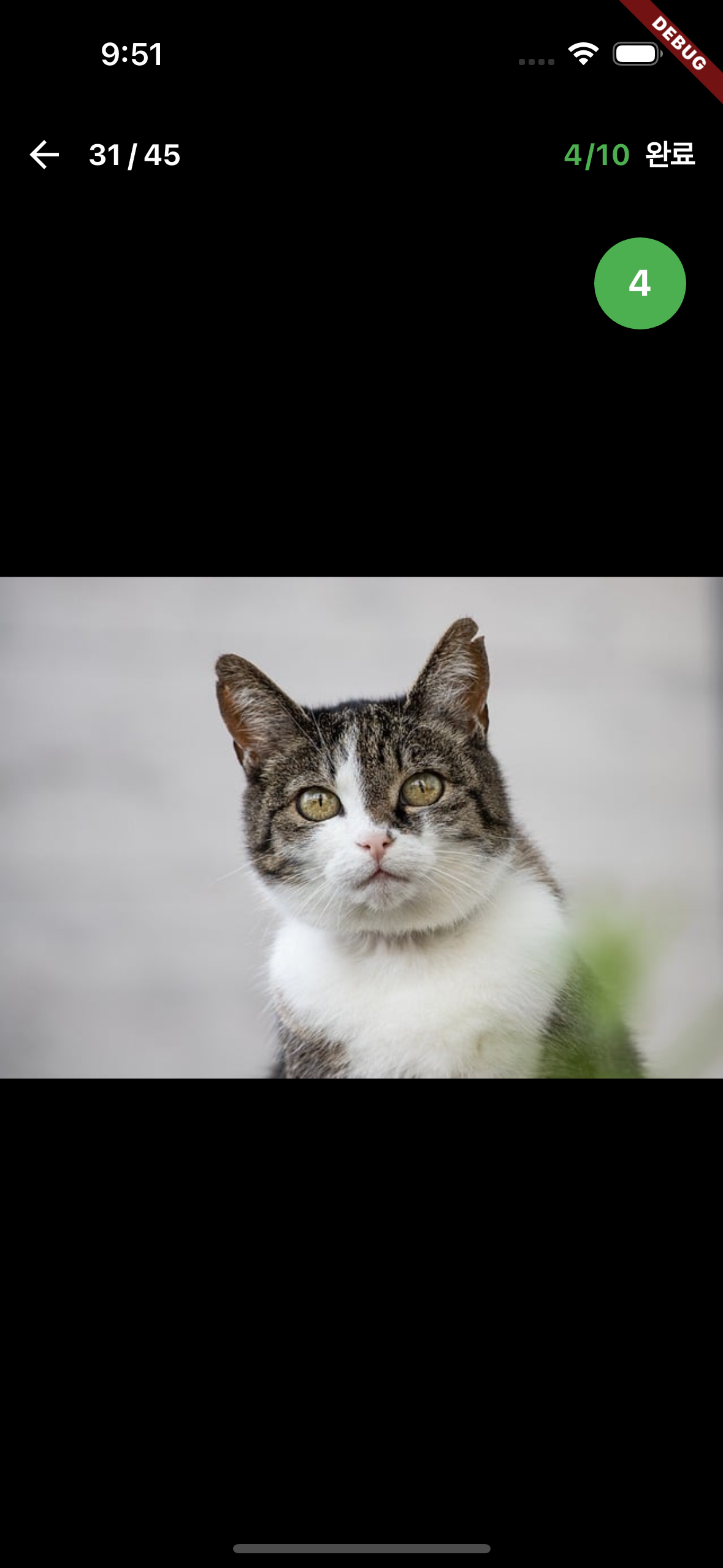
스크린샷

grid preview

사용방법

dependency 추가
dependencies:
  simple_asset_picker: 최신버전 사용
안드로이드

android/app/src/main/AndroidManifest.xml 파일에 권한 추가

<uses-permission
        android:name="android.permission.WRITE_EXTERNAL_STORAGE"
        android:maxSdkVersion="29"/>
<uses-permission
    android:name="android.permission.READ_EXTERNAL_STORAGE"
    android:maxSdkVersion="32"/>
<uses-permission android:name="android.permission.READ_MEDIA_IMAGES" />
<uses-permission android:name="android.permission.READ_MEDIA_VIDEO" />
<uses-permission android:name="android.permission.READ_MEDIA_AUDIO" />
<uses-permission android:name="android.permission.READ_MEDIA_VISUAL_USER_SELECTED" />  
<uses-permission android:name="android.permission.INTERNET"/>

Gradle 버전( gradle-wrapper.properties)을 7.5.1 이상 버전 사용.
Kotlin 버전( ext.kotlin_version) 을 1.7.22 이상 버전 사용.
AGP 버전( com.android.tools.build:gradle) 을 7.2.2 이상 버전 사용.

android/app/build.gradle에 minSdk 수정

defaultConfig {
        ...
        minSdkVersion 21
        ...
    }
ios

ios/Runner/Info.plist에 권한 설정 추가

<key>NSAppTransportSecurity</key>
<dict>
  <key>NSAllowsArbitraryLoads</key>
  <true/>
</dict>
<key>NSPhotoLibraryUsageDescription</key>
<string>갤러리 접근 권한이 필요합니다.</string>
<key>NSPhotoLibraryAddUsageDescription</key>
<string>사진, 동영상 촬영을 위한 권한이 필요합니다.</string>
<key>NSCameraUsageDescription</key>
<string>카메라 접근 권한이 필요합니다.</string>
<key>NSMicrophoneUsageDescription</key>
<string>영상촬영을 위한 권한이 필요합니다.</string>
<!-- localize -->
<key>CFBundleDevelopmentRegion</key>
<array>
  <string>ko-KR</string>
  <string>en-US</string>
</array>
<key>CFBundleLocalizations</key>
<array>
  <string>ko-KR</string>
  <string>en-US</string>
</array>
공통

권한설정 거부 시 '권한이 없습니다.' 메세지만 출력하고 있으니 권한이 꼭 필요한 경우

PhotoManager.openSetting();

또는 permission_handler의

openAppSetting();

을 통해 앱설정에서 허용하도록 따로 처리해야합니다.

main 설정

main의 runApp에서 ProviderScope로 감싸준다(필수)

void main() {
  runApp(
    const ProviderScope(child: MyApp()),
  );
}
사진 선택창 띄우기

Picker.pickAssets으로 사진 선택 기능 사용
PickerConfig를 통해 옵션 설정 가능

final List<AssetEntity> list = 
  await Picker.pickAssets(
    context,
    pickerConfig: PickerConfig(
      // 선택한 사진 테두리 색상
      mainColor: Colors.green,
      // 선택사진 갯수 텍스트 색상
      brightness: Brightness.light,
      // 사진 목록 한줄에 표시할 갯수
      gridCount: 3,
      // 최대 선택가능 갯수
      maxAssets: 10,
      // 사진 목록 페이징 사이즈
      pageSize: 30,
      // asset타입(사진, 영상, 음성)
      requestType: RequestType.common,
      // 기존에 선택한 사진
      selectedAssets: selectedlist,
      // 다음 버전에서 구현예정
      // 현버전에서는 false 권장
      useCamera: false,
    ),
  );
선택한 사진, 영상 표시

photo_manager에서 제공하는 방법 사용.
영상은 썸네일 이미지만 표시됩니다.

AssetEntityImage(asset, isOriginal: false);

또는

Image(image: AssetEntityImageProvider(asset, isOriginal: false));
multipart/form-data 전송

photo_manager에서 제공하는 방법 사용.
http 사용
pseudo code :

import 'package:http/http.dart' as http;

Future<void> upload() async {
  final entity = await obtainYourEntity();
  final uri = Uri.https('example.com', 'create');
  final request = http.MultipartRequest('POST', uri)
    ..fields['test_field'] = 'test_value'
    ..files.add(await multipartFileFromAssetEntity(entity));
  final response = await request.send();
  if (response.statusCode == 200) {
    print('Uploaded!');
  }
}

Future<http.MultipartFile> multipartFileFromAssetEntity(AssetEntity entity) async {
  http.MultipartFile mf;
  // Using the file path.
  final file = await entity.file;
  if (file == null) {
    throw StateError('Unable to obtain file of the entity ${entity.id}.');
  }
  mf = await http.MultipartFile.fromPath('test_file', file.path);
  // Using the bytes.
  final bytes = await entity.originBytes;
  if (bytes == null) {
    throw StateError('Unable to obtain bytes of the entity ${entity.id}.');
  }
  mf = http.MultipartFile.fromBytes('test_file', bytes);
  return mf;
}

dio 사용
pseudo code :

import 'package:dio/dio.dart' as dio;

Future<void> upload() async {
  final entity = await obtainYourEntity();
  final uri = Uri.https('example.com', 'create');
  final response = dio.Dio().requestUri(
    uri,
    data: dio.FormData.fromMap({
      'test_field': 'test_value',
      'test_file': await multipartFileFromAssetEntity(entity),
    }),
  );
  print('Uploaded!');
}

Future<dio.MultipartFile> multipartFileFromAssetEntity(AssetEntity entity) async {
  dio.MultipartFile mf;
  // Using the file path.
  final file = await entity.file;
  if (file == null) {
    throw StateError('Unable to obtain file of the entity ${entity.id}.');
  }
  mf = await dio.MultipartFile.fromFile(file.path);
  // Using the bytes.
  final bytes = await entity.originBytes;
  if (bytes == null) {
    throw StateError('Unable to obtain bytes of the entity ${entity.id}.');
  }
  mf = dio.MultipartFile.fromBytes(bytes);
  return mf;
}

Categories

Dependencies

Dependency list 7 items

Source repository

Projects using this package

No data available yet.