Package selection guidance compiled from public package information, community data, and project usage.
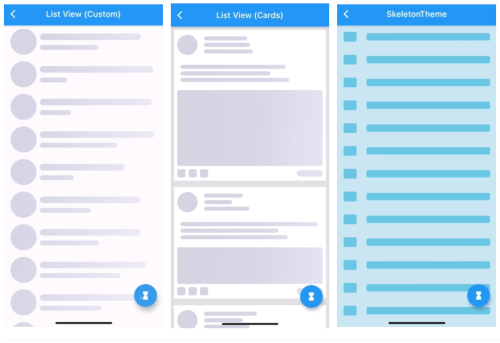
The skeletons package provides a simple way to create custom skeleton loading widgets in Flutter, allowing developers to mimic the layout of a page while content is being loaded. It helps improve user experience by showing a placeholder structure that reflects the final UI, reducing perceived load time. The package is lightweight and flexible, supporting various shapes and animations for placeholders. Ideal for screens with complex layouts, it ensures a smooth transition from loading to content display.
Use cases
Loading screen placeholders
Content preview during data fetch
Improving perceived performance
Complex UI layout simulation
Onboarding screens
Dynamic list placeholders
Key features
Customizable skeleton shapes
Built-in animation support
Easy integration with existing widgets
Flexible layout matching
Lightweight and performant
Supports nested skeletons
Suitable for
UI/UX designers
Frontend developers
Apps with heavy data loading
Prototyping interactive screens
Mobile apps requiring smooth loading states
Considerations
Limited to visual placeholders only
No built-in data fetching
Requires manual layout alignment
Not suitable for non-visual loading indicators
Depends on accurate layout prediction
Original README
Original README snapshot from the linked source repository. Visit the repository for the latest content.
Skeletons
A Flutter package for building custom skeleton widgets to mimic the page's layout while loading.