Search packages, repositories and app categories

Package detailsv1.0.3

slide_countdown_clock

A countdown clock with slide up and down animation plugin for Flutter.

30-day downloads
38
Likes
94
Pub points
30

Install package

flutter pub add slide_countdown_clock

Package Overview

Package selection guidance compiled from public package information, community data, and project usage.

A Flutter plugin that provides a visually engaging countdown clock with smooth slide-up and slide-down animations. Designed for applications requiring dynamic time displays, it enhances user experience with fluid transitions as the timer progresses. The package is lightweight and easy to integrate, ideal for timers in games, reminders, or event countdowns. It supports customizable styling and timing behavior through simple configuration.

Use cases

  • Timer-based game interfaces
  • Event countdown displays
  • Reminder notifications
  • Interactive learning apps
  • Task completion timers

Key features

  • Slide animation on time updates
  • Customizable timer appearance
  • Simple integration with Flutter
  • Smooth transition effects
  • Lightweight and performant

Suitable for

  • Developers building interactive timers
  • Apps needing visual feedback during countdowns
  • UI-focused time-tracking features
  • Educational or gamified applications
  • Minimalist design projects

Considerations

  • Limited to basic countdown functionality
  • No built-in support for multiple timers
  • Animations may impact performance on low-end devices
  • Requires manual handling of timer logic
  • No platform-specific optimizations mentioned

Original README

Original README snapshot from the linked source repository. Visit the repository for the latest content.

slide_countdown_clock

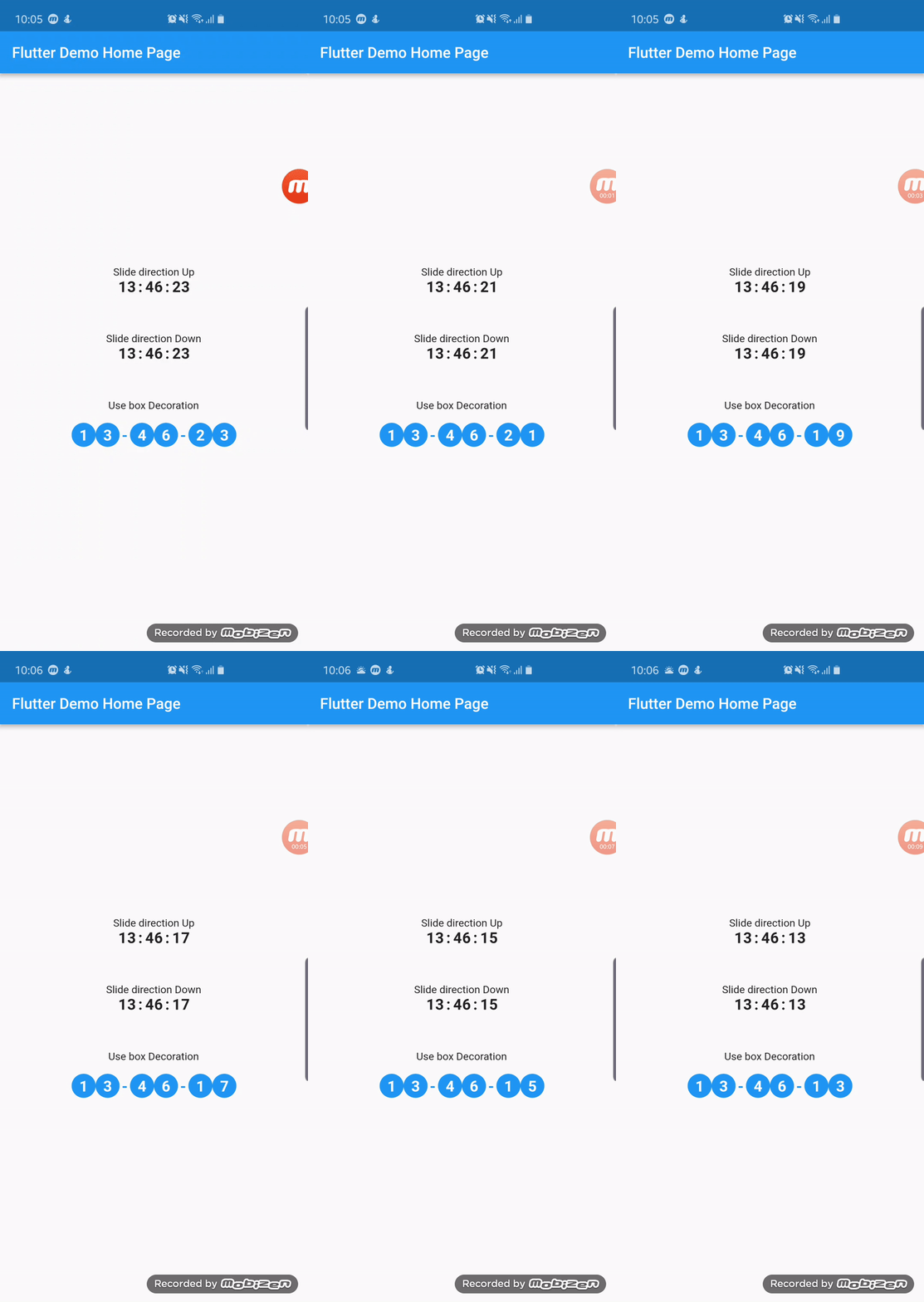
A Countdown clock with slide up and down animation plugin for Flutter

Demo

Demo:

Usage

To use plugin, just import package import 'package:slide_countdown_clock/slide_countdown_clock.dart';

Example

You can check example directory to know how to use it like the demo gif.

import 'package:flutter/material.dart';
import 'package:slide_countdown_clock/slide_countdown_clock.dart';

void main() => runApp(MyApp());

class MyApp extends StatelessWidget {
  @override
  Widget build(BuildContext context) {
    return MaterialApp(
      title: 'Flutter Demo',
      theme: ThemeData(
        primarySwatch: Colors.blue,
      ),
      home: MyHomePage(title: 'Flutter Demo Home Page'),
    );
  }
}

class MyHomePage extends StatefulWidget {
  MyHomePage({Key key, this.title}) : super(key: key);

  final String title;

  @override
  _MyHomePageState createState() => _MyHomePageState();
}

class _MyHomePageState extends State<MyHomePage> {
  GlobalKey<ScaffoldState> _scaffoldKey = GlobalKey();
  Duration _duration = Duration(seconds: 1000000);

  @override
  Widget build(BuildContext context) {
    return Scaffold(
      key: _scaffoldKey,
      appBar: AppBar(title: Text(widget.title)),
      body: Center(
        child: Column(
          mainAxisSize: MainAxisSize.min,
          crossAxisAlignment: CrossAxisAlignment.center,
          mainAxisAlignment: MainAxisAlignment.center,
          children: <Widget>[
            Text('Slide direction Up'),
            SlideCountdownClock(
              duration: Duration(days: 20, minutes: 1000000),
              slideDirection: SlideDirection.Up,
              separator: ":",
              textStyle: TextStyle(
                fontSize: 20,
                fontWeight: FontWeight.bold,
              ),
              shouldShowDays: true,
              onDone: () {
                _scaffoldKey.currentState.showSnackBar(SnackBar(content: Text('Clock 1 finished')));
              },
            ),
            _buildSpace(),
            Text('Slide direction Down'),
            SlideCountdownClock(
              duration: _duration,
              slideDirection: SlideDirection.Down,
              separator: ":",
              textStyle: TextStyle(
                fontSize: 20,
                fontWeight: FontWeight.bold,
              ),
              onDone: () {
                _scaffoldKey.currentState.showSnackBar(SnackBar(content: Text('Clock 1 finished')));
              },
            ),
            _buildSpace(),
            Text('Use box Decoration'),
            Padding(
              padding: EdgeInsets.all(10),
              child: SlideCountdownClock(
                duration: _duration,
                slideDirection: SlideDirection.Up,
                separator: "-",
                textStyle: TextStyle(
                  fontSize: 20,
                  fontWeight: FontWeight.bold,
                  color: Colors.white,
                ),
                separatorTextStyle: TextStyle(
                  fontSize: 20,
                  fontWeight: FontWeight.bold,
                  color: Colors.blue,
                ),
                padding: EdgeInsets.all(10),
                decoration: BoxDecoration(color: Colors.blue, shape: BoxShape.circle),
                onDone: () {
                  _scaffoldKey.currentState.showSnackBar(SnackBar(content: Text('Clock 1 finished')));
                },
              ),
            ),
          ],
        ),
      ),
    );
  }

  Widget _buildSpace() {
    return SizedBox(height: 50);
  }
}

Categories

Source repository

Projects using this package

No data available yet.