Search packages, repositories and app categories

Package detailsv1.0.7

social_login_buttons

A new Flutter package which allows users to create social media login button easily.

AndroidiOSLinuxmacOSWebWindows
30-day downloads
1.2K
Likes
56
Pub points
150

Install package

flutter pub add social_login_buttons

Package Overview

Package selection guidance compiled from public package information, community data, and project usage.

A Flutter package that simplifies the creation of social media login buttons, enabling developers to quickly integrate popular social logins like Google, Facebook, and Apple into their apps. It provides pre-designed, customizable buttons with consistent styling across platforms. The package supports multiple platforms including Android, iOS, Web, and desktop environments, ensuring a seamless user experience. With minimal setup, it enhances app onboarding by offering familiar, visually appealing login options.

Use cases

  • Quick integration of social logins
  • Enhancing user onboarding
  • Cross-platform authentication
  • Simplifying login UI design
  • Supporting multiple social providers
  • Reducing boilerplate code

Key features

  • Pre-built social login buttons
  • Customizable button styles
  • Multi-platform support
  • Easy setup with minimal code
  • Consistent UI across devices
  • Built-in provider icons

Suitable for

  • Mobile app developers
  • Web application creators
  • Desktop app integrators
  • Startups needing fast login implementation
  • Developers focused on UX/UI efficiency

Considerations

  • Requires additional configuration for each social provider
  • May need custom handling for OAuth flows
  • Limited to predefined button designs
  • Depends on external provider APIs
  • Not suitable for complex authentication workflows
  • Needs internet connection during login

Original README

Original README snapshot from the linked source repository. Visit the repository for the latest content.

pub package pub points

Flutter Social Login Button

Social Login Button is a flutter package to create social media login buttons of all common used SSO.

Usage

Add the dependency in pubsec.yaml file.

  dependencies:
    flutter:
      sdk: flutter
    social_login_buttons: 1.0.7

How to Use

  SocialLoginButton(
    buttonType: SocialLoginButtonType.apple,
    onPressed: () {},
  )          

You can also specify some other arguments which are:

  • imageURL (if you're specifying the image link from your Github repo, don't forget to change blob with raw)
  • imagePath (you can also use local image, Local will be preferred incase cpecifed both)
  • imageWidth
  • text
  • backgroundColor
  • textColor
  • height
  • width
  • borderRadius
  • fontSize
  • mode

Below is the example with all arguments supplied:

   SocialLoginButton(
      backgroundColor: Colors.amber,
      height: 50,
      text: 'SignIn',
      borderRadius: 20,
      fontSize: 25,
      buttonType: SocialLoginButtonType.generalLogin,
      imageWidth: 20,
      imagepath: "assets/file.png",
      imageURL: "URL",
      onPressed: () {},
   ),

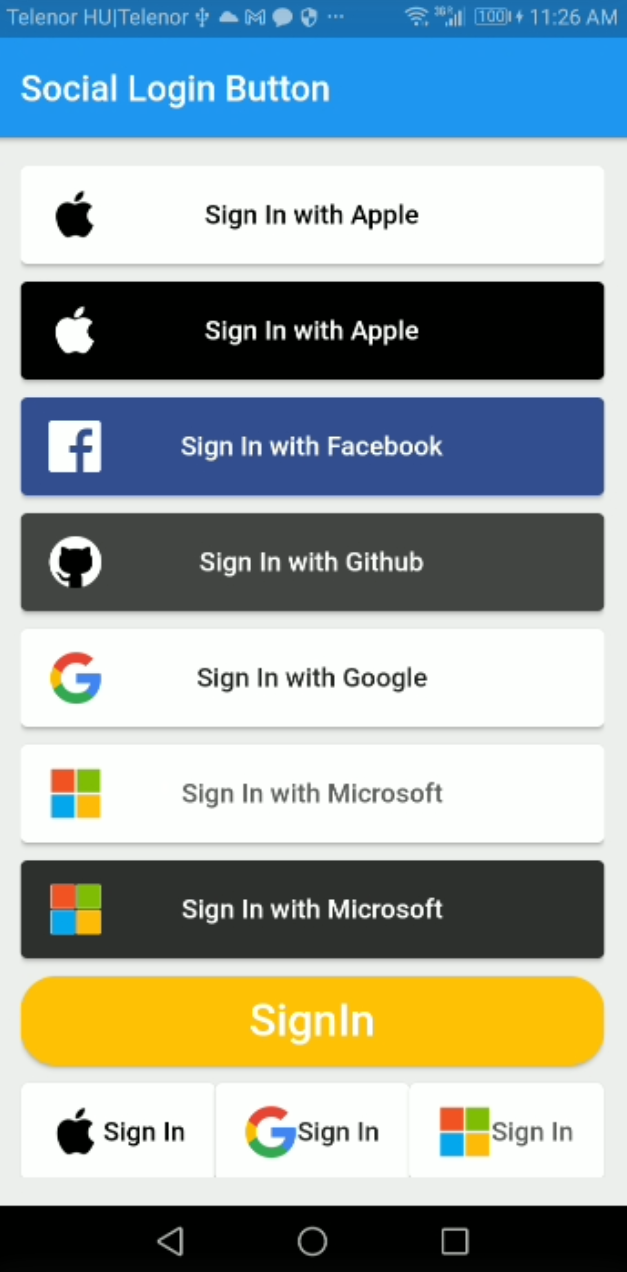
Button Types

  • Facebook
  • Google
  • Twitter
  • Apple
  • AppleBlack
  • Microsoft
  • MicrosoftBlack
  • Github
  • General Login

Mode

There are two modes available for the buttons, You can make shorter buttons with single mode.

  • single
  • multi

Example

import 'package:flutter/material.dart';
import 'package:social_login_buttons/social_login_buttons.dart';

void main() {
  runApp(const MyApp());
}

class MyApp extends StatelessWidget {
  const MyApp({Key? key}) : super(key: key);

  @override
  Widget build(BuildContext context) {
    return MaterialApp(
      title: 'Flutter Social Login Buttons',
      debugShowCheckedModeBanner: false,
      theme: ThemeData(
        primarySwatch: Colors.blue,
      ),
      home: const MyHomePage(tittle: 'Flutter Social Login Buttons'),
    );
  }
}

class MyHomePage extends StatelessWidget {
  const MyHomePage({Key? key, required this.tittle}) : super(key: key);
  final String tittle;

  @override
  Widget build(BuildContext context) {
    return Scaffold(
      appBar: AppBar(
        title: const Text('Social Login Button'),
        elevation: 2.0,
      ),
      body: _buildContainer(context),
      backgroundColor: Colors.grey[200],
    );
  }

  Widget _buildContainer(BuildContext context) {
    return Padding(
      padding: const EdgeInsets.all(16.0),
      child: Center(
        child: SingleChildScrollView(
          child: Column(
            crossAxisAlignment: CrossAxisAlignment.stretch,
            mainAxisAlignment: MainAxisAlignment.center,
            children: <Widget>[
              SocialLoginButton(
                buttonType: SocialLoginButtonType.apple,
                onPressed: () {},
              ),
              const SizedBox(height: 10),
              SocialLoginButton(
                buttonType: SocialLoginButtonType.appleBlack,
                onPressed: () {},
              ),
              const SizedBox(height: 10),
              SocialLoginButton(
                buttonType: SocialLoginButtonType.facebook,
                onPressed: () {},
              ),
              const SizedBox(height: 10),
              SocialLoginButton(
                buttonType: SocialLoginButtonType.github,
                onPressed: () {},
              ),
              const SizedBox(height: 10),
              SocialLoginButton(
                buttonType: SocialLoginButtonType.google,
                onPressed: () {},
              ),
              const SizedBox(height: 10),
              SocialLoginButton(
                buttonType: SocialLoginButtonType.microsoft,
                onPressed: () {},
              ),
              const SizedBox(height: 10),
              SocialLoginButton(
                buttonType: SocialLoginButtonType.microsoftBlack,
                onPressed: () {},
                imageWidth: 20,
              ),
              const SizedBox(height: 10),
              SocialLoginButton(
                backgroundColor: Colors.amber,
                height: 50,
                text: 'SignIn',
                borderRadius: 20,
                fontSize: 25,
                buttonType: SocialLoginButtonType.generalLogin,
                onPressed: () {},
              ),
              const SizedBox(height: 10),
              Row(
                mainAxisAlignment: MainAxisAlignment.spaceBetween,
                children: [
                  SocialLoginButton(
                    buttonType: SocialLoginButtonType.google,
                    onPressed: () {},
                    mode: SocialLoginButtonMode.single,
                  ),
                ],
              )
            ],
          ),
        ),
      ),
    );
  }
}

Contributing

Pull requests are welcome. For major changes, please open an issue first to discuss what you would like to change.

License

Apache-2.0

Screenshot

Image

Categories

Source repository

Projects using this package

No data available yet.