Search packages, repositories and app categories

Package detailsv1.0.1

steps

Flutter plugin for displaying vertical/horizontal steps with other Flutter widgets on Android and iOS.

30-day downloads
53
Likes
29
Pub points
30

Install package

flutter pub add steps

Package Overview

Package selection guidance compiled from public package information, community data, and project usage.

The steps package is a Flutter plugin designed to display vertical or horizontal step indicators, ideal for guiding users through multi-stage processes like forms or onboarding flows. It supports integration with any Flutter widgets, enabling custom content within each step. Compatible with both Android and iOS, it provides a clean, customizable interface for visualizing progress. The package is lightweight and easy to implement, making it suitable for apps requiring intuitive navigation cues.

Use cases

  • Onboarding flows
  • Multi-step forms
  • Process tracking
  • User journey visualization
  • Checkout sequences

Key features

  • Vertical and horizontal step layouts
  • Custom widget support
  • Cross-platform compatibility (Android & iOS)
  • Simple API integration
  • Progress indication

Suitable for

  • App developers needing step indicators
  • Designers wanting flexible progress UIs
  • Projects with multi-stage user interactions

Considerations

  • No built-in animations
  • Limited customization beyond basic styling
  • Requires manual handling of step state management

Original README

Original README snapshot from the linked source repository. Visit the repository for the latest content.

Steps package for Flutter

pub package

Flutter plugin for displaying vertical/horizontal steps with other Flutter widgets on Android and iOS.

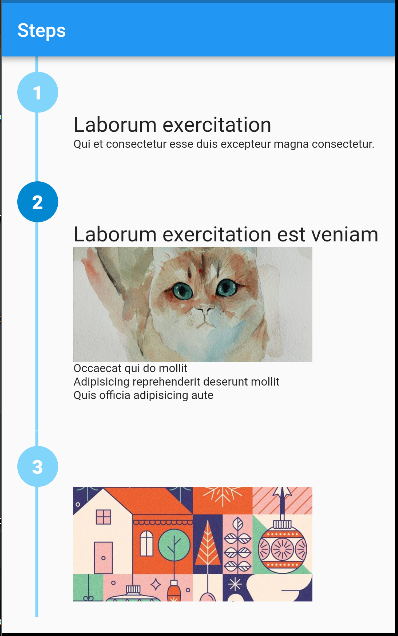
vertical with rich content

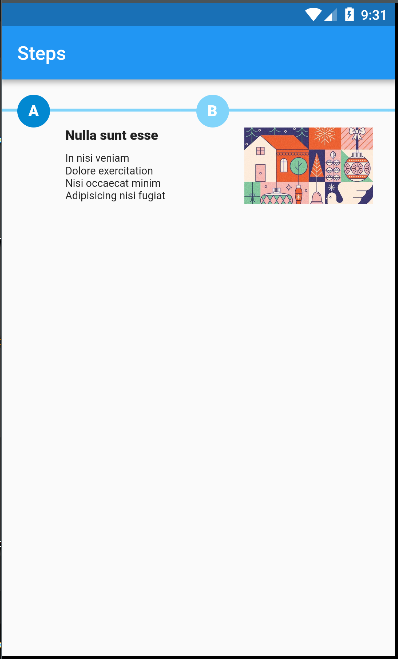
horizontal with rich content

Note: This package is still under development. Feedback welcome and Pull Requests are most welcome!

Installation

First, add steps as a dependency in your pubspec.yaml file.

Example
import 'package:flutter/material.dart';
import 'package:steps/steps.dart';

void main() => runApp(MaterialApp(
      debugShowCheckedModeBanner: false,
      home: Home(title: 'Steps'),
    ));

class Home extends StatelessWidget {
  final String title;
  Home({Key key, this.title}) : super(key: key);
  @override
  Widget build(BuildContext context) {
    return Scaffold(
        appBar: AppBar(
          title: Text(title),
        ),
        body: Container(
          alignment: Alignment.topCenter,
          child: Steps(
            direction: Axis.vertical,
            size: 20.0,
            path: {'color': Colors.lightBlue.shade200, 'width': 3.0},
            steps: [
              {
                'color': Colors.white,
                'background': Colors.lightBlue.shade200,
                'label': '1',
                'content': Column(
                  crossAxisAlignment: CrossAxisAlignment.start,
                  children: <Widget>[
                    Text(
                      'Laborum exercitation',
                      style: TextStyle(fontSize: 22.0),
                    ),
                    Text(
                      'Qui et consectetur esse duis excepteur magna consectetur.',
                      style: TextStyle(fontSize: 12.0),
                    ),
                  ],
                ),
              },
              {
                'color': Colors.white,
                'background': Colors.lightBlue.shade700,
                'label': '2',
                'content': Column(
                  crossAxisAlignment: CrossAxisAlignment.start,
                  children: <Widget>[
                    Text(
                      'Laborum exercitation est veniam',
                      style: TextStyle(fontSize: 22.0),
                    ),
                    Image.asset(
                      'assets/cat.jpg',
                      width: 250,
                      height: 120,
                      fit: BoxFit.cover,
                      alignment: Alignment.center,
                    ),
                    Text(
                      '''
Occaecat qui do mollit
Adipisicing reprehenderit deserunt mollit
Quis officia adipisicing aute
                      ''',
                      style: TextStyle(fontSize: 12.0),
                    )
                  ],
                )
              },
              {
                'color': Colors.white,
                'background': Colors.lightBlue.shade200,
                'label': '3',
                'content': Image.asset(
                  'assets/art.jpg',
                  width: 250,
                  height: 120,
                  fit: BoxFit.cover,
                  alignment: Alignment.center,
                ),
              }
            ],
          ),
        ));
  }
}

Categories

Source repository

Projects using this package

No data available yet.