Search packages, repositories and app categories

stretchy_header cover
Package detailsv2.0.0

stretchy_header

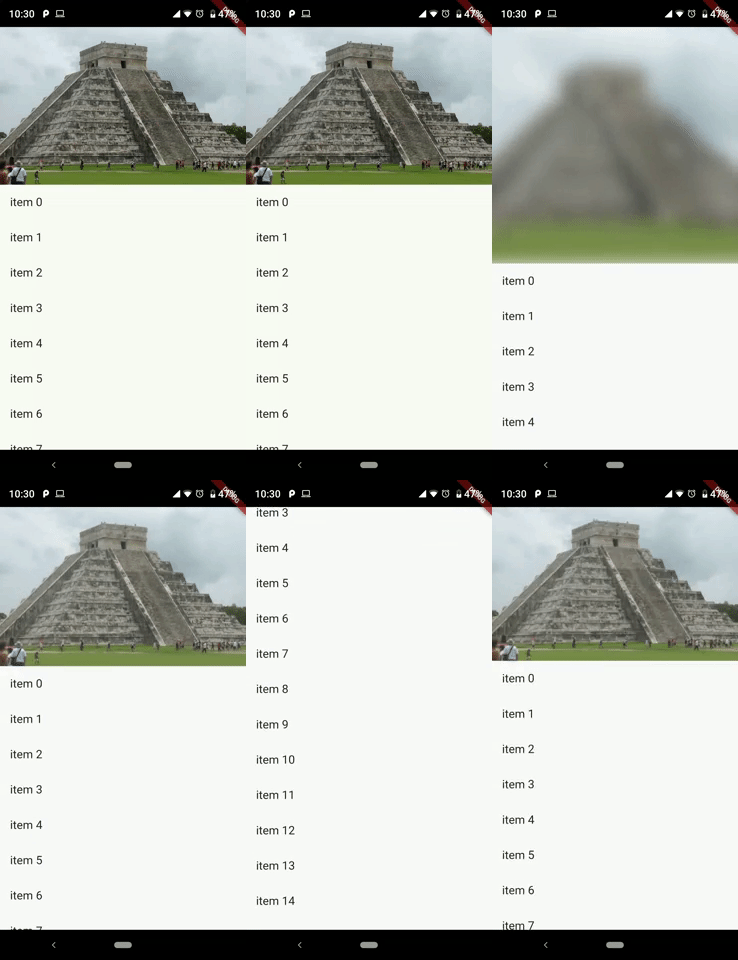
This package allows us to create a elastic header, to give a good effect when you scroll down the widget.

AndroidiOSWebmacOSWindowsLinux
30-day downloads
196
Likes
98
Pub points
140

Install package

flutter pub add stretchy_header

Package Overview

Package selection guidance compiled from public package information, community data, and project usage.

The stretchy_header package enables developers to create elastic or stretchable headers in Flutter applications, enhancing scroll interactions with a dynamic visual effect. When users scroll down, the header stretches and animates smoothly, providing an engaging and immersive experience. It's ideal for apps with rich content layouts where header visuals play a key role in user engagement. The package supports multiple platforms including Android, iOS, Web, macOS, Windows, and Linux, ensuring consistent behavior across devices.

Use cases

  • Creating animated app launch screens
  • Enhancing scroll effects in news or media apps
  • Designing immersive profile or dashboard headers
  • Improving user engagement in social media interfaces
  • Building visually appealing onboarding experiences

Key features

  • Smooth elastic stretching animation
  • Support for custom header content
  • Cross-platform compatibility
  • Easy integration with ListView or ScrollController
  • Configurable stretch sensitivity and duration

Suitable for

  • Developers building interactive UIs
  • Designers seeking dynamic header effects
  • Apps with content-heavy scrolling interfaces
  • Projects aiming for polished user experiences

Considerations

  • May impact performance on low-end devices
  • Requires careful tuning of stretch parameters
  • Not suitable for simple static headers
  • Limited customization beyond basic animations
  • Best used with lightweight header content

Original README

Original README snapshot from the linked source repository. Visit the repository for the latest content.

Stretchy Header

pub package

This package allows us to create an elastic header, to give a good effect when you scroll down the widget.

Sample 1

Sample 2

Getting started

You should ensure that you add the router as a dependency in your flutter project.

dependencies:
  stretchy_header: "^1.0.8"

You should then run flutter packages upgrade or update your packages in IntelliJ.

Example Project

There is an example project in the example folder. Check it out. Otherwise, keep reading to get up and running.


Usage

Sample 1
import 'package:flutter/material.dart';
import 'package:stretchy_header/stretchy_header.dart';

class SampleListView extends StatelessWidget {
  @override
  Widget build(BuildContext context) {
    return Scaffold(
      body: StretchyHeader.listViewBuilder(
        headerData: HeaderData(
          headerHeight: 250,
          header: Image.asset(
            "images/chichen.jpg",
            fit: BoxFit.cover,
          ),
        ),
        itemCount: 15,
        itemBuilder: (context, index) {
          return ListTile(
            title: Text("item $index"),
            onTap: () {
              final snackBar = SnackBar(
                content: Text('item $index tapped'),
              );
              ScaffoldMessenger.of(context).showSnackBar(snackBar);
            },
          );
        },
      ),
    );
  }
}
Sample 2
import 'package:flutter/material.dart';
import 'package:stretchy_header/stretchy_header.dart';

class SampleCustomHeader extends StatelessWidget {
  @override
  Widget build(BuildContext context) {
    return Scaffold(
      body: StretchyHeader.singleChild(
        headerData: HeaderData(
          headerHeight: 200,
          backgroundColor: Colors.black54,
          blurColor: Colors.yellow,
          header: UserAccountsDrawerHeader(
            accountName: Text("Diego"),
            accountEmail: Text("twitter @diegoveloper"),
            currentAccountPicture: CircleAvatar(
              backgroundColor: Colors.red,
              child: Text("DV"),
            ),
            margin: EdgeInsets.zero,
          ),
          overlay: Align(
            alignment: Alignment.bottomRight,
            child: Material(
              color: Colors.transparent,
              child: InkResponse(
                onTap: () {
                  ScaffoldMessenger.of(context).showSnackBar(
                    SnackBar(
                      content: Text('onTap'),
                    ),
                  );
                },
                child: Padding(
                  padding: EdgeInsets.all(12),
                  child: Icon(
                    Icons.fullscreen,
                    color: Colors.white,
                  ),
                ),
              ),
            ),
          ),
        ),
        child: Padding(
          padding: const EdgeInsets.all(15),
          child: Text(
            "Hello World!",
            style: TextStyle(fontSize: 45, color: Colors.white),
          ),
        ),
      ),
    );
  }
}
Sample 3
class SampleBottomLabel extends StatelessWidget {
  @override
  Widget build(BuildContext context) {
    return Scaffold(
      body: StretchyHeader.singleChild(
        headerData: HeaderData(
          headerHeight: 250,
          header: Image.asset(
            "images/machu.jpg",
            fit: BoxFit.cover,
          ),
          highlightHeaderAlignment: HighlightHeaderAlignment.bottom,
          highlightHeader: Container(
            width: MediaQuery.of(context).size.width,
            decoration: BoxDecoration(
                gradient: LinearGradient(
                  colors: [
                    Colors.black54,
                    Colors.black54,
                    Colors.black26,
                    Colors.black12,
                    Colors.black12,
                  ],
                  begin: Alignment.bottomCenter,
                  end: Alignment.topCenter,
                )),
            child: Padding(
              padding: const EdgeInsets.all(15),
              child: Text(
                "Machu Picchu",
                style: TextStyle(color: Colors.white, fontSize: 22),
              ),
            ),
          ),
        ),
        child: Padding(
          padding: const EdgeInsets.all(15),
          child: Text(LONG_DESCRIPTION),
        ),
      ),
    );
  }
}
Sample 4
class SampleCenterWidget extends StatelessWidget {
  @override
  Widget build(BuildContext context) {
    return Scaffold(
      body: StretchyHeader.singleChild(
        headerData: HeaderData(
          headerHeight: 250,
          header: Image.asset(
            "images/machu.jpg",
            fit: BoxFit.cover,
          ),
          highlightHeaderAlignment: HighlightHeaderAlignment.center,
          highlightHeader: SizedBox(
            width: MediaQuery.of(context).size.width,
            child: GestureDetector(
              onTap: () {
                print("tap highlightHeader");
              },
              child: CircleAvatar(
                backgroundColor: Colors.red,
                child: Text("M"),
              ),
            ),
          ),
        ),
        child: Padding(
          padding: const EdgeInsets.all(15),
          child: Text(LONG_DESCRIPTION),
        ),
      ),
    );
  }
}

You can follow me on twitter @diegoveloper

Categories

Source repository

Projects using this package