Search packages, repositories and app categories

Package detailsv1.0.33

substring_highlight

Highlight Flutter text at the character-level for simple and customizable search term highlighting.

AndroidiOSWebmacOSWindowsLinux
30-day downloads
74.7K
Likes
200
Pub points
150

Install package

flutter pub add substring_highlight

Package Overview

Package selection guidance compiled from public package information, community data, and project usage.

A Flutter package that enables character-level text highlighting, ideal for visually emphasizing search terms within text. It provides simple integration and customizable styling options for matched substrings, making it suitable for search interfaces. The package supports multiple platforms including Android, iOS, Web, macOS, Windows, and Linux, ensuring consistent behavior across devices. With minimal setup via the pub command, developers can enhance user experience by clearly marking relevant text segments during searches.

Use cases

  • Search result previews
  • Text filtering with visual cues
  • Custom search UI components
  • Real-time keyword highlighting
  • User input feedback in forms
  • Document or content scanning

Key features

  • Character-level substring matching
  • Customizable highlight colors and styles
  • Simple API for integration
  • Cross-platform compatibility
  • Supports multiple text widgets
  • Configurable match sensitivity

Suitable for

  • Developers building search-heavy apps
  • UI designers needing visual feedback
  • Apps requiring real-time text highlighting
  • Educational or document review tools
  • Content discovery interfaces

Considerations

  • May impact performance with very long texts
  • Requires manual handling of text updates
  • Limited to substring matching (no regex)
  • Styling may need platform-specific adjustments
  • Does not support nested text spans inherently
Original README

Original README snapshot from the linked source repository. Visit the repository for the latest content.

substring_highlight

Highlight Flutter text at the character-level.

Designed for case-insensitive search-term highlighting, a single search term sub-string is highlighted (perhaps multiple times) within a longer string.

Inspired by the existing Flutter package "highlight_text" which supports word matches ('Peter''), but substring_highlight has more granular character-by-character matches (e.g., 't' in 'Peter').

Limitations:

  1. Highlighted text is not clickable
  2. Doesn't solve perplexing world problems like hunger and climate change

The substrings being searched for highlighting don't have to match at the beginning of the longer strings (can be anywhere inside).

Even space characters will match, but not be highlighted, obviously.

Ancestor MUST have textDirection set (required by internal RichText widget), either through MaterialApp widget or explicitly wrapped by a Directionality widget:

Directionality(
    child: SubstringHighlight(text: 'Peter', term: 't'),
    textDirection: TextDirection.ltr)

Pull Requests

Pull requests are welcome and I try to merge them within a few days.

Examples

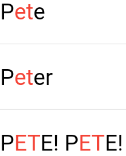
Default Styling Example

Code:

As an example, the following code snippet uses this package to highlight matching characters in each search result:

import 'package:substring_highlight/substring_highlight.dart';

...

  @override
  Widget build(BuildContext context) (
    return Container(
      padding: const EdgeInsets.all(12),
      child: SubstringHighlight(
        text: dropDownItem,     // search result string from database or something
        term: searchTerm,       // user typed "et"
      ),
    );
  )
Output:

Screenshot

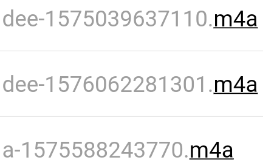
Customized Styling Example

Code:

This example adds 'textStyle' and 'textStyleHighlight' to change the colors of the text:

import 'package:substring_highlight/substring_highlight.dart';

...

  @override
  Widget build(BuildContext context) (
    return Container(
      padding: const EdgeInsets.all(12),
      child: SubstringHighlight(
        text: dropDownItem,                         // each string needing highlighting
        term: searchTerm,                           // user typed "m4a"        
        textStyle: TextStyle(                       // non-highlight style                       
          color: Colors.grey,
        ),
        textStyleHighlight: TextStyle(              // highlight style
          color: Colors.black,
          decoration: TextDecoration.underline,
        ),        
      ),
    );
  )
Output:

Screenshot

Categories

Source repository

Projects using this package