Search packages, repositories and app categories

swipe_cards cover
Package detailsv2.0.0+1

swipe_cards

Tinder like swipe cards.

AndroidiOSWebmacOSWindowsLinux
30-day downloads
64
Likes
117
Pub points
130

Install package

flutter pub add swipe_cards

Package Overview

Package selection guidance compiled from public package information, community data, and project usage.

Swipe Cards is a Flutter package that enables developers to create Tinder-like swipeable card interfaces. It supports horizontal swiping with intuitive gestures, allowing users to swipe left or right on cards. The package is designed for simplicity and customization, making it ideal for apps requiring card-based navigation such as dating apps, product showcases, or content discovery features. It works across multiple platforms including Android, iOS, Web, macOS, Windows, and Linux.

Use cases

  • Dating app interfaces
  • Product or item discovery
  • Content browsing
  • User preference collection
  • Interactive onboarding screens

Key features

  • Tinder-style swipe gestures
  • Customizable card appearance
  • Cross-platform support
  • Smooth animation transitions
  • Gesture recognition
  • Easy integration with Flutter

Suitable for

  • Developers building swipe-based UIs
  • Apps needing user interaction via card swipes
  • Projects targeting multiple platforms

Considerations

  • Requires handling of state management
  • Limited built-in card data handling
  • May need additional styling for complex layouts
  • Not optimized for large card datasets without pagination

Original README

Original README snapshot from the linked source repository. Visit the repository for the latest content.

swipe_cards pub package

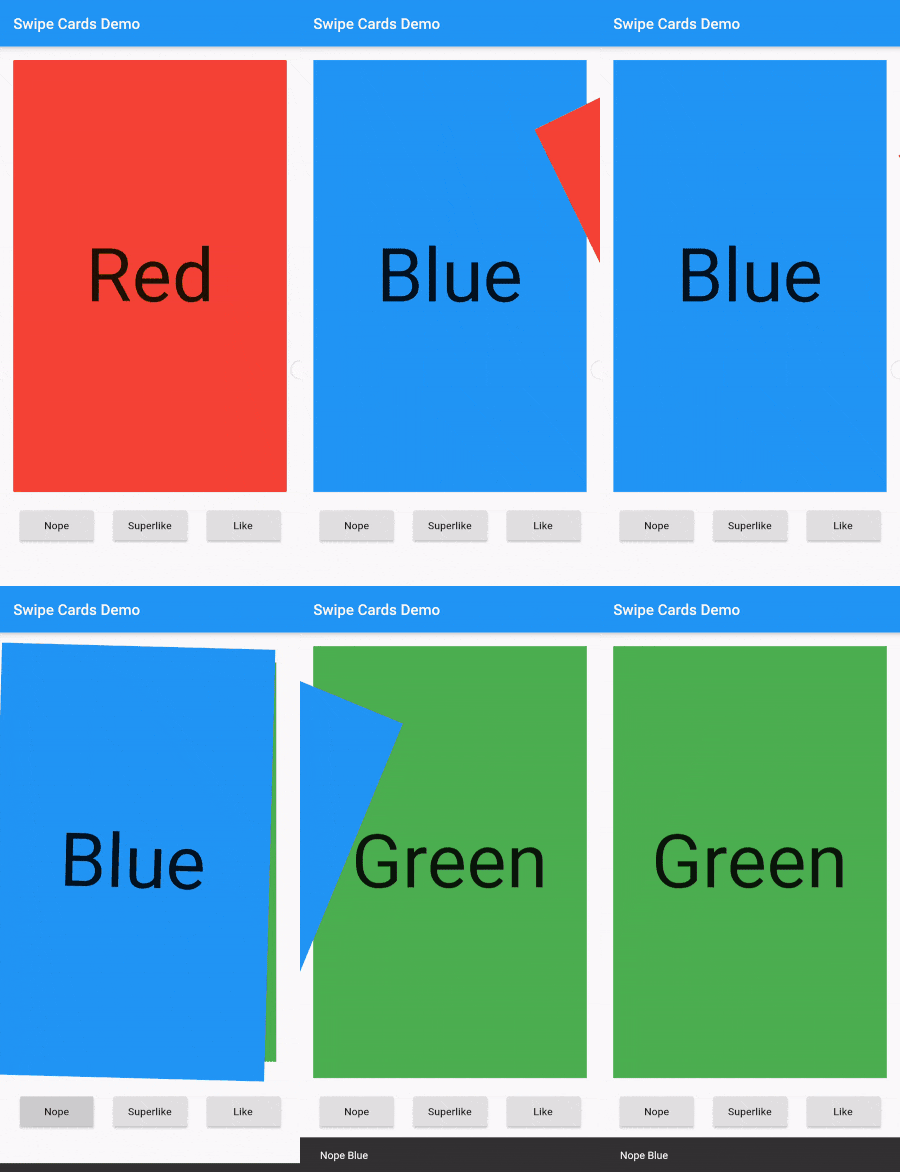
A Flutter widget for Tinder like swipe cards. The card can be swiped right, left and up for different responses. Currently it supports the following responses:

  • Right swipe for like
  • Left swipe for nope
  • Up swipe for superlike

Install

To install the package, add the following dependency to your pubspec.yaml

dependencies:
  swipe_cards: ^2.0.0+1

Usage

Basic
import 'package:swipe_cards/swipe_cards.dart';

SwipeCards(
            matchEngine: <MatchEngine>,
            itemBuilder: (BuildContext context, int index) {},
            onStackFinished: () {},
            itemChanged: (SwipeItem item, int index) {},
            upSwipeAllowed: <bool>,
            fillSpace: <bool>,
);
Attributes of SwipeCards
Key Description
matchEngine An instance of MatchEngine that acts as controller for trigerring swipes manually.
itemBuilder A function that returns the view inside a swipe card.
likeTag Widget appears in like/right area during swipe.
nopeTag Widget appears in nope/left area during swipe.
superLikeTag Widget appears in super-like/up area during swipe.
onStackFinished A function that is triggered as soon as all the cards have been swiped.
itemChanged A function that is triggered when item in the stack changes (moves to next card).
leftSwipeAllowed To enable/disable left swipe. (Default: true)
rightSwipeAllowed To enable/disable right swipe. (Default: true)
upSwipeAllowed To enable/disable up swipe. (Default: false)
fillSpace Config weather to fill up the space or not. (Default: true)
MatchEngine

MatchEngine is the controller for the swipe cards. It takes swipeItems as an argument and is used to trigger the swipes manually, for example on button press. The data type of swipeItems is List<SwipeItem>.

MatchEngine _matchEngine = MatchEngine(swipeItems: List<SwipeItem>);
Functions in MatchEngine
Key Description
_matchEngine.currentItem.like(); To trigger right swipe manually.
_matchEngine.currentItem.nope(); To trigger left swipe manually.
_matchEngine.currentItem.superLike(); To trigger up swipe manually.
SwipeItem

SwipeItem contains the actual data that can be rendered in the swipe card. Actually it is a wrapper over any dynamic object and just adds the functionality of like, nope and superlike to that object.

SwipeItem(
            content: "Anup Kumar Panwar",
            likeAction: () {
                log("Like");
            },
            nopeAction: () {
                log("Nope");
            },
            superlikeAction: () {
                log("Superlike");
            },
            onSlideUpdate: (SlideRegion? region){
                log("Region $region");
            }
);
Attributes of SwipeItem
Key Description
content An object that contains the actual data to be rendered in the swipe card.
likeAction A function that is triggered when the card is liked.
nopeAction A function that is triggered when the card is not liked / swiped left.
superlikeAction A function that is triggered when the card is superliked.
onSlideUpdate A function that is triggered when the card is being dragged and tells about the current region of the card.
Example
List<SwipeItem> _swipeItems = List<SwipeItem>();
  MatchEngine _matchEngine;
  GlobalKey<ScaffoldState> _scaffoldKey = GlobalKey();
  List<String> _names = ["Red", "Blue", "Green", "Yellow", "Orange"];
  List<Color> _colors = [
    Colors.red,
    Colors.blue,
    Colors.green,
    Colors.yellow,
    Colors.orange
  ];

  @override
  void initState() {
    for (int i = 0; i < _names.length; i++) {
      _swipeItems.add(SwipeItem(
          content: Content(text: _names[i], color: _colors[i]),
          likeAction: () {
            ScaffoldMessenger.of(context).showSnackBar(SnackBar(
              content: Text("Liked ${_names[i]}"),
              duration: Duration(milliseconds: 500),
            ));
          },
          nopeAction: () {
            ScaffoldMessenger.of(context).showSnackBar(SnackBar(
              content: Text("Nope ${_names[i]}"),
              duration: Duration(milliseconds: 500),
            ));
          },
          superlikeAction: () {
            ScaffoldMessenger.of(context).showSnackBar(SnackBar(
              content: Text("Superliked ${_names[i]}"),
              duration: Duration(milliseconds: 500),
            ));
          },
          onSlideUpdate: (SlideRegion? region) async {
            print("Region $region");
          }));
    }

    _matchEngine = MatchEngine(swipeItems: _swipeItems);
    super.initState();
  }

  @override
  Widget build(BuildContext context) {
    return Scaffold(
        key: _scaffoldKey,
        appBar: AppBar(
          title: Text(widget.title),
        ),
        body: Container(
            child: Column(children: [
          Container(
            height: 550,
            child: SwipeCards(
              matchEngine: _matchEngine,
              itemBuilder: (BuildContext context, int index) {
                return Container(
                  alignment: Alignment.center,
                  color: _swipeItems[index].content.color,
                  child: Text(
                    _swipeItems[index].content.text,
                    style: TextStyle(fontSize: 100),
                  ),
                );
                  },
                  onStackFinished: () {
                    ScaffoldMessenger.of(context).showSnackBar(SnackBar(
                      content: Text("Stack Finished"),
                      duration: Duration(milliseconds: 500),
                    ));
                  },
                  itemChanged: (SwipeItem item, int index) {
                    print("item: ${item.content.text}, index: $index");
                  },
                  upSwipeAllowed: true,
                  fillSpace: true,
                ),
              ),
              Row(
                mainAxisAlignment: MainAxisAlignment.spaceEvenly,
                children: [
                  RaisedButton(
                      onPressed: () {
                        _matchEngine.currentItem.nope();
                      },
                      child: Text("Nope")),
                  RaisedButton(
                      onPressed: () {
                        _matchEngine.currentItem.superLike();
                      },
                      child: Text("Superlike")),
                  RaisedButton(
                      onPressed: () {
                        _matchEngine.currentItem.like();
                      },
                      child: Text("Like"))
                ],
              )
            ])));
  }
  class Content {
    final String text;
    final Color color;

    Content({this.text, this.color});
  }

Screenshot

Screenshot

Categories

Source repository

Projects using this package

No data available yet.