Package selection guidance compiled from public package information, community data, and project usage.
SwipeTo is a Flutter package that wraps a chat view widget, enabling developers to trigger callbacks when users perform horizontal swipes. It's designed for chat interfaces where swipe gestures can initiate actions like message deletion or quick replies. The package supports multiple platforms including Android, iOS, Web, macOS, Windows, and Linux, making it versatile for cross-platform applications. With a simple API, it integrates seamlessly into existing chat UIs without requiring complex setup. It enhances user interaction by adding gesture-based functionality to chat elements.
Use cases
Chat message deletion
Quick reply actions
Gesture-driven navigation
Interactive chat interfaces
Swipe-to-dismiss messages
Enhanced user engagement in chats
Key features
Horizontal swipe detection
Callback triggers on swipe
Cross-platform compatibility
Simple integration with chat widgets
Supports multiple platforms
Lightweight and minimal overhead
Suitable for
Developers building chat apps
UI designers seeking gesture interactions
Apps needing swipe-to-action features
Cross-platform mobile and web apps
Interactive messaging interfaces
Considerations
Requires proper gesture handling setup
May need customization for complex swipe behaviors
Limited to horizontal swipes only
Depends on underlying chat widget structure
Not suitable for vertical swipe scenarios
Original README
Original README snapshot from the linked source repository. Visit the repository for the latest content.
swipe_to
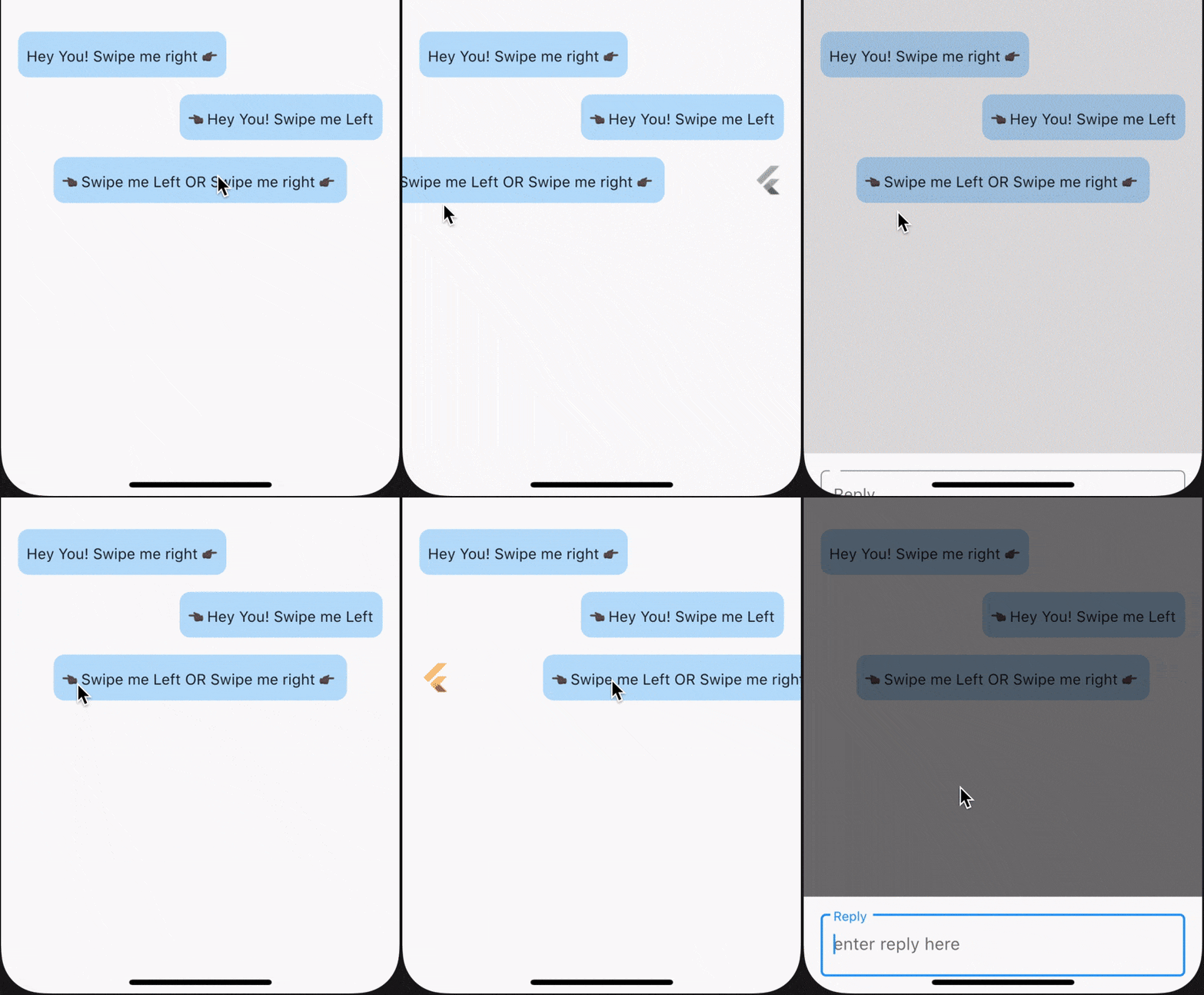
SwipeTo is a wrapper for a chat view widget which can be used initiate callback when user horizontally swipe on it.
Getting Started
To use this packages, you just simply need to wrap your child component in SwipeTo widget and pass a VoidCallback that you can carry forward with your task.
In the pubspec.yaml of your flutter project, add the following dependency:
dependencies:...swipe_to:1.0.6
In your library add the following import:
import'package:swipe_to/swipe_to.dart';
Parameter Info
child : (@required) StateLess or StateFull flutter widget.
onRightSwipe : callback which will be initiated at the end of right swipe animation. If not passed right swipe will be disabled
onLeftSwipe : callback which will be initiated at the end of left swipe animation. If not passed left swipe will be disabled
iconOnRightSwipe : IconData that will be displayed on left beneath child widget when swiped right. If not specified default is Icons.reply
rightSwipeWidget : Widget that will be displayed beneath child widget when swipe right. If iconOnRightSwipe is defined this will have no effect.
iconOnLeftSwipe : IconData that will be displayed on right beneath child widget when swiped left. If not specified default is Icons.reply
leftSwipeWidget : Widget that will be displayed beneath child widget when swipe left. If iconOnLeftSwipe is defined this will have no effect.
iconSize : Double value defining size of displayed icon beneath child widget. If not specified default it will take 26
iconColor : Color value defining color of displayed icon beneath child widget. If not specified primaryColor from theme will be taken
offsetDx : Double dx value used in Offset() till which position of child widget will get animated. If not specified 0.3 default will be taken. onRightSwipe +dx value will be used and for onLeftSwipe -dx value will be used
animationDuration : Duration value to define animation duration. If not specified default is 150 milliseconds
swipeSensitivity : Swipe sensitivity integer value which will be in range of default min 5 to max 35. Crossing mentioned value of this parameter (+ve in right and -ve in left direction) will trigger swipe animation.
Major changes onwards [ver 0.0.1+5]
For a single child widget, we can now enable swipe for both left and right direction
swipeDirection parameter is removed. Now onLeftSwipe and onRightSwipe callback will enable swiping for a particular direction if passed
iconData is now split into two parameter, iconOnRightSwipe & iconOnLeftSwipe for future use
endOffset is now change to accept a double value only
callBack is now split into two parameter, onLeftSwipe & onRightSwipe
Using SwipeTo widget for ListView items
While using SwipeTo widget for ListView items, make sure to pass a Key() as key parameter of SwipeTo widget. Suggested to use UniqueKey() which will differentiate each individual widget in the Widget Tree. Check example below. To view example code click here.
swipeDirection : Enum value from [swipeToLeft, swipeToRight] only. Make sure to pass relative Offset value according to passed swipeDirection value. If not specified swipeToRight will be taken as default.
iconData : IconData that will be displayed beneath child widget. if not specified default is Icons.reply
endOffset : Offset value till which position of child widget will get animated. if not specified Offset(0.3, 0.0) default will be taken
callBack : (@required) callback which will be initiated at the end of swipe animation
Example : SwipeToRight
Wrap your desired widget with SwipeTo & pass a call to onRightSwipe parameter.
SwipeTo(
child: Container(
padding: constEdgeInsets.symmetric(vertical: 10.0, horizontal: 8.0),
child: Text('Hey You! Swipe me right 👉🏿'),
),
onRightSwipe: (details) {
print('Callback from Swipe To Right');
},
),
Example : SwipeToLeft
Wrap your desired widget with SwipeTo & pass a call to onLeftSwipe parameter.
SwipeTo(
child: Container(
padding: constEdgeInsets.symmetric(vertical: 10.0, horizontal: 8.0),
child: Text('👈🏿 Hey You! Swipe me Left'),
),
onLeftSwipe: (details) {
print('Callback from Swipe To Left');
},
),
Example : SwipeToLeft & SwipeToRight
Wrap your desired widget with SwipeTo & pass a call to onLeftSwipe & onRightSwipe parameters.
SwipeTo(
child: Container(
padding: constEdgeInsets.symmetric(vertical: 10.0, horizontal: 8.0),
child: Text('👈🏿 Swipe me Left | YOU |Swipe me right 👉🏿'),
),
onLeftSwipe: (details) {
print('Callback from Swipe To Left');
},
onRightSwipe: (details) {
print('Callback from Swipe To Right');
},
),