Search packages, repositories and app categories

Package detailsv0.0.2

swipeable_button_view

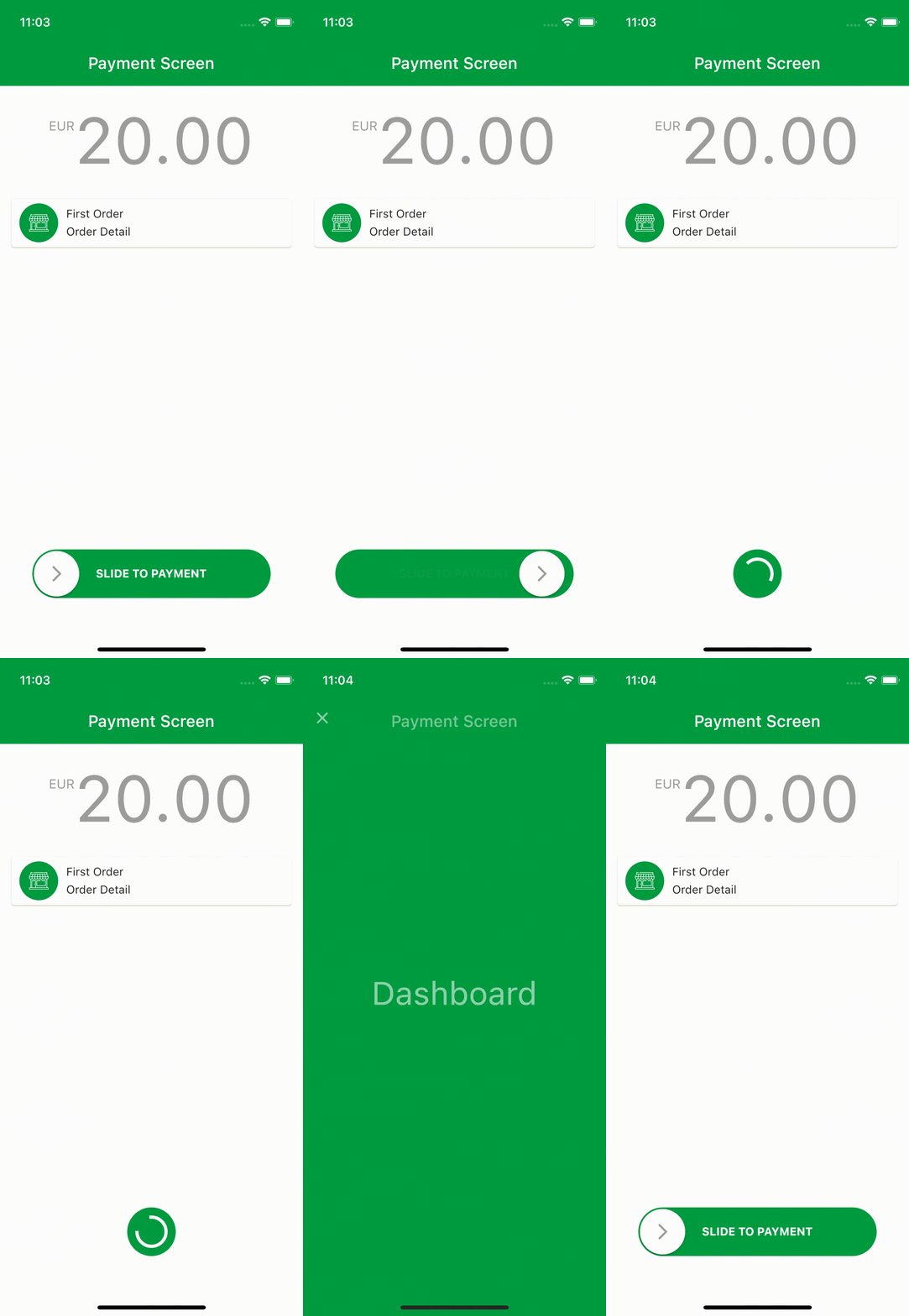
You can create ripple animated pages with swipeable_button_view.

AndroidiOSWebmacOSWindowsLinux
30-day downloads
2.7K
Likes
114
Pub points
140

Install package

flutter pub add swipeable_button_view

Package Overview

Package selection guidance compiled from public package information, community data, and project usage.

SwipeableButtonView is a Flutter package that enables the creation of interactive, ripple-animated buttons and pages through swipe gestures. It enhances user engagement with smooth animations and responsive feedback when users swipe across the button. Ideal for modern UIs requiring gesture-based interactions, it supports multiple platforms including Android, iOS, Web, macOS, Windows, and Linux. The package integrates seamlessly into Flutter apps, offering customizable visual effects and intuitive touch interactions. Developers can easily implement swipe-driven navigation or actions with minimal code. Its lightweight design makes it suitable for both simple and complex gesture-based interfaces.

Use cases

  • Gesture-based navigation
  • Interactive button animations
  • Ripple effect on swipes
  • Mobile-first UI components
  • Cross-platform gesture support
  • Engaging onboarding screens

Key features

  • Ripple animation on swipe
  • Multi-platform compatibility
  • Customizable swipe behavior
  • Smooth transition effects
  • Lightweight and easy to integrate
  • Supports touch and drag gestures

Suitable for

  • Developers building gesture-rich apps
  • Designers seeking interactive UI elements
  • Apps requiring swipe-to-activate features
  • Cross-platform mobile and web applications
  • UI/UX focused Flutter projects

Considerations

  • May require additional styling for complex layouts
  • Performance impact on low-end devices
  • Limited to swipe-based interactions
  • Not ideal for non-gesture workflows
  • Requires careful handling of edge cases in gesture recognition
  • Best suited for touch-enabled devices

Original README

Original README snapshot from the linked source repository. Visit the repository for the latest content.

swipeable_button_view

Pub Version License

You can create ripple animated pages with swipeable_button_view.

Install

Add swipeable_button_view: to your pubspec.yaml dependencies then run flutter pub get

dependencies:
  swipeable_button_view:

Then import the package to use

import 'package:swipeable_button_view/swipeable_button_view.dart';

Example

import 'package:swipeable_button_view/swipeable_button_view.dart';

SwipeableButtonView(
    buttonText: 'SLIDE TO PAYMENT',
    buttonWidget: Container(
        child: Icon(Icons.arrow_forward_ios_rounded,
            color: Colors.grey,
                ),),
    activeColor: Color(0xFF009C41),
    isFinished: isFinished,
    onWaitingProcess: () {
    Future.delayed(Duration(seconds: 2), () {
            setState(() {
                isFinished = true;
                      });
                    });
                  },
    onFinish: () async {
        await Navigator.push(context,
                        PageTransition(
                            type: PageTransitionType.fade,
                            child: DashboardScreen()));

                    //TODO: For reverse ripple effect animation
                    setState(() {
                      isFinished = false;
                    });
                  },
)

Screen Recording

Props

props types defaultValues isRequired
onFinish VoidCallback true
onWaitingProcess VoidCallback true
activeColor Color true
buttonWidget Widget true
buttonText String true
isFinished bool false
isActive bool true
disableColor Color Colors.grey
buttonColor Color Colors.white
buttontextstyle TextStyle TextStyle(color: Colors.white, fontWeight: FontWeight.bold)
indicatorColor Animation<Color?> AlwaysStoppedAnimation<Color>(Colors.white)})

Categories

Source repository

Projects using this package

No data available yet.