Package selection guidance compiled from public package information, community data, and project usage.
A Flutter plugin enabling app termination and restart with optional data clearing, designed for Android, iOS, and Web. It allows developers to programmatically close the app and restart it, useful for scenarios requiring a clean state, such as after configuration changes or authentication resets. The plugin provides a simple API to trigger these actions across platforms, ensuring consistent behavior. It integrates seamlessly into existing Flutter projects via pub.dev.
Use cases
App restart after settings change
Clearing cached data on logout
Reinitializing app state
Handling authentication resets
Forcing a fresh launch after updates
Key features
Cross-platform support (Android, iOS, Web)
Option to clear app data on restart
Simple API for termination and restart
Works on all major platforms
Lightweight and easy integration
Suitable for
Developers needing app restart functionality
Apps requiring state reset after user actions
Projects with complex session management
Mobile apps with sensitive data handling
Web applications needing controlled restarts
Considerations
May not work on all Android launchers
iOS restrictions may limit full termination
Web support is limited by browser behavior
Data clearing behavior varies by platform
Requires appropriate permissions on some devices
Original README
Original README snapshot from the linked source repository. Visit the repository for the latest content.
Terminate Restart
A robust Flutter plugin for terminating and restarting your app with extensive customization options. Perfect for implementing dynamic updates, clearing app state, or refreshing your app's UI.
Demo
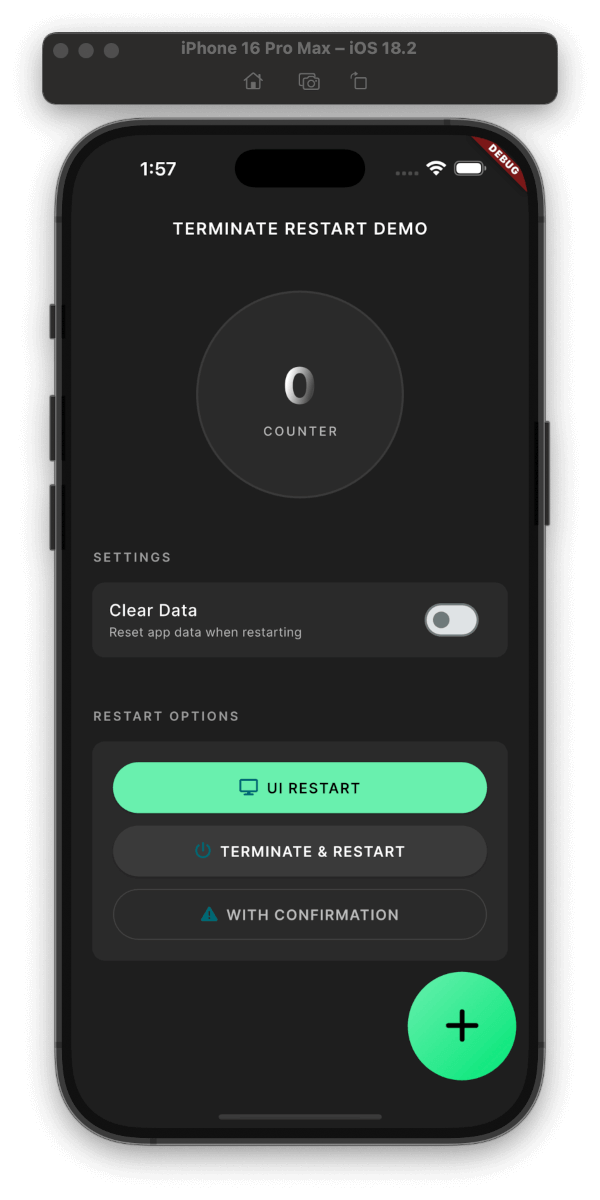
Plugin in Action
Clean & Simple Interface
Features
Three Restart Modes:
UI-only Restart: (~200ms)
Recreates activities/views while maintaining connections
Perfect for theme changes, language switches
Preserves network connections and background tasks
Faster execution with minimal disruption
Full Process Restart: (~800ms)
Complete app termination and restart
Ideal for updates, security-related changes
Cleans up all resources and states
Ensures fresh start with no residual state
With Confirmation Dialog: (+50ms)
Shows a customizable confirmation dialog
User can choose to proceed or cancel
Supports both UI-only and full restart
Perfect for user-initiated actions
Smart Data Management:
Configurable data clearing during restart
Granular control over data preservation
Secure handling of sensitive information
Security Features:
Optional keychain data preservation
Secure user defaults handling
Clean process termination
Platform Support:
Android: Full support with activity recreation
iOS: Compliant with App Store guidelines
Web: Page reload with browser storage clearing
User Experience:
Built-in confirmation dialogs
Customizable messages and buttons
Smooth transitions and animations
Installation
dependencies:terminate_restart:^1.1.0
Quick Start
Get up and running with Terminate Restart in minutes:
voidmain() {
WidgetsFlutterBinding.ensureInitialized();
TerminateRestart.instance.initialize();
// Wrap your app with wrapWithRestart to enable UI-only restartrunApp(TerminateRestart.wrapWithRestart(child: MyApp()));
}
Basic Usage
// Quick UI refreshawaitTerminateRestart.instance.restartApp(
options: constTerminateRestartOptions(
terminate: false,
),
);
// Full app restartawaitTerminateRestart.instance.restartApp(
options: constTerminateRestartOptions(
terminate: true,
),
);
// With confirmation dialogawaitTerminateRestart.instance.restartAppWithConfirmation(
context,
title: 'Restart App',
message: 'Do you want to restart the app?',
terminate: true,
);
Feature Comparison
Feature
Description
UI Restart
Quick UI refresh without app termination
Full Restart
Complete app termination and restart
Data Clearing
Optional storage clearing with keychain preservation
Confirmation
Optional user confirmation before restart
iOS Compliance
System-approved methods for App Store compliance
Web Support
Page reload with browser storage clearing
iOS App Store Compliance
This plugin follows Apple's App Store guidelines regarding app termination:
User-Initiated Actions: The plugin only performs termination in response to explicit user actions.
Graceful Shutdown: On iOS, the plugin uses approved APIs to ensure graceful app termination:
Uses exit(0) for clean termination
Properly saves state and closes resources
Follows iOS application lifecycle
Restart Mechanism: The restart functionality complies with iOS guidelines by:
Using approved launch mechanisms
Preserving user preferences when requested
Maintaining system integrity
Data Handling: When clearing data:
Respects iOS data protection
Properly handles keychain items
Maintains necessary system files
Note: While Android allows direct app termination, iOS termination is handled through system-approved methods.
Common Use Cases
After Dynamic Updates
// After downloading new assets/codeawaitTerminateRestart.instance.restartAppWithConfirmation(
context,
title: 'Update Ready',
message: 'Restart to apply updates?',
terminate: true,
);
Clearing Cache
// Clear app data but preserve important settingsawaitTerminateRestart.instance.restartApp(
options: constTerminateRestartOptions(
terminate: true,
clearData: true,
preserveKeychain: true,
preserveUserDefaults: true,
),
);
Quick UI Refresh
// Refresh UI without full restartawaitTerminateRestart.instance.restartApp(
options: constTerminateRestartOptions(
terminate: false,
),
);
With Confirmation Dialog
// Show confirmation dialog before restartawaitTerminateRestart.instance.restartAppWithConfirmation(
context,
title: 'Restart Required',
message: 'Do you want to restart the app?',
terminate: true,
clearData: false,
preserveKeychain: true,
);
Shows a confirmation dialog before restarting the app. Returns true if the user confirmed and the restart was successful, or false if the user canceled.
Parameters:
context: The BuildContext used to show the dialog.
title: The title of the confirmation dialog.
message: The message shown in the confirmation dialog.
confirmText: The text for the confirm button.
cancelText: The text for the cancel button.
clearData: Whether to clear app data during restart.
preserveKeychain: Whether to preserve keychain data when clearing app data.
preserveUserDefaults: Whether to preserve user defaults when clearing app data.
terminate: Whether to fully terminate the app process or just restart the UI.
Frequently Asked Questions
1. What's the difference between UI-only and Full restart?
UI-only Restart: Only recreates the UI components while keeping the app process alive. Perfect for theme changes or language switches.
Full Restart: Completely terminates the app process and starts fresh. Ideal for updates or when you need a clean state.
2. When should I use confirmation dialog?
Use confirmation dialog when:
User needs to be aware of the restart
Data might be lost during restart
Action is user-initiated
Critical operations are in progress
3. Will my app data be preserved?
By default, all app data is preserved
Use clearData: true to clear app data
Use preserveKeychain and preserveUserDefaults to selectively preserve data
4. Is it safe to use in production?
Yes! The plugin:
Uses official platform APIs
Follows platform guidelines
Handles errors gracefully
Has no special permission requirements
Advanced Use Cases
1. Language Change with Data Preservation
Future<void> changeLanguage(String newLocale) async {
// Save new localeawait prefs.setString('locale', newLocale);
// Restart UI only with confirmationawaitTerminateRestart.instance.restartAppWithConfirmation(
context,
title: 'Language Change',
message: 'Restart app to apply new language?',
terminate: false,
preserveUserDefaults: true,
);
}
graph TD
    A[Start] --> B{Restart Type}
    B -->|UI-only| C[Recreation Mode]
    B -->|Full| D[Termination Mode]

    C --> E{Show Dialog?}
    D --> E

    E -->|Yes| F[Show Confirmation]
    E -->|No| G[Process Restart]

    F -->|Confirmed| G
    F -->|Cancelled| H[Cancel Operation]

    G --> I{Clear Data?}
    I -->|Yes| J[Clear App Data]
    I -->|No| K[Preserve Data]

    J --> L[Restart App]
    K --> L

    L --> M[End]