Package selection guidance compiled from public package information, community data, and project usage.
Textuality is a Flutter package that extends the functionality of the Text widget with advanced visual effects. It enables developers to apply gradient fills, stroke outlines, neon lighting, and shadow effects directly to text, enhancing UI aesthetics without complex custom painting. Designed for ease of use, it integrates seamlessly into existing Flutter projects. The package supports multiple platforms including Android, iOS, Web, macOS, Windows, and Linux, making it ideal for cross-platform apps requiring expressive typography.
Use cases
Creating eye-catching headlines
Adding decorative text effects in games
Enhancing app onboarding screens
Designing themed UIs with vibrant text
Improving accessibility through visual contrast
Key features
Gradient text styling
Stroke and outline effects
Neon glow effects
Shadow and depth enhancements
Simple API integration
Suitable for
UI designers seeking visual flair
Developers building creative apps
Cross-platform mobile and web projects
Apps with dynamic or animated text
Considerations
May impact performance with heavy effects
Limited customization beyond provided styles
Requires careful testing across platforms
Not suitable for high-performance animations
Original README
Original README snapshot from the linked source repository. Visit the repository for the latest content.
Textuality Package
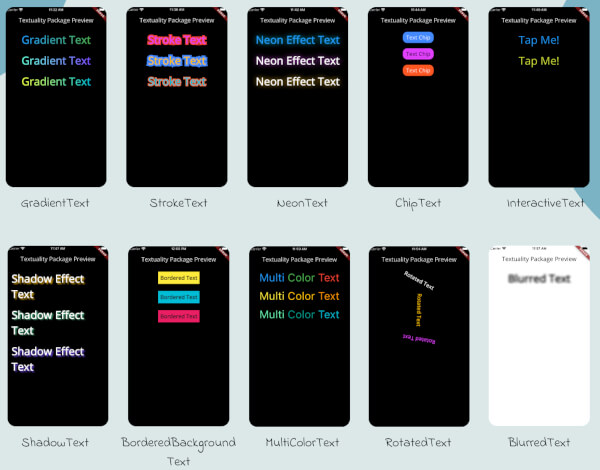
Textuality is a powerful Flutter package that enhances the appearance of text widgets with a variety of customizable text effects and styles. With this package, you can easily add gradient text, stroke text, neon effects, shadow effects, interactive text, and more to your Flutter app.
Features
GradientText: Add gradient colors to your text.
StrokeText: Apply an outline or stroke around your text.
NeonText: Create a glowing neon text effect.
ChipText: Display text inside stylish chip-like containers.
ShadowText: Add customizable shadows to your text.
InteractiveText: Make text interactive for clicks, taps, or custom gestures.
MultiColorText: Display text in multiple colors, even within the same string.
RotatedText: Rotate the text in any direction, including vertical.
BlurredText: Add a blurred effect to your text.
BorderedBackgroundText: Add a border around the background of your text.
Each widget accepts various optional parameters for customization, such as style, text alignment, maxLines, overflow, and more.
Installation
To use the textuality package in your Flutter project, follow these steps:
Add the package to your pubspec.yaml file:
dependencies:textuality:^0.0.1
Run the following command to install the package:
flutter pub get
💻Example
Below is an example of how to use the Textuality package in your Flutter app: