Search packages, repositories and app categories

Package detailsv0.2.0

wave_slider

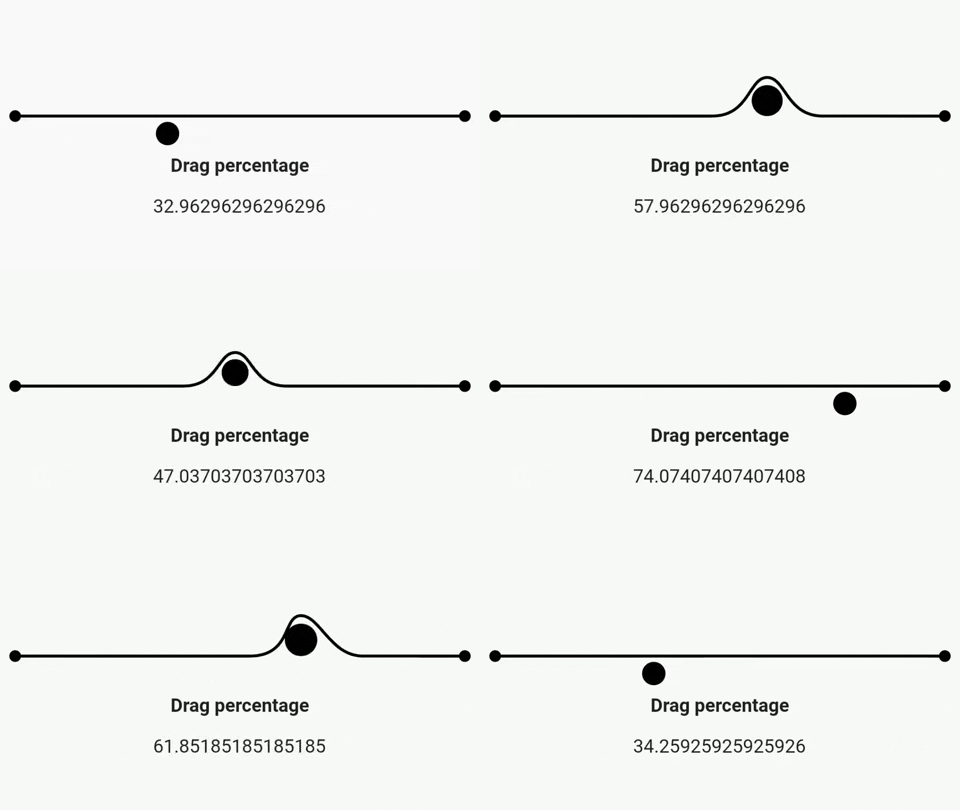
A Flutter slider that makes a wave effect when dragged. Does a little bounce when dropped.

30-day downloads
11
Likes
131
Pub points
30

Install package

flutter pub add wave_slider

Package Overview

Package selection guidance compiled from public package information, community data, and project usage.

Wave Slider is a Flutter package that enhances the standard slider with a dynamic wave animation during dragging and a subtle bounce effect when released. Designed for playful, engaging user interfaces, it adds visual feedback to slider interactions, making them feel more responsive and fun. Ideal for apps aiming to stand out with lively, tactile animations. The package integrates seamlessly into Flutter projects and is maintained by FunWithFlutter.

Use cases

  • Interactive form sliders
  • Gamified app interfaces
  • Visual feedback in settings
  • Engaging onboarding experiences
  • Creative UI prototyping

Key features

  • Wave animation during drag
  • Bounce effect on release
  • Smooth, fluid motion
  • Minimal setup with pub add
  • Customizable wave appearance

Suitable for

  • Designers seeking expressive UIs
  • Developers building interactive apps
  • Projects emphasizing user engagement
  • Apps targeting younger audiences
  • Prototypes requiring animated feedback

Considerations

  • May impact performance on low-end devices
  • Limited customization beyond wave style
  • Not suitable for minimalistic or serious UIs
  • Requires Flutter 3.0+ for optimal performance
  • No built-in support for directional waves
Original README

Original README snapshot from the linked source repository. Visit the repository for the latest content.

A Flutter slider that makes a wave effect when dragged. Does a little bounce when dropped.

Demo

Getting Started

To use this plugin, add wave_slider as a dependency in your pubspec.yaml file.

The color can be set with the color property. The slider size is dependent on the size of its parent. The height of the wave slider can be set with the sliderHeigth property - which is constrained with a minimum of 50 and a maximum of 600.

An option displayTrackball property can be set to true to show a trackball along with the slider. The default is false

Values are retrieved by passing in an onChanged callback, which returns a value between 0 and 1 to indicate the current drag completion percentage.

The onChangeStart and onChangeEnd callbacks can be used to retrieve the start and end drag percentages respectively.

Example
import 'package:flutter/material.dart';
import 'package:wave_slider/wave_slider.dart';

void main() => runApp(MaterialApp(
      home: App(),
    ));

class App extends StatefulWidget {
  @override
  _AppState createState() => _AppState();
}

class _AppState extends State<App> {
  double _dragPercentage = 0;

  @override
  Widget build(BuildContext context) {
    return Scaffold(
      body: Column(
        mainAxisAlignment: MainAxisAlignment.center,
        children: <Widget>[
          WaveSlider(
            displayTrackball: false,
            onChanged: (double dragUpdate) {
              setState(() {
                _dragPercentage = dragUpdate *
                    100; // dragUpdate is a fractional value between 0 and 1
              });
            },
          ),
          Padding(
            padding: const EdgeInsets.all(8.0),
            child: Text(
              'Drag percentage',
              style: TextStyle(fontSize: 16, fontWeight: FontWeight.bold),
            ),
          ),
          Padding(
            padding: const EdgeInsets.all(8.0),
            child: Text(
              '$_dragPercentage',
              style: TextStyle(fontSize: 16),
            ),
          )
        ],
      ),
    );
  }
}
Interested in how the package was made?

Check out this playlist on the Fun with Flutter YouTube channel!

Categories

Source repository

Projects using this package

No data available yet.