Search packages, repositories and app categories

widget_marker_google_map cover
Package detailsv0.0.2

widget_marker_google_map

Customized google map with widget markers. Enables to show markers with widget code.

AndroidiOSWeb
30-day downloads
75
Likes
23
Pub points
140

Install package

flutter pub add widget_marker_google_map

Package Overview

Package selection guidance compiled from public package information, community data, and project usage.

A Flutter package that extends Google Maps by allowing developers to place custom widget-based markers on maps. Unlike standard markers, this package enables the use of any Flutter widget—such as icons, avatars, or interactive elements—as map markers. It integrates seamlessly with the Google Maps plugin and supports Android, iOS, and Web platforms. Ideal for apps requiring rich, dynamic, or interactive marker content beyond simple images or text.

Use cases

  • Interactive map interfaces
  • Custom marker UIs with animations
  • Real-time location tracking with rich visuals
  • User profile markers on maps
  • Dynamic data visualization on maps

Key features

  • Supports arbitrary Flutter widgets as markers
  • Cross-platform compatibility (Android, iOS, Web)
  • Easy integration with Google Maps plugin
  • Customizable marker positioning and behavior
  • Live updates for dynamic marker content

Suitable for

  • Developers building interactive maps
  • Apps needing branded or animated markers
  • Projects with real-time location data
  • UI-heavy geolocation applications
  • Teams using Flutter for full-stack map features

Considerations

  • Performance impact with many complex widgets
  • Requires proper state management for dynamic updates
  • Limited support for advanced marker clustering
  • May need optimization for large-scale map rendering
  • Dependent on Google Maps SDK availability

Original README

Original README snapshot from the linked source repository. Visit the repository for the latest content.

widget_marker_google_map

All Contributors

pub package License: MIT

Google map with widget markers.

Set up

Follow the steps on google_maps_flutter document.

Usage

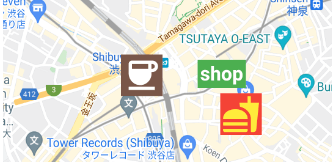
Same as google_maps_flutter except for widgetMarkers.

 WidgetMarkerGoogleMap(
    initialCameraPosition: shibuya,
    mapType: MapType.normal,
    widgetMarkers: [
      WidgetMarker(
        position: cafePosition,
        markerId: 'cafe',
        widget: Container(
          color: Colors.brown,
          padding: const EdgeInsets.all(2),
          child: const Icon(
            Icons.coffee,
            color: Colors.white,
            size: 64,
          ),
        ),
      ),
      WidgetMarker(
        position: clothesShopPosition,
        markerId: 'clothes',
        widget: Container(
          color: Colors.green,
          padding: const EdgeInsets.all(4),
          child: const Text(
            'shop',
            style: TextStyle(
              color: Colors.white,
              fontWeight: FontWeight.bold,
              fontSize: 32,
            ),
          ),
        ),
      ),
      WidgetMarker(
        position: hamburgerShopPosition,
        markerId: 'hamburger',
        widget: Container(
          color: Colors.red,
          padding: const EdgeInsets.all(2),
          child: const Icon(
            Icons.fastfood,
            color: Colors.yellow,
            size: 64,
          ),
        ),
      ),
    ],
  ),
WidgetMarker

You need to insert the list of WidgetMarker to use widget markers.

Make sure that you still need to use onTap method when you use gestures.

class WidgetMarker {
  WidgetMarker({
    required this.position,
    required this.markerId,
    required this.widget,
    this.onTap,
  }) : assert(markerId.isNotEmpty);

  final LatLng position;

  /// Keep this unique, otherwise it will not appear.
  final String markerId;

  /// Gestures of widget is disabled.
  /// Use this callback instead.
  final VoidCallback? onTap;

  final Widget widget;
}

If you have any requests or questions, feel free to ask on github.

Contributors ✨

Thanks goes to these wonderful people (emoji key):

Devin
Devin

💻
Santa Takahashi
Santa Takahashi

💻

This project follows the all-contributors specification. Contributions of any kind welcome!

Categories

Dependencies

Dependency list 2 items

Source repository

Projects using this package

No data available yet.