Search packages, repositories and app categories

widget_to_marker cover
Package detailsv1.0.6

widget_to_marker

A package to convert any Flutter Widget to BitmapDescriptor which can be used in google_maps_flutter icon marker.

AndroidiOSWeb
30-day downloads
16.6K
Likes
133
Pub points
155

Install package

flutter pub add widget_to_marker

Package Overview

Package selection guidance compiled from public package information, community data, and project usage.

The widget_to_marker package enables developers to convert any Flutter widget into a BitmapDescriptor, allowing custom-designed widgets to be used as icons on Google Maps markers via the google_maps_flutter plugin. This is particularly useful for creating visually rich, dynamic markers that go beyond standard icons. The package supports Android, iOS, and Web platforms, ensuring cross-platform consistency. It simplifies the process of rendering complex UI elements like avatars, badges, or custom shapes directly on maps.

Use cases

  • Custom map markers with dynamic content
  • Displaying user avatars on maps
  • Creating branded or themed markers
  • Real-time marker updates with animated widgets
  • Overlaying interactive UI elements on maps

Key features

  • Converts any Flutter widget to BitmapDescriptor
  • Supports Android, iOS, and Web
  • Simple integration with google_maps_flutter
  • Efficient rendering of complex widgets
  • Cross-platform compatibility

Suitable for

  • Developers building interactive maps
  • Apps requiring branded or personalized markers
  • Projects using dynamic or animated marker content
  • Teams prioritizing visual consistency across platforms
  • Users seeking alternatives to static icon images

Considerations

  • Performance impact with complex or frequently updated widgets
  • Potential memory overhead from bitmap generation
  • Requires proper disposal of generated descriptors
  • Limited to static snapshots (not interactive widgets)
  • May need optimization for high-frequency updates

Original README

Original README snapshot from the linked source repository. Visit the repository for the latest content.

Features

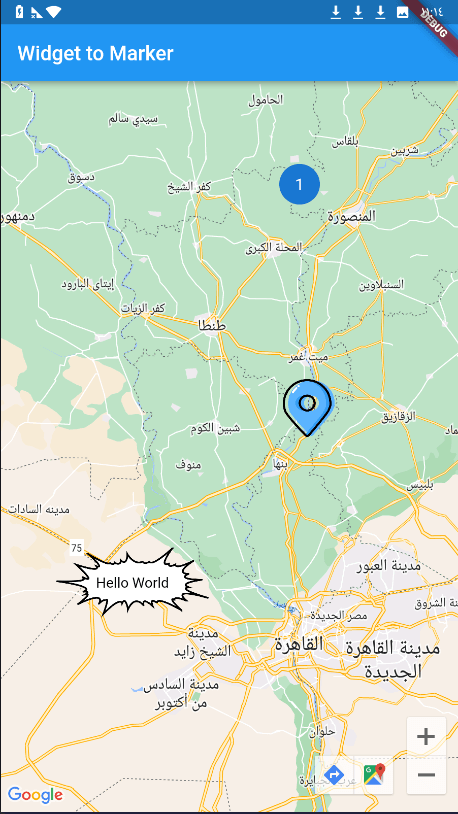
When using Google Maps, we always have a problem with adding a marker on the map, and the available tools were either drawing the marker through canvas path or using an image, but the problem is if we want to add words or data or add custom edit to this marker, but this package has solved the problem and now you can use any widget in flutter as a marker for google map ! using the .toBitmapDescriptor() function on the widget to use it as a marker icon!

Getting started

Add dependency

dependencies:
  widget_to_marker: ^1.0.6

1 - Create Your Widget To Make it as Marker:

import 'package:widget_to_marker/widget_to_marker.dart';

class TextOnImage extends StatelessWidget {
  const TextOnImage({
    super.key,
    required this.text,
  });
  final String text;
  @override
  Widget build(BuildContext context) {
    return Stack(
      alignment: Alignment.center,
      children: [
        Image(
          image: const AssetImage(
            "assets/marker.png",
          ),
          height: 150,
          width: 150,
        ),
        Text(
          text,
          style: TextStyle(color: Colors.black),
        )
      ],
    );
  }
}

2 - Add it to the marker with .toBitmapDescriptor():

Marker(
      markerId: const MarkerId("3"),
      position: const LatLng(30.01124477440843, 30.78459296375513),
      icon: await TextOnImage(
        text: "Hello World",
      ).toBitmapDescriptor(
         logicalSize: const Size(150, 150), imageSize: const Size(150, 150)
      ),
    )

Note

You Can Use waitToRender Attribute to set duration for rendering large network and asset images

Enjoy!!

image

Categories

Dependencies

Dependency list 1 items

Source repository

Projects using this package

No data available yet.