Search packages, repositories and app categories

Package detailsv0.1.5

wifi

Flutter plugin providing WiFi.

30-day downloads
118
Likes
52
Pub points
25

Install package

flutter pub add wifi

Package Overview

Package selection guidance compiled from public package information, community data, and project usage.

The wifi package is a Flutter plugin that provides access to WiFi network information on mobile devices. It enables developers to retrieve details about connected networks, such as SSID and signal strength, facilitating network-aware applications. Designed for Android and iOS, it integrates seamlessly into Flutter apps to enhance connectivity features. The plugin supports basic WiFi operations through a simple API, making it suitable for apps requiring network diagnostics or user-driven network selection. Its lightweight nature ensures minimal performance impact. The source code is publicly available on GitHub for transparency and community contributions.

Use cases

  • Network diagnostics
  • WiFi network monitoring
  • User network selection
  • App connectivity checks
  • Location-based services

Key features

  • Retrieve connected WiFi details
  • Simple API integration
  • Cross-platform support
  • Open-source code
  • Lightweight implementation

Suitable for

  • Developers building network-aware apps
  • Apps needing WiFi status
  • Mobile apps with connectivity features
  • DIY network tools
  • Educational projects

Considerations

  • Limited to Android and iOS
  • Requires device permissions
  • No real-time updates
  • Depends on platform-specific implementations
  • May not work on all devices

Original README

Original README snapshot from the linked source repository. Visit the repository for the latest content.

wifi

This plugin allows Flutter apps to get wifi ssid and list, connect wifi with ssid and password.

This plugin works Android.

iOS later released.

Sample usage to check current status:

import 'package:wifi/wifi.dart';

String ssid = await Wifi.ssid;

//Signal strength, 1-3,The bigger the number, the stronger the signal
int level = await Wifi.level;

String ip = await Wifi.ip;

var result = await Wifi.connection('ssid', 'password');

// only work on Android.
List<WifiResult> list = await Wifi.list('key'); // this key is used to filter

When you use connection on iOS (iOS 11 only)

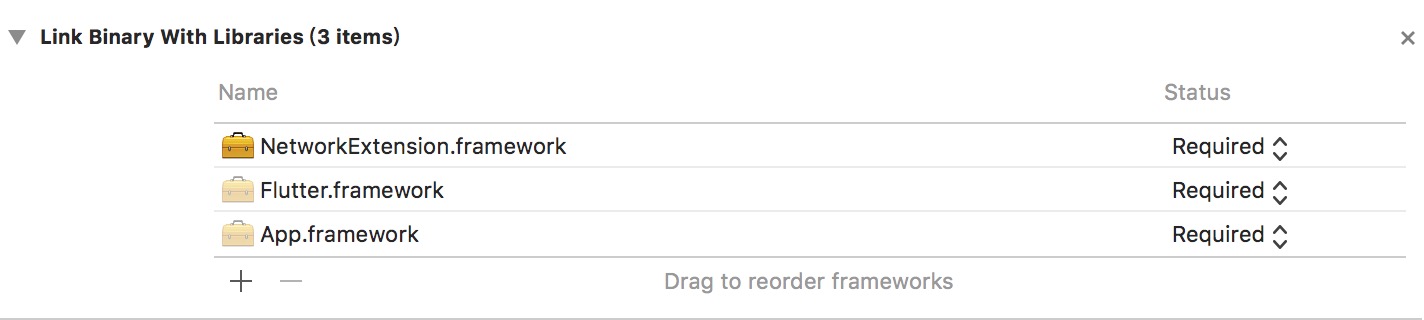
  1. 'build Phass' -> 'Link Binay With Libraries' add 'NetworkExtension.framework' NetworkExtension

  2. in 'Capabilities' open 'Hotspot Configuration'

    NetworkExtension

  3. If you device is iOS12, in 'Capabilities' open 'Access WiFi Information'

    NetworkExtension

If you want to use Wifi.list on iOS,

reference http://baixin.io/2017/01/iOS_Wifilist/

Getting Started

For help getting started with Flutter, view our online documentation.

For help on editing plugin code, view the documentation.

Categories

Source repository

Projects using this package