Package selection guidance compiled from public package information, community data, and project usage.
wifi_hunter is a Flutter package designed to scan and retrieve information about nearby Wi-Fi access points on Android devices. It enables developers to detect available networks, including their SSIDs, signal strengths, and MAC addresses, providing real-time network visibility. Ideal for network diagnostics, location-based services, or security assessments, the package leverages Android's Wi-Fi scanning APIs. It requires appropriate permissions and works exclusively on Android platforms.
Use cases
Network discovery
Location-based services
Security audits
Device connectivity monitoring
Wi-Fi signal analysis
Key features
Real-time Wi-Fi scanning
SSID and MAC address retrieval
Signal strength detection
Android-only support
Simple API integration
Suitable for
Android app developers
Network diagnostic tools
IoT device management
Security researchers
Location-aware applications
Considerations
Requires Android permissions
Limited to Android platform
Privacy-sensitive data access
Background scanning limitations
No iOS support
Original README
Original README snapshot from the linked source repository. Visit the repository for the latest content.
wifi_hunter
A flutter package to hunt down info from all WiFi APs around you.
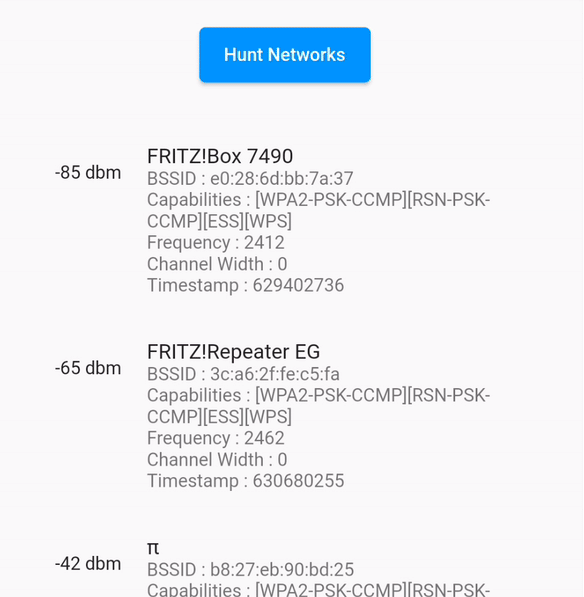
Here is what infos you can get by using this package :
String[] SSIDs
String[] BSSIDs
String[] Signal strength
int[] Frequencies
int[] Capabilities
int[] Channel widths
long[] Timestamps (of information retrieval)
... of all WiFi APs in reach.
Running the sample
When running the sample app, make sure you've granted it the location permissions available in the system preferences, as there is currently no permission dialog implemented in the example app.
The permission settings are available under Settings > Apps > wifi_hunter_example > Permissions > Location > Allow only while using the app
Android WiFi Scan Throttling
Starting with Android 8.0 and up, the operating system severely limits the number of WiFi scans. Please keep this limit in mind when implementing your scan issuing logic. Find out more about these limits on developer.android.com.
Debugging
You can get a good overview of pretty much all related log entries by searching for wifi in the Logcat output.