Search packages, repositories and app categories

zo_animated_border cover
Package detailsv1.1.0

zo_animated_border

Add animated, glowing, and gradient borders to any Flutter widget with zo_animated_border – a powerful and flexible package for modern UIs.

AndroidiOSWebmacOSWindowsLinux
30-day downloads
6.5K
Likes
137
Pub points
160

Install package

flutter pub add zo_animated_border

Package Overview

Package selection guidance compiled from public package information, community data, and project usage.

zo_animated_border is a Flutter package that enables developers to add dynamic, animated, glowing, and gradient borders to any widget. With smooth transitions and customizable effects, it enhances UIs with modern visual appeal. The package supports multiple platforms and integrates seamlessly into existing Flutter projects. It's ideal for buttons, cards, and interactive elements requiring attention-grabbing borders. Its flexible configuration allows control over color, animation speed, and border style. Designed for simplicity and performance, it’s perfect for creating engaging user interfaces.

Use cases

  • Creating animated buttons
  • Enhancing card components
  • Adding hover effects on web
  • Designing interactive UI elements
  • Implementing glowing focus states
  • Building modern dashboard widgets

Key features

  • Animated border transitions
  • Glowing border effects
  • Gradient border support
  • Customizable animation speed
  • Cross-platform compatibility
  • Easy integration with existing widgets

Suitable for

  • UI designers seeking modern aesthetics
  • Developers building interactive apps
  • Frontend-focused Flutter projects
  • Apps with high visual engagement
  • Prototyping dynamic interfaces
  • Projects targeting multiple platforms

Considerations

  • May impact performance on low-end devices
  • Requires careful tuning for complex animations
  • Limited to border decoration only
  • Not suitable for static UIs
  • Best used with minimal overlapping elements
  • Animation may conflict with other transforms

Original README

Original README snapshot from the linked source repository. Visit the repository for the latest content.

pub package pub points License: MIT

Zo Animated Border is a powerful Flutter package that brings modern UI to life with beautifully animated borders. Whether you're building a login screen, a button, or a decorative container, this package lets you wrap any widget with stylish, animated border effects.

Getting started

First, add zo_animated_border as a dependency in your pubspec.yaml file

dependencies:
  flutter:
    sdk: flutter
  zo_animated_border : ^[version]

Import the package

import 'package:zo_animated_border/zo_animated_border.dart';

Usage

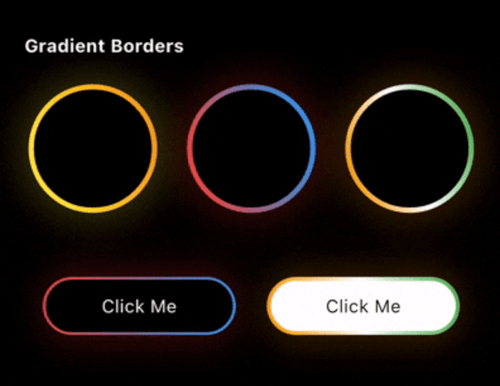
For Gradient border

gradient_border (online-video-cutter com)

ZoAnimatedGradientBorder(
  borderRadius: 100,
  animationCurve: Curves.linear,
  borderThickness: 4,
  gradientColor: [
    Colors.yellow,
    Colors.orange,
  ],
  animationDuration: const Duration(seconds: 4),
  child: Container(
    width: 100,
    height: 100,
    alignment: Alignment.center,
    decoration: BoxDecoration(
      shape: BoxShape.circle,
    ),
    child: Text(
      "Circle",
      style: TextStyle(color: Colors.white),
    ),
  ),
);

For Fire Border

Screen Recording 2026-07-25 at 11 22 57 PM
ZoFireBorder(
  duration: const Duration(seconds: 3),
  borderWidth: 4,
  snakeLength: 0.8,
  borderRadius: BorderRadius.circular(24),
  gradient: const LinearGradient(
    colors: [
      Colors.orange,
      Colors.red,
      Colors.green,
    ],
  ),
  particleColors: const [
    Colors.orange,
    Colors.orangeAccent,
    Colors.white,
  ],
  child: Container(
    width: 200,
    height: 200,
    alignment: Alignment.center,
    decoration: BoxDecoration(
      color: Colors.black,
      borderRadius: BorderRadius.circular(24),
    ),
    child: const Icon(
      Icons.local_fire_department,
      color: Colors.white,
      size: 60,
    ),
  ),
),

For Psycho Border

Screen Recording 2026-07-25 at 11 19 24 PM
ZoPsychoBorder(
  ringCount: 4,
  maxSpread: 10.0,
  borderRadius: BorderRadius.circular(75),
  colors: const [
    Color(0xFFFF2A85),
    Color(0xFFFF992A),
    Color(0xFF00E5FF),
    Color(0xFF6B2AFF),
  ],
  duration: const Duration(seconds: 3),
  child: Container(
    width: 150,
    height: 150,
    alignment: Alignment.center,
    decoration: BoxDecoration(
      color: Colors.transparent,
      borderRadius: BorderRadius.circular(20),
    ),
    child: const Text(
      'Z',
      style: TextStyle(
        color: Colors.white,
        fontSize: 50,
        fontWeight: FontWeight.bold,
      ),
    ),
  ),
),

For Sequential Glow Border

Screen Recording 2026-09-08 at 12 28 33 PM
ZoSequentialGlowBorder(
  borderRadius: BorderRadius.circular(20),
  borderWidth: 4.0,
  glowRadius: 10.0,
  duration: const Duration(seconds: 4),
  gradientPalettes: const [
    [Color(0xFF6B2AFF), Color(0xFF00E5FF)], // Purple to Cyan
    [Color(0xFFFF2A85), Color(0xFFFF992A)], // Pink to Orange
    [Color(0xFF00FF87), Color(0xFF60EFFF)], // Green to Blue
  ],
  child: Container(
    width: 250,
    height: 120,
    alignment: Alignment.center,
    child: const Text(
      "Sequential Glow Border",
      style: TextStyle(
        color: Colors.white,
        fontSize: 18,
      ),
    ),
  ),
)

For MultiColor Border

multicolor

ZoMultiColorBorder(
  colors: [
    Colors.orange,
    Colors.white,
    Colors.green,
    Colors.indigo,
    Colors.pink,
  ],
  strokeWidth: 3,
  borderRadius: 75,
  child: Padding(
    padding: const EdgeInsets.all(3.0),
    child: Container(
      width: 150,
      height: 150,
      alignment: Alignment.center,
      decoration: BoxDecoration(
        color: Colors.blue,
        shape: BoxShape.circle,
      ),
      child: Text(
        "MultiColor Border",
        style: TextStyle(color: Colors.white),
        textAlign: TextAlign.center,
      ),
    ),
  ),
)

For Text Border

circular_text

ZoTextBorder(
  text: "The Zerone",
  borderRadius: BorderRadius.circular(100),
  padding: 12,
  duration: const Duration(seconds: 12),
  textStyle: const TextStyle(
    color: Colors.greenAccent,
    fontSize: 12,
  ),
  child: Container(
    width: 150,
    height: 150,
    decoration: BoxDecoration(
      borderRadius: BorderRadius.circular(8),
    ),
    child: const Icon(
      Icons.shield,
      color: Colors.greenAccent,
      size: 50,
    ),
  ),
)

For Segmented Border

segment_border (online-video-cutter com) (1)
ZoSegmentBorder(
  borderRadius: 20,
  segmentLength: 0.2,
  glowOpacity: 1.0,
  glowRadius: 10,
  colors: const [
    Colors.cyanAccent,
    Colors.cyanAccent,
  ],
  child: Container(
    width: 250,
    height: 120,
    alignment: Alignment.center,
    child: const Text(
      "Zo Segment Border",
      style: TextStyle(
        color: Colors.white,
        fontSize: 18,
      ),
    ),
  ),
)

For Scribble Border

scribble_border

ZoScribbleBorder(
  borderColor: Colors.white,
  padding: const EdgeInsets.all(50),
  borderRadius: 100,
  child: ClipOval(
    child: Image.asset(
      'assets/pnglogo.png', // Replace with your asset
      width: 110,
      height: 110,
      fit: BoxFit.cover,
      errorBuilder: (context, error, stackTrace) =>
          const Icon(
            Icons.face,
            size: 80,
            color: Colors.orange,
          ),
    ),
  ),
),

For Ripple Border

ripple

ZoRippleEffect(
  rippleColor: Colors.cyanAccent,
  minCircleSize: 120,
  numberOfCircles: 4,
  animationDuration: const Duration(seconds: 4),
  child: const CircleAvatar(
    radius: 40,
    backgroundColor: Colors.cyanAccent,
    child: Icon(
      Icons.home,
      color: Colors.white,
      size: 30,
    ),
  ),
);

For Color Changing Border

new_border

ZoColorChangingBorder(
  borderRadius: 0,
  segmentLength: 0.2,
  colors: [
    Colors.orange,
    Colors.white,
    Colors.green,
  ],
  child: Padding(
    padding: const EdgeInsets.all(3.0),
    child: Container(
      width: 150,
      height: 150,
      alignment: Alignment.center,
      decoration: const BoxDecoration(
        color: Colors.blue,
      ),
      child: const Text(
        "Color Changing Border",
        textAlign: TextAlign.center,
        style: TextStyle(color: Colors.white),
      ),
    ),
  ),
);

For Signal Border

Simulator Screen Recording - iPhone 15 Pro - 2025-08-19 at 11 56 35 (online-video-cutter com)

ZoSignalBorder(
  maxRadius: 120,
  ringColors: [
    Colors.yellow,
    Colors.orange,
    Colors.red,
    Colors.purple,
    Colors.blue,
  ],
  child: Container(
    alignment: Alignment.center,
    width: 130,
    height: 130,
    decoration: BoxDecoration(
      color: Colors.white,
      shape: BoxShape.circle,
    ),
    child: const Text("Signal Border"),
  ),
);

For Dual border

dual

ZoDualBorder(
  glowOpacity: 0.4,
  firstBorderColor: Colors.yellow,
  secondBorderColor: Colors.orange,
  trackBorderColor: Colors.transparent,
  borderWidth: 8,
  borderRadius: BorderRadius.circular(10),
  child: Container(
    width: 150,
    height: 150,
    alignment: Alignment.center,
    decoration: BoxDecoration(
      color: Colors.white,
      borderRadius: BorderRadius.circular(10),
    ),
    child: Text(
      "Dual Border",
      style: TextStyle(
        color: Colors.black,
      ),
    ),
  ),
);

For Dotted border

dotted

ZoDottedBorder(
  child: Container(
    height: 100,
    width: 100,
    color: Colors.red,
    alignment: Alignment.center,
    child: Text(
      "MonoChrome",
      style: TextStyle(fontSize: 14, color: Colors.white),
    ),
  ),
  animate: true,
  borderRadius: 10,
  dashLength: 10,
  gapLength: 5,
  strokeWidth: 3,
  color: Colors.blue,
  borderStyle: BorderStyleType.monochrome,
);

For Breathing border

breathing

ZoBreathingBorder(
  borderWidth: 3.0,
  borderRadius: BorderRadius.circular(75),
  colors: [
    Colors.blue,
    Colors.purple,
    Colors.red,
    Colors.orange,
  ],
  animationDuration: const Duration(seconds: 4),
  child: Container(
    width: 150,
    height: 150,
    decoration: BoxDecoration(
      color: Colors.white,
      borderRadius: BorderRadius.circular(75),
    ),
    alignment: Alignment.center,
    child: const Text(
      'Breathing Border',
      textAlign: TextAlign.center,
      style: TextStyle(
        fontSize: 16,
        fontWeight: FontWeight.bold,
      ),
    ),
  ),
);

For Snake Border

snake_border

ZoSnakeBorder(
  glowOpacity: 0,
  snakeHeadColor: Colors.red,
  snakeTailColor: Colors.blue,
  snakeTrackColor: Colors.blueGrey,
  borderWidth: 5,
  borderRadius: BorderRadius.circular(10),
  child: Container(
    width: 150,
    height: 45,
    alignment: Alignment.center,
    decoration: BoxDecoration(
      color: Colors.white,
      borderRadius: BorderRadius.circular(10),
    ),
    child: Text(
      "Snake Border",
      style: TextStyle(color: Colors.black),
    ),
  ),
);

For GlowEdge Border

glowEdge

ZoGlowingEdgeBorder(
  gradientColors: [
    Colors.orange,
    Colors.white,
    Colors.green,
  ],
  child: Padding(
    padding: const EdgeInsets.all(3.0),
    child: Container(
      width: 150,
      height: 150,
      alignment: Alignment.center,
      decoration: const BoxDecoration(
        color: Colors.blue,
      ),
      child: const Text(
        "Glow Edge Border",
        textAlign: TextAlign.center,
        style: TextStyle(color: Colors.white),
      ),
    ),
  ),
);


For Pulsating border

pulse (online-video-cutter com)

ZoPulsatingBorder(
  type: ZoPulsatingBorderType.pulse,
  borderRadius: BorderRadius.circular(100),
  pulseColor: Colors.blue,
  child: Container(
    alignment: Alignment.center,
    width: 100,
    height: 100,
    decoration: BoxDecoration(
      color: Colors.red,
      borderRadius: BorderRadius.circular(50),
    ),
    child: Text(
      "Radar Pulse",
      style: TextStyle(color: Colors.white),
    ),
  ),
);

For MonoChrome border

mono_chrome (online-video-cutter com)

ZoMonoCromeBorder(
  trackBorderColor: Colors.white,
  cornerRadius: 50.0,
  borderStyle: ZoMonoCromeBorderStyle.mirror,
  borderWidth: 5.5,
  child: Container(
    width: 100,
    height: 100,
    alignment: Alignment.center,
    decoration: BoxDecoration(
      color: Colors.red,
      shape: BoxShape.circle,
    ),
    child: Text(
      "Mirror",
      style: TextStyle(color: Colors.white),
    ),
  ),
);

Feel free to post a feature requests or report a bug issues.

My Other packages

  • zo_micro_interactions: A curated set of high-quality Flutter micro-interactions designed for modern, polished apps.
  • zo_screenshot: The zo_screenshot plugin helps restrict screenshots and screen recording in Flutter apps, enhancing security and privacy by preventing unauthorized screen captures.
  • zo_collection_animation: A lightweight Flutter package to create smooth collect animations for coins carts
  • connectivity_watcher: A Flutter package to monitor internet connectivity with subsecond response times, even on mobile networks.
  • zo_app_blocker: A Flutter plugin to block specific applications on Android.
  • ultimate_extension: Enhances Dart collections and objects with utilities for advanced data manipulation and simpler coding.
  • theme_manager_plus: Allows customization of your app's theme with your own theme class, eliminating the need for traditional
  • date_util_plus: A powerful Dart API designed to augment and simplify date and time handling in your Dart projects.
  • pick_color: A Flutter package that allows you to extract colors and hex codes from images with a simple touch.

Categories

Source repository

Projects using this package

No data available yet.