Search packages, repositories and app categories

Package detailsv1.1.0

zoom_tap_animation

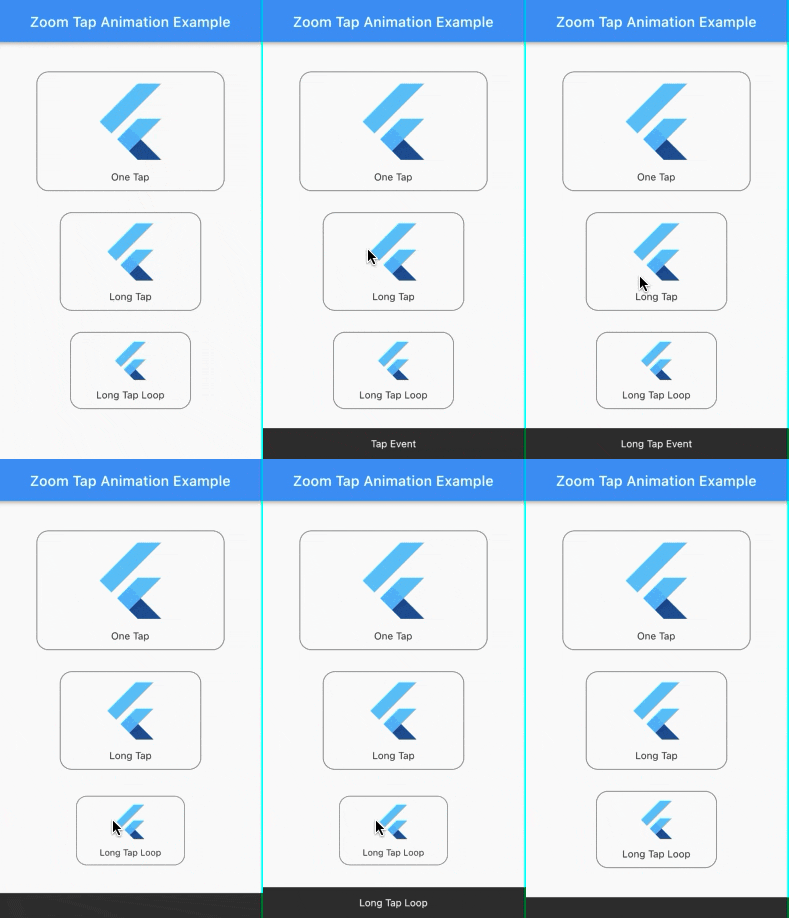
Zoom Tap Animation allows you to make an effect similar to App Store's items in Today tab, when you long tap on some item, it start zooming in then zooming out.

AndroidiOSWebmacOSWindowsLinux
30-day downloads
5.5K
Likes
139
Pub points
140

Install package

flutter pub add zoom_tap_animation

Package Overview

Package selection guidance compiled from public package information, community data, and project usage.

Zoom Tap Animation is a Flutter package that creates a dynamic zoom-in and zoom-out effect when a user long-presses an item, mimicking the interactive behavior seen in the App Store's Today tab. It enhances user engagement by providing visual feedback during touch interactions. The animation is smooth and customizable, suitable for buttons, cards, or any interactive UI element. Built with performance and cross-platform compatibility in mind, it works seamlessly across Android, iOS, Web, macOS, Windows, and Linux.

Use cases

  • Interactive app icons
  • Animated card taps
  • Enhanced button feedback
  • Today tab-style interfaces
  • User engagement elements
  • Touch interaction highlights

Key features

  • Long press triggered zoom
  • Smooth zoom-in and zoom-out
  • Cross-platform support
  • Customizable animation duration
  • Easy integration with existing widgets
  • Lightweight and performant

Suitable for

  • Developers seeking engaging touch effects
  • UI designers enhancing interactivity
  • Apps with gesture-based navigation
  • Projects requiring App Store-like animations
  • Flutter apps targeting multiple platforms

Considerations

  • May require tuning for optimal timing
  • Not ideal for static or non-interactive content
  • Best used with clear visual targets
  • Can conflict with other gestures if not managed
  • Limited to tap/long press triggers

Original README

Original README snapshot from the linked source repository. Visit the repository for the latest content.

pub package

Zoom Tap Animation

Zoom Tap Animation is is a package that allows you to make an zoom animation effect similar to App Store's (ios app) items in Today tab, when you long tap on some item, it start to zoom in then it zoom out when you release it.

Screenshots:

Source of idea

The idea is inspired from App Store app in Today tab where you can long tap on some item and it start to zoom in then zoom out as shown in the screenshot below.

Example:

Check out the example project in the example folder.

Installation:

add the package to your dependencies
dependencies:
  zoom_tap_animation: ^1.1.0
import 'package:zoom_tap_animation/zoom_tap_animation.dart';

Usage:

default use of ZoomTapAnimation widget
ZoomTapAnimation(
      onTap: (){},
      child: YOUR_WIDGET
);
and you can also define custom parameters
ZoomTapAnimation(
      child: YOUR_WIDGET,
      onTap: (){},
      onLongTap: (){},
      enableLongTapRepeatEvent: false,
      longTapRepeatDuration: const Duration(milliseconds: 100),
      begin: 1.0,
      end: 0.93,
      beginDuration: const Duration(milliseconds: 20),
      endDuration: const Duration(milliseconds: 120),
      beginCurve: Curves.decelerate,
      endCurve: Curves.fastOutSlowIn
);
also you can use ZoomTapAnimation with your custom gestures
ZoomTapAnimation(
      child: GestureDetector(
      onTap: () {},
      onLongPress: (){},
      onDoubleTap: (){},
      // you can add more gestures...
      child: Container(color: Colors.yellow, width: 100.0, height: 100.0),
      ),
);
parameters
parameter description default
child your child widget that you want to put the zoom effect on.
onTap what should happen when you tap on the widget. null
onLongTap what should happen when you long tap on the widget. null
enableLongTapRepeatEvent option to enable long tap loop which repeat every onTap event (in case onLongTap is specified, it repeats the onLongTap event). false
longTapRepeatDuration the duration between every onTap/onLongTap loop event. const Duration(milliseconds: 100)
begin the size of widget you want to begin with. 1.0
end the size of widget you want to begin with. 0.93
beginDuration the duration of the begin zoom in animation. const Duration(milliseconds: 20)
endDuration the duration of the end zoom in animation. const Duration(milliseconds: 120)
beginCurve the curve animation type of the begin zoom in animation. Curves.decelerate
endCurve the curve animation type of the end zoom in animation. Curves.fastOutSlowIn

Categories

Source repository

Projects using this package