Search packages, repositories and app categories

animated_hint_textfield cover
Package detailsv1.3.0

animated_hint_textfield

Flutter package for animating textfield hint/label text, adding dynamic and eye-catching transitions to enhance user experience.

AndroidiOSWebmacOSWindowsLinux
30-day downloads
3.5K
Likes
107
Pub points
160

Install package

flutter pub add animated_hint_textfield

Package Overview

Package selection guidance compiled from public package information, community data, and project usage.

A Flutter package that animates text field hint or label text, creating smooth and dynamic transitions when the field is focused or unfocused. It enhances user experience by adding visual feedback through subtle animations, making input fields more engaging and intuitive. Ideal for modern UIs where aesthetics and interactivity matter. The package supports multiple platforms including Android, iOS, Web, macOS, Windows, and Linux, ensuring consistent behavior across devices.

Use cases

  • Enhancing form inputs with visual feedback
  • Creating modern and interactive login screens
  • Improving UX in mobile and web applications
  • Adding micro-interactions to text fields
  • Designing visually appealing data entry forms

Key features

  • Smooth focus and blur animations
  • Customizable animation duration and curve
  • Support for multiple platforms
  • Easy integration with existing text fields
  • Dynamic hint positioning and scaling

Suitable for

  • UI/UX designers seeking interactive elements
  • Developers building polished forms
  • Apps prioritizing user engagement
  • Cross-platform Flutter projects
  • Projects requiring subtle yet effective animations

Considerations

  • May impact performance on low-end devices
  • Requires careful tuning of animation parameters
  • Limited to hint/label text animation only
  • Not suitable for complex form validation logic
  • Depends on correct widget hierarchy for optimal results

Original README

Original README snapshot from the linked source repository. Visit the repository for the latest content.

pub package pub points

Animated Hint TextField

A Flutter package designed to animate the label/hint text of a textfield, providing suggestive guidance to the user regarding what to input. Try out our example app.


Platform Support

Android iOS MacOS Web Linux Windows
✅ ✅ ✅ ✅ ✅ ✅


Installing

1. Depend on it

Add this to your package's pubspec.yaml file:

dependencies:
  animated_hint_textfield: ^1.0.0
2. Install it

You can install packages from the command line:

with pub:

$ pub get

with Flutter:

$ flutter pub get
3. Import it

Now in your Dart code, you can use:

import 'package:animated_hint_textfield/animated_hint_textfield.dart';


Animations

Currently this package supports 3 animations, more animations will be added in the future.

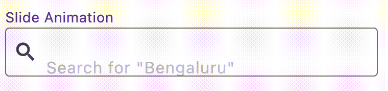
Slide

AnimatedTextField(
  animationType: Animationtype.slide, // Use Animationtype.slide for Slide animations
  decoration: InputDecoration(
    prefixIcon: Icon(Icons.search),
    border: OutlineInputBorder(
      borderSide: BorderSide(color: Colors.red, width: 2,
      ),
      borderRadius: BorderRadius.circular(4),
    ),
    focusedBorder: OutlineInputBorder(
      borderSide: BorderSide(color: Colors.black, width: 2,
      ),
      borderRadius: BorderRadius.circular(4),
    ),
    contentPadding: EdgeInsets.all(12),
  ),
  staticHintText: 'Search for ',
  hintTexts: [
    '"Bengaluru"',
    '"Mumbai"',
    '"Chennai"',
  ],
);

Fade

AnimatedTextField(
  animationType: Animationtype.fade, // Use Animationtype.fade for Fade animations
  decoration: InputDecoration(
    prefixIcon: Icon(Icons.search),
    border: OutlineInputBorder(
      borderSide: BorderSide(color: Colors.red, width: 2,
      ),
      borderRadius: BorderRadius.circular(4),
    ),
    focusedBorder: OutlineInputBorder(
      borderSide: BorderSide(color: Colors.black, width: 2,
      ),
      borderRadius: BorderRadius.circular(4),
    ),
    contentPadding: EdgeInsets.all(12),
  ),
  hintTexts: [
    'Search for "Bengaluru"',
    'Search for "Mumbai"',
    'Search for "Chennai"',
  ],
);

Typer

AnimatedTextField(
  animationType: Animationtype.typer, // Use Animationtype.typer for Type Write Style animations
  hintTextStyle: const TextStyle(
    color: Colors.deepPurple,
    overflow: TextOverflow.ellipsis,
  ),
  hintTexts: const [
    'How is the weather today?',
    'Will it rain today?',
    'What is the temperature',
  ],
  decoration: InputDecoration(
    suffixIcon: const Icon(Icons.search),
    filled: true,
    border: OutlineInputBorder(
      borderSide: const BorderSide(color: Colors.red, width: 2),
      borderRadius: BorderRadius.circular(25),
    ),
    focusedBorder: OutlineInputBorder(
      borderSide: const BorderSide(color: Colors.black, width: 2),
      borderRadius: BorderRadius.circular(25),
    ),
    contentPadding: const EdgeInsets.all(12),
  ),
);
💡 Tip

Use staticHintText when part of the hint should stay fixed while only the animated part changes:

AnimatedTextField(
  staticHintText: 'Search for ',
  hintTexts: const ['Bengaluru', 'Mumbai', 'Chennai'],
);

For suffix-style hints, set staticHintTextPosition:

AnimatedTextField(
  staticHintText: ' nearby',
  staticHintTextPosition: StaticHintTextPosition.suffix,
  hintTexts: const ['Cafe', 'Hotel', 'Restaurant'],
);

By default, the animated hint text can span multiple lines if the text is long. If you want to keep the hint on a single line and show overflow with ellipses (...), set the overflow property in hintTextStyle:

hintTextStyle: TextStyle(
  overflow: TextOverflow.ellipsis,
),

Contributors


Deekshith Shetty

Torregrossa François

Categories

Dependencies

Dependency list 1 items

Source repository

Projects using this package

No data available yet.