Search packages, repositories and app categories

cupertino_date_textbox cover
Package detailsv1.0.3

cupertino_date_textbox

Cupertino text box which can be used to select a date with CupertinoDatePicker

AndroidiOSWebmacOSWindowsLinux
30-day downloads
83
Likes
20
Pub points
150

Install package

flutter pub add cupertino_date_textbox

Package Overview

Package selection guidance compiled from public package information, community data, and project usage.

A Flutter package that provides a Cupertino-styled text input field for selecting dates using the CupertinoDatePicker. Designed to match iOS's native date picker appearance and behavior, it integrates seamlessly into iOS-style apps. The widget allows users to tap the text box and choose a date from a scrollable wheel interface, supporting both date-only and date-time selection modes. It is lightweight, easy to implement, and compatible across multiple platforms including Android, iOS, Web, macOS, Windows, and Linux.

Use cases

  • iOS-style date selection in cross-platform apps
  • form inputs requiring date entry
  • native-like date pickers on non-iOS platforms
  • date input in mobile-first Flutter applications
  • custom date fields with Cupertino design

Key features

  • Cupertino-themed date picker UI
  • supports date and datetime selection
  • platform-agnostic implementation
  • easy integration with existing forms
  • built-in accessibility and localization support

Suitable for

  • developers targeting iOS design consistency
  • Flutter apps needing native date picker experience
  • cross-platform projects with iOS UI requirements
  • forms requiring intuitive date input
  • teams prioritizing consistent user experience across platforms

Considerations

  • Limited customization of picker appearance
  • requires manual handling of date formatting
  • may not fully align with platform-specific date conventions on non-iOS platforms
  • not suitable for complex date logic or validation
  • best used in contexts where iOS-native interaction is desired
Original README

Original README snapshot from the linked source repository. Visit the repository for the latest content.

Flutter Cupertino Date Text Box

Example

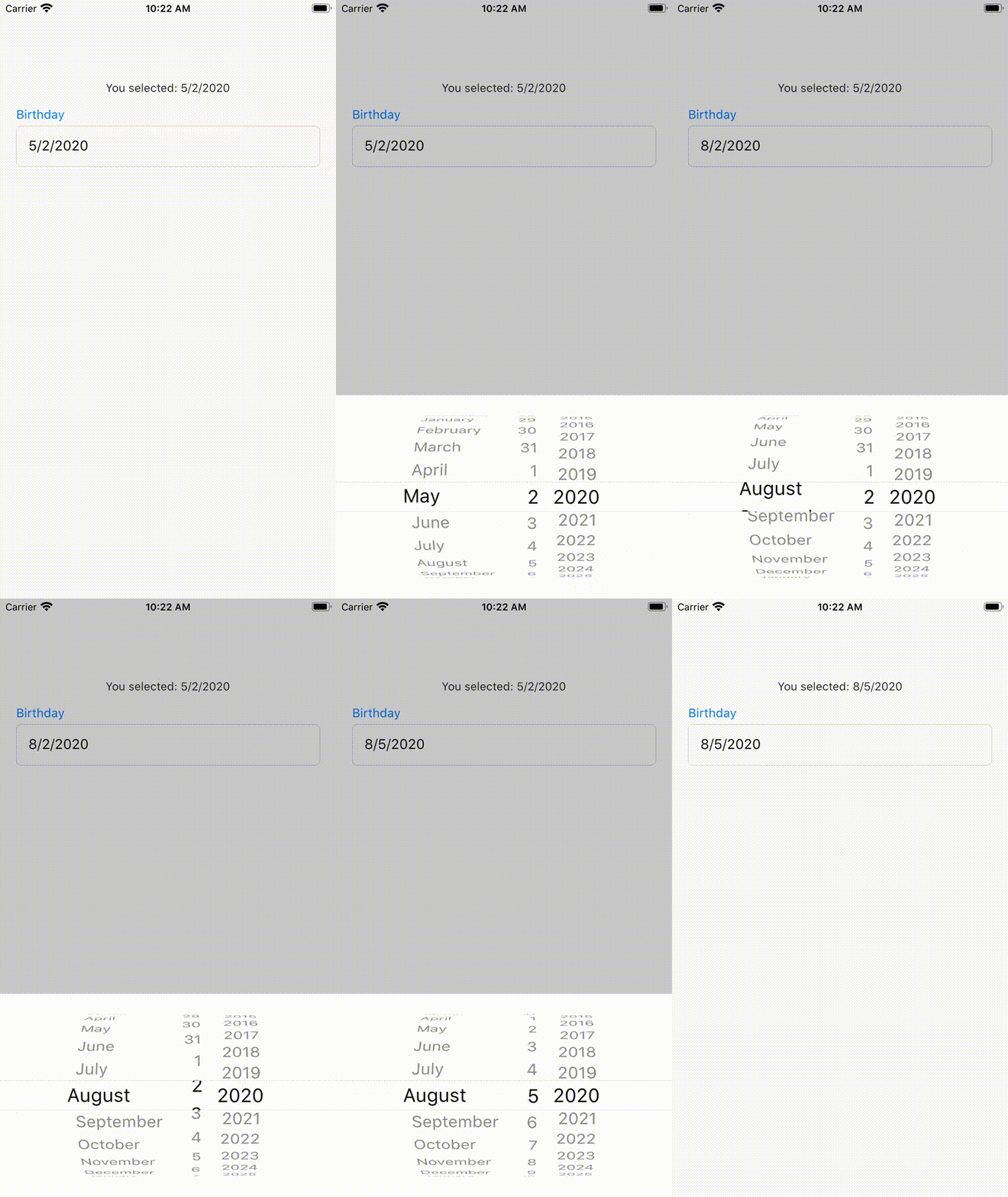
A text box with an attached CupertinoDatePicker which opens when the text box is tapped.

With this library the following is possible:

  • Text Box / Text Field with multiple features to customize its style (e.g. font, padding, etc.)
  • Date callback can be used to get result date value

Quick Usage

Just fill the required parameters of CupertinoDateTextBox and you're ready to go, e.g.:

CupertinoDateTextBox(
    initialValue: DateTime.now(),
    onDateChange: onDateChangeCallback,
    hintText: 'Hint Text'))

You can find a full tutorial concerning CupertinoDateTextBox here Tutorial.

Please refer to the example for usage: Quick-Link

Bugs/Requests

If you encounter any problems feel free to open an issue. If you feel the library is missing a feature, please raise a ticket on Github and I'll look into it. Pull Request are also welcome.

Categories

Dependencies

Dependency list 1 items

Source repository

Projects using this package