Search packages, repositories and app categories

cupertino_onboarding cover
Package detailsv1.3.0

cupertino_onboarding

Flutter package that provides an iOS-style onboarding experience.

AndroidiOSWebmacOSWindowsLinux
30-day downloads
928
Likes
195
Pub points
150

Install package

flutter pub add cupertino_onboarding

Package Overview

Package selection guidance compiled from public package information, community data, and project usage.

A Flutter package that delivers an iOS-style onboarding experience with smooth transitions and native-like animations. Designed to mimic Apple's onboarding interface, it offers a clean, modern carousel for introducing users to app features. The package supports multiple platforms including Android, iOS, Web, macOS, Windows, and Linux, ensuring consistent UX across devices. It integrates easily via pub add and is ideal for apps aiming for a polished, platform-specific look. Customizable content and swipe gestures enhance user engagement.

Use cases

  • App onboarding tutorials
  • Feature introduction screens
  • User onboarding flows
  • Mobile-first app launches
  • Cross-platform onboarding experiences

Key features

  • iOS-style design
  • Smooth swipe animations
  • Multi-platform support
  • Customizable content
  • Easy integration via pub
  • Responsive layout

Suitable for

  • iOS-inspired app designs
  • Cross-platform mobile apps
  • Onboarding-focused applications
  • Developers seeking native-like UIs
  • Apps targeting a modern aesthetic

Considerations

  • Limited customization beyond iOS theme
  • May require additional styling for non-iOS branding
  • Depends on Cupertino widgets for appearance
  • Not suitable for non-swipe-based onboarding
  • Best for simple, linear onboarding flows

Original README

Original README snapshot from the linked source repository. Visit the repository for the latest content.

cupertino_onboarding

style: very good analysis pub.dev badge GitHub build status codecov License: MIT

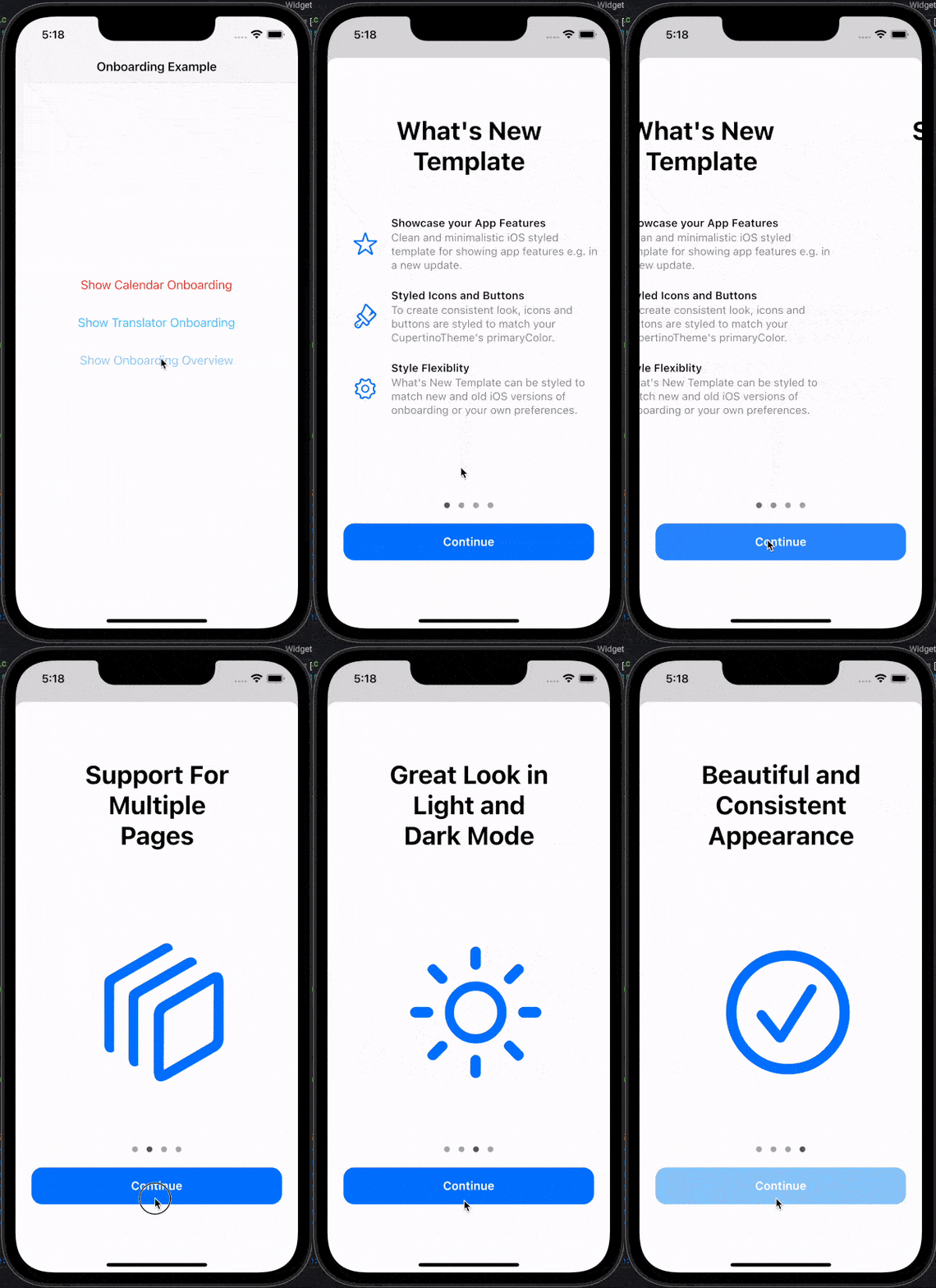
Flutter package that provides a beautiful, iOS-like, easy onboarding experience with minimal code.

It's designed to easily showcase your app's features and provide a simple way for users to learn about your app.

onboarding example calendar example translator example

Getting Started

Add the package to your pubspec.yaml file:

cupertino_onboarding: ^1.2.0

Import the library:

import 'package:cupertino_onboarding/cupertino_onboarding.dart';

Create CupertinoOnboarding widget and pass your pages as parameter:

@override
Widget build(BuildContext context) {
  return CupertinoOnboarding(
    onPressedOnLastPage: () => Navigator.pop(context),
    pages: [
      // To create What's New page like Calendar or Translator
      // examples in the readme, use `WhatsNewPage` widget:

      // Actual code from the Calendar example:
      WhatsNewPage(
        title: const Text("What's New in Calendar"),
        features: [
          // Feature's type must be `WhatsNewFeature`
          WhatsNewFeature(
            icon: Icon(
              CupertinoIcons.mail,
              color: CupertinoColors.systemRed.resolveFrom(context),
            ),
            title: const Text('Found Events'),
            description: const Text(
              'Siri suggests events found in Mail, Messages, and Safari, so you can add them easily, such as flight reservations and hotel bookings.',
            ),
          ),
          WhatsNewFeature(
            icon: Icon(
              CupertinoIcons.time,
              color: CupertinoColors.systemRed.resolveFrom(context),
            ),
            title: const Text('Time to Leave'),
            description: const Text(
              "Calendar uses Apple Maps to look up locations, traffic conditions, and transit options to tell you when it's time to leave.",
            ),
          ),
        ],
      ),

      // To create custom onboarding page, use
      // `CupertinoOnboardingPage` widget:

      // Actual code from the GIF example:
      const CupertinoOnboardingPage(
        title: Text('Support For Multiple Pages'),
        body: Icon(
          CupertinoIcons.square_stack_3d_down_right,
          size: 200,
        ),
      ),
      const CupertinoOnboardingPage(
        title: Text('Great Look in Light and Dark Mode'),
        body: Icon(
          CupertinoIcons.sun_max,
          size: 200,
        ),
      ),
    ],
  );
}

CupertinoOnboarding can be shown as any other widget, but to match native feel, consider using modal_bottom_sheet package or other modal view.

See API reference for more information about customizing look and feel of the onboarding.

Features, bugs and contributions

Feel free to contribute to this project.

Please file feature requests and bugs at the issue tracker.
If you fixed a bug or implemented a feature by yourself, feel free to send a pull request.

Sponsoring

I am working on my packages in my free time.

If this package is helping you, please consider buying me a coffee, so I can keep updating and maintaining this package.

Categories

Dependencies

Dependency list 1 items

Source repository

Projects using this package