Search packages, repositories and app categories

document_scanner_flutter cover
Package detailsv0.4.0

document_scanner_flutter

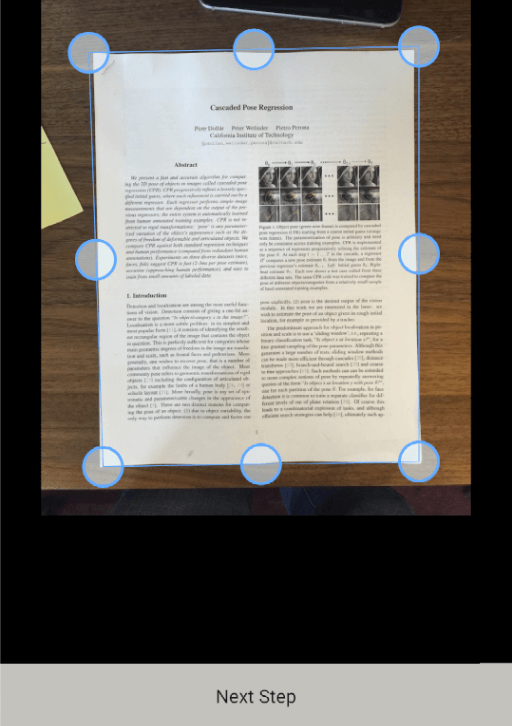
A android & ios document scanner & auto detector plugin for flutter.

AndroidiOS
30-day downloads
186
Likes
158
Pub points
130

Install package

flutter pub add document_scanner_flutter

Package Overview

Package selection guidance compiled from public package information, community data, and project usage.

A Flutter plugin that enables document scanning and automatic detection on both Android and iOS devices. It leverages native camera functionality to capture documents and automatically detect their boundaries, making it ideal for applications requiring quick and accurate document digitization. The plugin is designed for seamless integration with minimal setup, supporting real-time processing and high-quality output. It's particularly useful in apps focused on receipts, IDs, or forms.

Use cases

  • Scanning receipts and invoices
  • Document digitization in mobile apps
  • ID and passport capture
  • Form data entry automation
  • Onboarding workflows

Key features

  • Auto document boundary detection
  • Cross-platform support (Android & iOS)
  • Real-time camera preview
  • High-resolution output
  • Simple API integration

Suitable for

  • Mobile apps needing document capture
  • Finance and accounting tools
  • Identity verification systems
  • Field service and logistics apps
  • E-signature and onboarding platforms

Considerations

  • Requires camera permissions
  • Performance varies by device hardware
  • May need optimization for low-light conditions
  • Limited customization of detection algorithms
  • Depends on native SDKs for core functionality

Original README

Original README snapshot from the linked source repository. Visit the repository for the latest content.

document_scanner_flutter pub package

A document scanner + PDF generator plugin for Flutter. Supports Android and iOS with auto edge detection, cropping, B&W filter, and PDF generation.

Requirements

Platform Minimum Version
Android API 21 (Android 5.0)
iOS iOS 12.0
Flutter 3.0.0
Dart 2.17.0

Getting Started

Installing
document_scanner_flutter: ^0.4.0

Usage

Basic — Camera or Gallery picker
final File? scannedDoc = await DocumentScannerFlutter.launch(context);
// returns null if user cancels
Specific source
final File? scannedDoc = await DocumentScannerFlutter.launch(
  context,
  source: ScannerFileSource.CAMERA, // or ScannerFileSource.GALLERY
);
Re-edit an existing image (v0.4.0+)
final Uint8List imageBytes = await myFile.readAsBytes();

final File? rescanned = await DocumentScannerFlutter.launch(
  context,
  source: ScannerFileSource.CAMERA,
  initialImage: imageBytes,
  canBackToInitial: true,
);
Recover last scan after crash (v0.4.0+)
// Call this on app startup to recover image lost due to process death
final File? recovered = await DocumentScannerFlutter.retrieveLostData();
if (recovered != null) {
  // use recovered image
}
PDF generation from multiple scans
final File? pdfFile = await DocumentScannerFlutter.launchForPdf(
  context,
  source: ScannerFileSource.CAMERA,
);
// returns a PDF File or null if cancelled
Labels customization
final File? scannedDoc = await DocumentScannerFlutter.launch(
  context,
  source: ScannerFileSource.CAMERA,
  labelsConfig: {
    ScannerLabelsConfig.ANDROID_NEXT_BUTTON_LABEL: 'Next',
    ScannerLabelsConfig.ANDROID_SAVE_BUTTON_LABEL: 'Save',
    ScannerLabelsConfig.ANDROID_ROTATE_LEFT_LABEL: 'Rotate Left',
    ScannerLabelsConfig.ANDROID_ROTATE_RIGHT_LABEL: 'Rotate Right',
    ScannerLabelsConfig.ANDROID_ORIGINAL_LABEL: 'Original',
    ScannerLabelsConfig.ANDROID_BMW_LABEL: 'B & W',
    ScannerLabelsConfig.PICKER_CAMERA_LABEL: 'Camera',
    ScannerLabelsConfig.PICKER_GALLERY_LABEL: 'Gallery',
    ScannerLabelsConfig.PICKER_CANCEL_LABEL: 'Cancel',
    ScannerLabelsConfig.ANDROID_INITIAL_IMAGE_LOADING_MESSAGE: 'Loading image...',
  },
);

Changelog

See CHANGELOG.md for full release history.

Categories

Dependencies

Dependency list 3 items

Source repository

Projects using this package

No data available yet.