Package selection guidance compiled from public package information, community data, and project usage.
EasyRichText simplifies the use of RichText in Flutter by automatically handling text segmentation and styling without requiring manual string splitting. It allows developers to apply different styles, colors, and widgets directly within a single text string using simple syntax. Ideal for displaying formatted text with mixed styles, such as links, mentions, or emojis, it reduces boilerplate code and improves readability. The package supports all major platforms including mobile, web, and desktop.
Use cases
Displaying styled text with mixed formatting
Creating rich text with embedded links
Highlighting keywords in text
Rendering user-generated content with styles
Adding emojis within formatted text
Key features
Automatic text segmentation
Support for inline styling
Simple syntax for complex formatting
Cross-platform compatibility
Minimal boilerplate code
Suitable for
Developers seeking easy rich text rendering
Apps with dynamic or user-generated content
Chat or messaging interfaces
Documentation or help systems with formatted text
Considerations
Limited to basic styling compared to full RichText
May have performance impact with very large texts
Requires careful handling of nested widgets
Not ideal for highly complex layouts
Depends on external library updates for new features
Original README
Original README snapshot from the linked source repository. Visit the repository for the latest content.
easy_rich_text
The EasyRichText widget makes the RichText widget easy. You do not have to split the string manually.
This widget use regular expression to effectively split the string based on the patterns defined in the list of EasyRichTextPattern.
The EasyRichTextPattern is a class defines the text pattern you want to format.
targetString can be a String or a List<String>.
By default matchWordBoundaries:true is set to match the whole word. If you want to match substring in a word, set matchWordBoundaries:false
GestureRecognizer and url_launcher are integrated.
If you find this package useful, I would appreciate it if you can give me a star on Github and a like on pub.dev
EasyRichText(
  "I want blue font. I want bold font. I want italic font.",
  patternList: [
    EasyRichTextPattern(
      targetString: 'blue',
      style: TextStyle(color: Colors.blue),
    ),
    EasyRichTextPattern(
      targetString: 'bold',
      style: TextStyle(fontWeight: FontWeight.bold),
    ),
    EasyRichTextPattern(
      targetString: 'italic',
      style: TextStyle(fontStyle: FontStyle.italic),
    ),
  ],
),
Trademark Example
EasyRichText(
  "ProductTM is a superscript trademark symbol. This TM is not a trademark.",
  patternList: [
    EasyRichTextPattern(
      targetString: 'TM',
      superScript: true,
      stringBeforeTarget: 'Product',
      matchWordBoundaries: false,
      style: TextStyle(color: Colors.blue),
    ),
  ],
),
Default Style:
EasyRichText(
  "This is a EasyRichText example with default grey font. I want blue font here.",
  defaultStyle: TextStyle(color: Colors.grey),
  patternList: [
    EasyRichTextPattern(
      targetString: 'blue',
      style: TextStyle(color: Colors.blue),
    ),
    EasyRichTextPattern(
      targetString: 'bold',
      style: TextStyle(fontWeight: FontWeight.bold),
    ),
  ],
),
Conditional Match
EasyRichText(
  "I want blue color here. I want no blue font here. I want blue invalid here.",
  patternList: [
    EasyRichTextPattern(
      targetString: 'blue',
      stringBeforeTarget: 'want',
      stringAfterTarget: "color",
      style: TextStyle(color: Colors.blue),
    ),
  ],
),
Match Option
matchOption can be a string or a list. default is 'all'.
string: 'all', 'first', 'last'
List:'first', 'last', and any integer index
For example, [0, 1, 'last'] will match the first, second, and last one.
EasyRichText(
  "blue 1, blue 2, blue 3, blue 4, blue 5",
  patternList: [
    EasyRichTextPattern(
      targetString: 'blue',
      //matchOption: 'all'
      matchOption: [0, 1, 'last'],
      style: TextStyle(color: Colors.blue),
    ),
  ],
),
Superscript and Subscript.
EasyRichText(
  "I want superscript font here. I want subscript here",
  patternList: [
    EasyRichTextPattern(
        targetString: 'superscript', superScript: true),
    EasyRichTextPattern(
        targetString: 'subscript', subScript: true),
  ],
),
Case Sensitivity
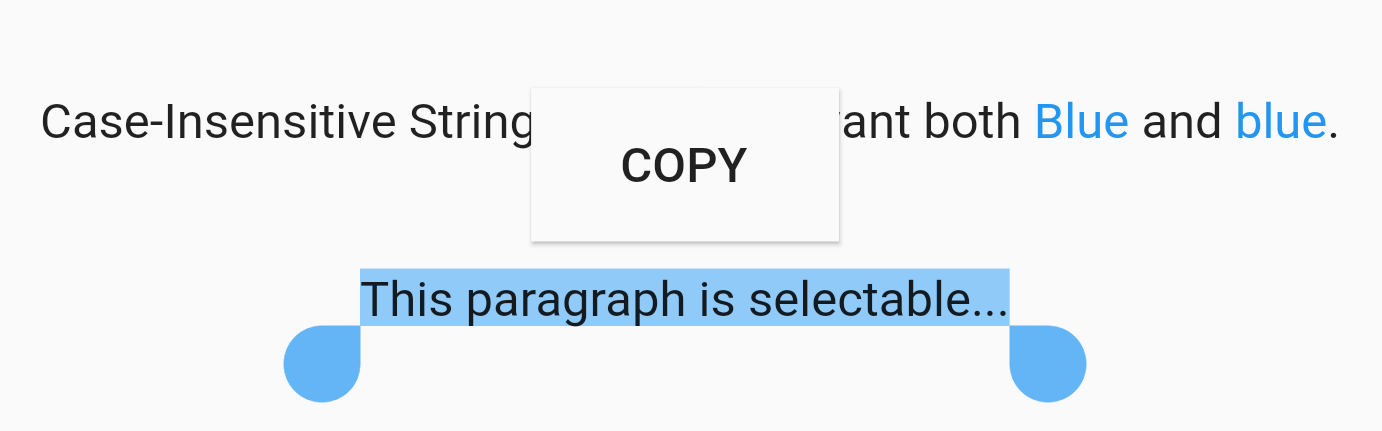
EasyRichText(
  "Case-Insensitive String Matching. I want both Blue and blue. This paragraph is selectable.",
  caseSensitive: false,
  selectable: true,
  patternList: [
    EasyRichTextPattern(
      targetString: 'Blue',
      style: TextStyle(color: Colors.blue),
    ),
  ],
),
Selectable Text
EasyRichText(
  "This paragraph is selectable...",
  selectable: true,
),
Regular Expression
EasyRichText(
  "Regular Expression. I want blue bluea blue1 but not blueA",
  patternList: [
    EasyRichTextPattern(
      targetString: 'bl[a-z0-9]*',
      style: TextStyle(color: Colors.blue),
    ),
  ],
),
Url Launcher
Integrated with url_launcher. Web url, email url, and telephone url are supported.
Set urlType : 'web', 'email', or 'tel'.
EasyRichText provides regular expression formula to match common urls.
EasyRichText(
  "Here is a website https://pub.dev/packages/easy_rich_text. Here is a email address test@example.com. Here is a telephone number +852 12345678.",
  patternList: [
    EasyRichTextPattern(
      targetString: 'https://pub.dev/packages/easy_rich_text',
      urlType: 'web',
      style: TextStyle(
        decoration: TextDecoration.underline,
      ),
    ),
    EasyRichTextPattern(
      targetString: EasyRegexPattern.emailPattern,
      urlType: 'email',
      style: TextStyle(
        decoration: TextDecoration.underline,
      ),
    ),
    EasyRichTextPattern(
      targetString: EasyRegexPattern.webPattern,
      urlType: 'web',
      style: TextStyle(
        decoration: TextDecoration.underline,
      ),
    ),
    EasyRichTextPattern(
      targetString: EasyRegexPattern.telPattern,
      urlType: 'tel',
      style: TextStyle(
        decoration: TextDecoration.underline,
      ),
    ),
  ],
),
GestureRecognizer
///GestureRecognizer, not working when superscript, subscript, or urlType is set.///TapGestureRecognizer, MultiTapGestureRecognizer, etc.EasyRichText(
"Tap recognizer to print this sentence.",
patternList: [
EasyRichTextPattern(
targetString: 'recognizer',
recognizer: TapGestureRecognizer()
..onTap = () {
print("Tap recognizer to print this sentence.");
},
style: TextStyle(
decoration: TextDecoration.underline,
),
),
],
),
//if the targetString contains the following special characters \[]()^*+?EasyRichText(
"Received 88+ messages. Received 99+ messages",
patternList: [
//set hasSpecialCharacters to trueEasyRichTextPattern(
targetString: '99+',
hasSpecialCharacters: true,
style: TextStyle(color: Colors.blue),
),
//or if you are familiar with regular expressions, then use \\ to skip itEasyRichTextPattern(
targetString: '88\\+',
style: TextStyle(color: Colors.blue),
),
],
),