Search packages, repositories and app categories

Package detailsv0.0.7

easy_url_launcher

A simple and very easy flutter package for launch url,email,call and sms in your App

AndroidiOSWebmacOSWindowsLinux
30-day downloads
203
Likes
40
Pub points
140

Install package

flutter pub add easy_url_launcher

Package Overview

Package selection guidance compiled from public package information, community data, and project usage.

EasyUrlLauncher is a lightweight Flutter package that simplifies launching URLs, emails, phone calls, and SMS messages within your app. It provides a straightforward API to handle common intents across multiple platforms, including Android, iOS, Web, macOS, Windows, and Linux. Designed for ease of use, it reduces boilerplate code and ensures consistent behavior across devices. The package integrates seamlessly into existing projects with minimal setup.

Use cases

  • Opening web links in a browser
  • Sending emails directly from the app
  • Initiating phone calls
  • Sending SMS messages
  • Sharing content via native apps
  • Launching external services

Key features

  • Simple one-line method calls
  • Cross-platform compatibility
  • Supports URL, email, call, and SMS
  • Minimal configuration required
  • Built-in error handling
  • Works on mobile, desktop, and web

Suitable for

  • Developers seeking quick intent integration
  • Apps needing basic sharing or communication features
  • Projects requiring minimal dependencies
  • Beginners learning Flutter navigation
  • Prototypes and MVPs

Considerations

  • Limited to basic launch operations
  • No customization for deep linking
  • Does not support custom URL schemes beyond standard protocols
  • Relies on system-level handlers
  • Not suitable for complex navigation flows
Original README

Original README snapshot from the linked source repository. Visit the repository for the latest content.

A flutter package based on url_launcher package for call,sms,email and launch url in browser or app with url parameters and launch mode as platform default or platform specific mode for web

Features

  • Very easy to use
  • Support All plateforms

Getting started

Add package to your project by running the follwing command in your terminal

flutter pub add easy_url_launcher

Import pakage

import 'pakage:easy_url_launcher/easy_url_launcher.dart';

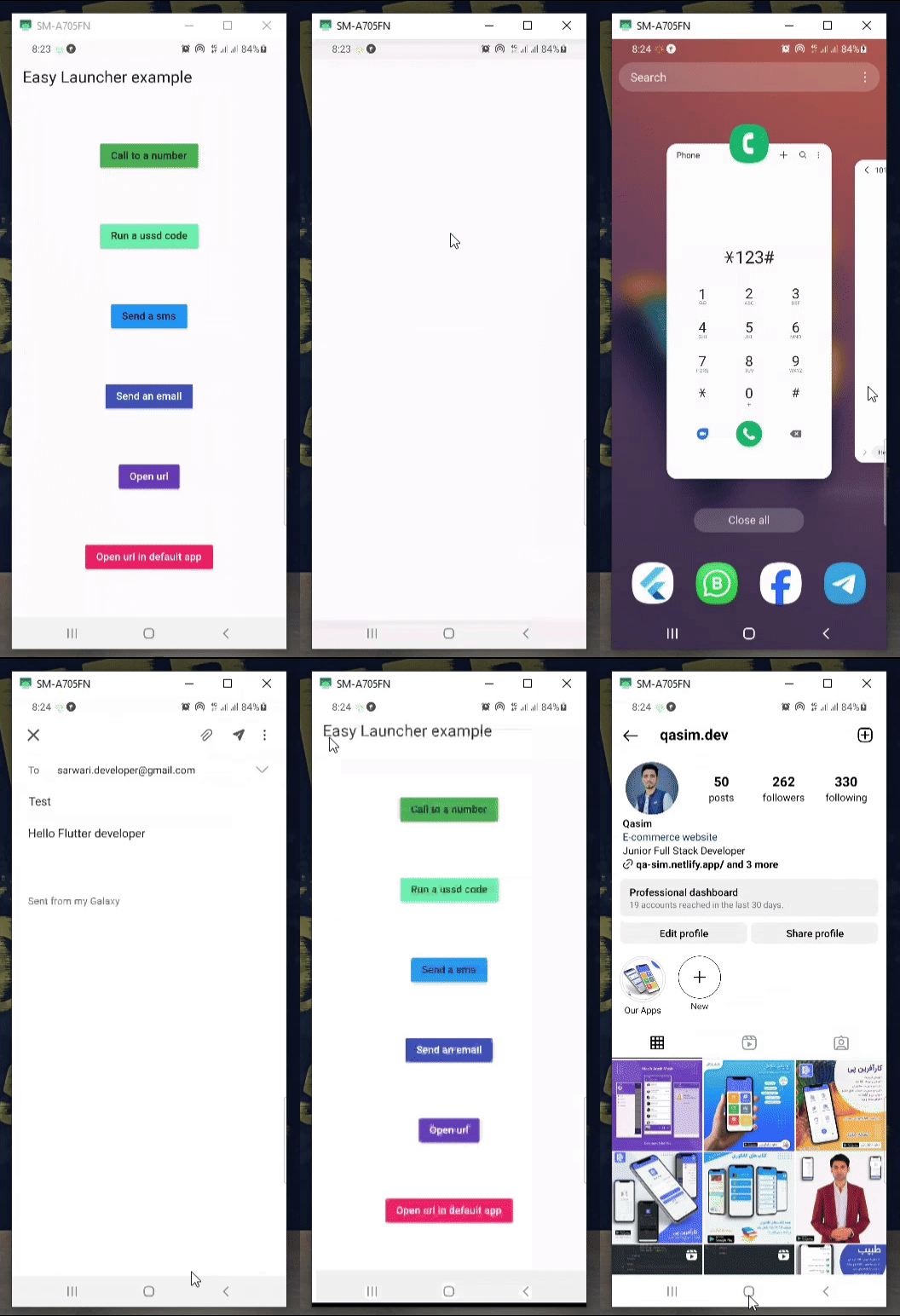
Demo

Easy Launcher Demo

Usage

  • You are free to use async & await in your code.
    Column(
            mainAxisAlignment: MainAxisAlignment.spaceAround,
            children: [
              MaterialButton(
                color: Colors.green,
                onPressed: () async {
                  await EasyLauncher.call(number: "767676776");
                },
                child: const Text("Call to a number"),
              ),
              MaterialButton(
                color: Colors.greenAccent,
                onPressed: () async {
                  await EasyLauncher.call(number: "*123#");
                },
                child: const Text("Run a ussd code"),
              ),
              MaterialButton(
                color: Colors.blue,
                onPressed: () async {
                  await EasyLauncher.sms(number: "1010", message: "Hello");
                },
                child: const Text("Send a sms"),
              ),
              MaterialButton(
                color: Colors.indigo,
                textColor: Colors.white,
                onPressed: () async {
                  await EasyLauncher.email(
                      email: "sarwari.developer@gmail.com",
                      subject: "Test",
                      body: "Hello Flutter developer");
                },
                child: const Text("Send an email"),
              ),
              MaterialButton(
                color: Colors.deepPurple,
                textColor: Colors.white,
                onPressed: () async {
                  await EasyLauncher.url(url: "https://pub.dev");
                },
                child: const Text("Open url"),
              ),
              MaterialButton(
                color: Colors.red,
                textColor: Colors.white,
                onPressed: () async {
                  await EasyLauncher.openMap(
                      lati: "36.7032925", long: "67.1891222");
                },
                child: const Text("Open Google map"),
              ),
              MaterialButton(
                color: Colors.pink,
                textColor: Colors.white,
                onPressed: () async {
                  await EasyLauncher.url(
                      url: "https://www.instagram.com/qasim.dev",
                      mode: Mode.platformDefault);
                },
                child: const Text("Open url in default app"),
              ),
               MaterialButton(
                color: Colors.green[700],
                textColor: Colors.white,
                onPressed: () async {
                  await EasyLauncher.sendToWhatsApp(
                      phone: "+93700000000", message: "hi");
                },
                child: const Text("Send to whatsapp"),
              ),
            ],
          ),

Categories

Dependencies

Dependency list 1 items

Source repository

Projects using this package

No data available yet.