Package selection guidance compiled from public package information, community data, and project usage.
Flutter Animarker is a specialized package for animating markers on Google Maps in Flutter applications. It enables smooth, dynamic marker movements and transitions, ideal for tracking real-time locations or visualizing path animations. Built with performance and ease of integration in mind, it supports all major platforms including Android, iOS, Web, macOS, Windows, and Linux. The package extends Google Maps functionality with intuitive APIs for controlling animation speed, easing, and marker behavior. Perfect for navigation apps, delivery tracking, or any use case requiring animated geolocation markers.
Use cases
Real-time location tracking
Animated route visualization
Delivery or ride-sharing apps
Interactive map tours
Geospatial data storytelling
Key features
Smooth marker animations
Cross-platform support
Customizable animation speed
Easing curve control
Simple API integration
Real-time position updates
Suitable for
Developers building location-based apps
Apps requiring animated map markers
Projects using Google Maps with dynamic data
Teams prioritizing cross-platform consistency
Considerations
Requires Google Maps SDK setup
Limited to Google Maps integration
Performance depends on animation complexity
May need optimization for high-frequency updates
Original README
Original README snapshot from the linked source repository. Visit the repository for the latest content.
Google Maps Marker Animation - Overview
Sometimes you need more than place a Marker📍 at map canvas 🌍, you need to smoothly move through Google Maps.
This package will help you to animate Markers' position changes and more.
This version v3.0.0 includes many useful features, namely:
Marker's position animation
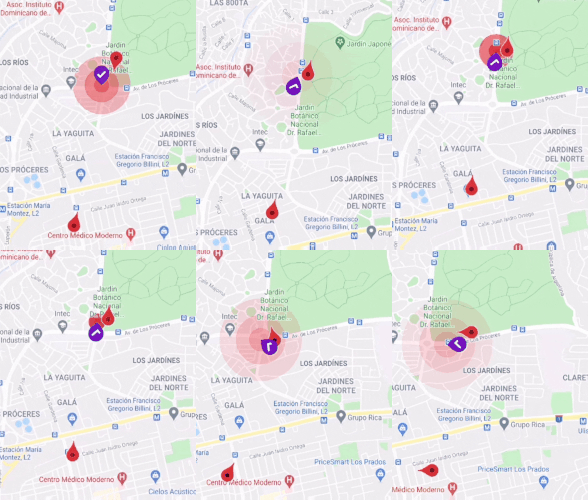
Multiple markers' animations at the same time
Null-safety compatible
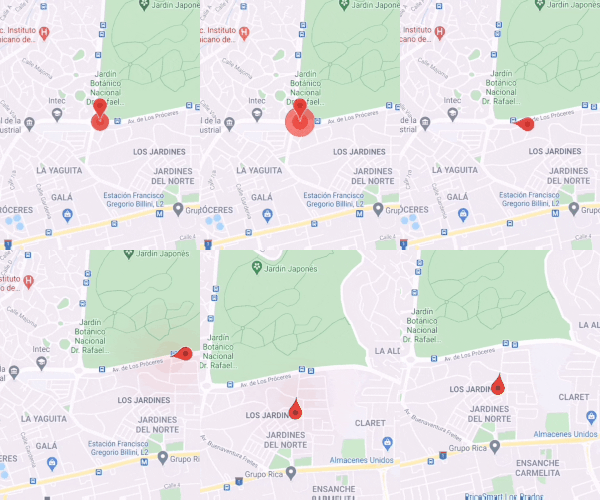
Ripple effect over marker position
Marker's rotation or bearing/heading of direction
Multipoint linear animation (Piecewise Linear Approximation Algorithm)
Support animation curves and duration
Widget-based with fully customized behaviors
Animation warm-up for improving performance
Useful LocationTween, AngleTween and PolynomialLocationInterpolator core logic
Note
This package only animate the marker's changes. Both Geolocation and Google Maps configuration are out of the scope of this package. So, before trying this package to ensure that you place a marker you Google Map or get location updates.
You only need to use the marker wrapper class RippleMarker, and set the ripple flag in order you can the ripple state.
Animarker(
// Other properties
rippleRadius: 0.5, //[0,1.0] range, how big is the circle
rippleColor: Colors.teal, // Color of fade ripple circle
rippleDuration: Duration(milliseconds: 2500), //Pulse ripple duration
markers: <Marker>{
//Ripple MarkerRippleMarker(
markerId: MarkerId('MarkerId1'),
position: LatLng(0, 0),
ripple: true, //Ripple state
),
//Non-ripple markerMarker(
markerId: MarkerId('MarkerId2'),
position: LatLng(0, 0),
),
},
// Other properties
)
So, Let's it rip!
Using Rotation
The Marker rotation can be useful for Uber-like or delivery apps. The bearing or heading is the angle of direction which the Marker is moving toward to over the earth.
  Animarker(
    // Other properties
    useRotation : true, // Actived by default
    markers: <Marker>{
      Marker(
      markerId: MarkerId('MarkerId2'),
      position: LatLng(0, 0),
      )
    },
  // Other properties
  )
This way useRotation = true, you control globally if Marker should rotate or not.
Using Curve and Duration
Just like a normal Flutter animation, you can set a Curve o Duration to get the desire effect or result. So flexible, right?
BSD-3-Clause License Copyright 2020 Gauris Javier. All rights
reserved.
Redistribution and use in source and binary forms, with or without
modification, are permitted provided that the following conditions are met:
Redistributions of source code must retain the above copyright
notice, this list of conditions and the following disclaimer.
Redistributions in binary form must reproduce the above copyright
notice, this list of conditions and the following disclaimer in the documentation and/or other materials provided with the distribution.
Neither the name of the copyright holder nor the names of its contributors
may be used to endorse or promote products derived from this software without specific prior written permission.
THIS SOFTWARE IS PROVIDED BY THE COPYRIGHT HOLDERS AND CONTRIBUTORS "AS IS"
AND ANY EXPRESS OR IMPLIED WARRANTIES, INCLUDING, BUT NOT LIMITED TO, THE IMPLIED WARRANTIES OF MERCHANTABILITY AND FITNESS FOR A PARTICULAR PURPOSE ARE DISCLAIMED. IN NO EVENT SHALL THE COPYRIGHT HOLDER OR CONTRIBUTORS BE LIABLE FOR ANY DIRECT, INDIRECT, INCIDENTAL, SPECIAL,
EXEMPLARY, OR CONSEQUENTIAL DAMAGES (INCLUDING, BUT NOT LIMITED TO, PROCUREMENT OF SUBSTITUTE GOODS OR SERVICES; LOSS OF USE, DATA, OR PROFITS;
OR BUSINESS INTERRUPTION) HOWEVER CAUSED AND ON ANY THEORY OF LIABILITY, WHETHER IN CONTRACT, STRICT LIABILITY, OR TORT (INCLUDING
NEGLIGENCE OR OTHERWISE) ARISING IN ANY WAY OUT OF THE USE OF THIS SOFTWARE, EVEN IF ADVISED OF THE POSSIBILITY OF SUCH DAMAGE.```