Search packages, repositories and app categories

Package detailsv1.1.1

flutter_bugly

Flutter plugin for Tencent Bugly, Crash monitoring, Crash analysis, exception reporting, application update, data statistics, etc

AndroidiOS
30-day downloads
3K
Likes
71
Pub points
125

Install package

flutter pub add flutter_bugly

Package Overview

Package selection guidance compiled from public package information, community data, and project usage.

Flutter Bugly is a Flutter plugin that integrates Tencent's Bugly service, enabling crash monitoring, exception reporting, and crash analysis for mobile applications. It provides real-time data statistics and supports application update features, helping developers identify and fix issues quickly. The plugin is compatible with both Android and iOS platforms, offering seamless integration into existing Flutter projects. With minimal setup via pub add, it enhances app stability and user experience through detailed error insights.

Use cases

  • Real-time crash monitoring
  • Exception tracking in production
  • Application update management
  • Performance issue identification
  • User behavior analytics
  • Error report aggregation

Key features

  • Cross-platform support (Android & iOS)
  • Automatic crash detection
  • Detailed crash logs and stack traces
  • Remote configuration and updates
  • Data analytics dashboard integration
  • Custom exception reporting

Suitable for

  • Mobile app developers
  • Quality assurance teams
  • Product managers
  • Teams focused on app stability
  • Developers using Tencent services
  • Projects requiring robust crash reporting

Considerations

  • Requires Tencent Bugly account setup
  • Limited to Tencent ecosystem
  • May increase app size due to SDK inclusion
  • Privacy compliance checks needed
  • Dependent on network connectivity for reports
  • Potential latency in crash data transmission

Original README

Original README snapshot from the linked source repository. Visit the repository for the latest content.

flutter_bugly

Bugly package Bugly Play package Discord

腾讯 Bugly 插件,支持Android/iOS/OpenHarmoy 运营统计、原生异常上报、flutter 异常上报。应用更新可以使用pgyer_updater


一、引入

AndroidX
dependencies:
  flutter_bugly: lastVersion
Google Play(停止维护,官方在新版本已经优化了合规性问题)
dependencies:
  flutter_bugly_play: lastVersion
Android Support
dependencies:
  flutter_bugly:
    git:
      url: git://github.com/crazecoder/flutter_bugly.git
      ref: dev

二、项目配置

如果iOS报错building for iOS Simulator, but linking in object file built for iOS时,在 ios/Podfile 的 post_install 下加入:

post_install do |installer|
  installer.pods_project.targets.each do |target|
    flutter_additional_ios_build_settings(target)
    target.build_configurations.each do |config|
      config.build_settings['EXCLUDED_ARCHS[sdk=iphonesimulator*]'] = 'arm64'
    end
  end
end

在 android/app/build.gradle 的 android 下加入:

    lintOptions {
        // 如打包出现Failed to transform libs.jar to match attributes
        checkReleaseBuilds false
    }
    defaultConfig {
        ndk {
            // 设置支持的 so 库架构 'armeabi-v7a', 'arm64-v8a', 'x86', 'x86_64'
            abiFilters 'armeabi-v7a'
        }
    }

三、使用

import 'package:flutter_bugly/flutter_bugly.dart';

/// 使用 flutter 异常上报
void main() {
  FlutterBugly.postCatchedException(() {
    // 如果需要 ensureInitialized,请在这里运行。
    // WidgetsFlutterBinding.ensureInitialized();
    runApp(MyApp());
    FlutterBugly.init(
      androidAppId: "your android app id",
      iOSAppId: "your iOS app id",
      ohosAppId: "your ohos app id",
      deviceId: "your ohos device id",
      appKey: "your ohos bugly app key",
    );
  });

  //如果报错 Zone mismatch.使用下面的方法
  runZonedGuarded(() async {
    WidgetsFlutterBinding.ensureInitialized();
    runApp(MyApp());
  }, (exception, stackTrace) async {
    FlutterBugly.uploadException(
      type: exception.runtimeType.toString(),
      message: exception.toString(),
      detail: stackTrace.toString(),
    );
  });
}
//bugly日志
FlutterBugly.log(tag: tag, message: message,level:LogLevel.INFO);

四、release打包(Android)

64-bit

flutter build apk --release --target-platform android-arm64

32-bit(目前配合armeabi-v7a可以打出32位64位通用包)

flutter build apk --release --target-platform android-arm

五、支持属性(Android)

 String channel, //自定义渠道标识
 bool autoCheckUpgrade = true,//自动检查更新开关
 bool autoInit = true,//自动初始化
 bool customUpgrade = true, //设置是否使用flutter自定义窗口,false为bugly自带弹窗
 int initDelay = 0, //延迟初始化,单位秒
 
 FlutterBugly.setUserId("user id");
 FlutterBugly.putUserData(key: "key", value: "value");
 int tag = 9527;
 FlutterBugly.setUserTag(tag);

六、说明(Android)

异常上报说明

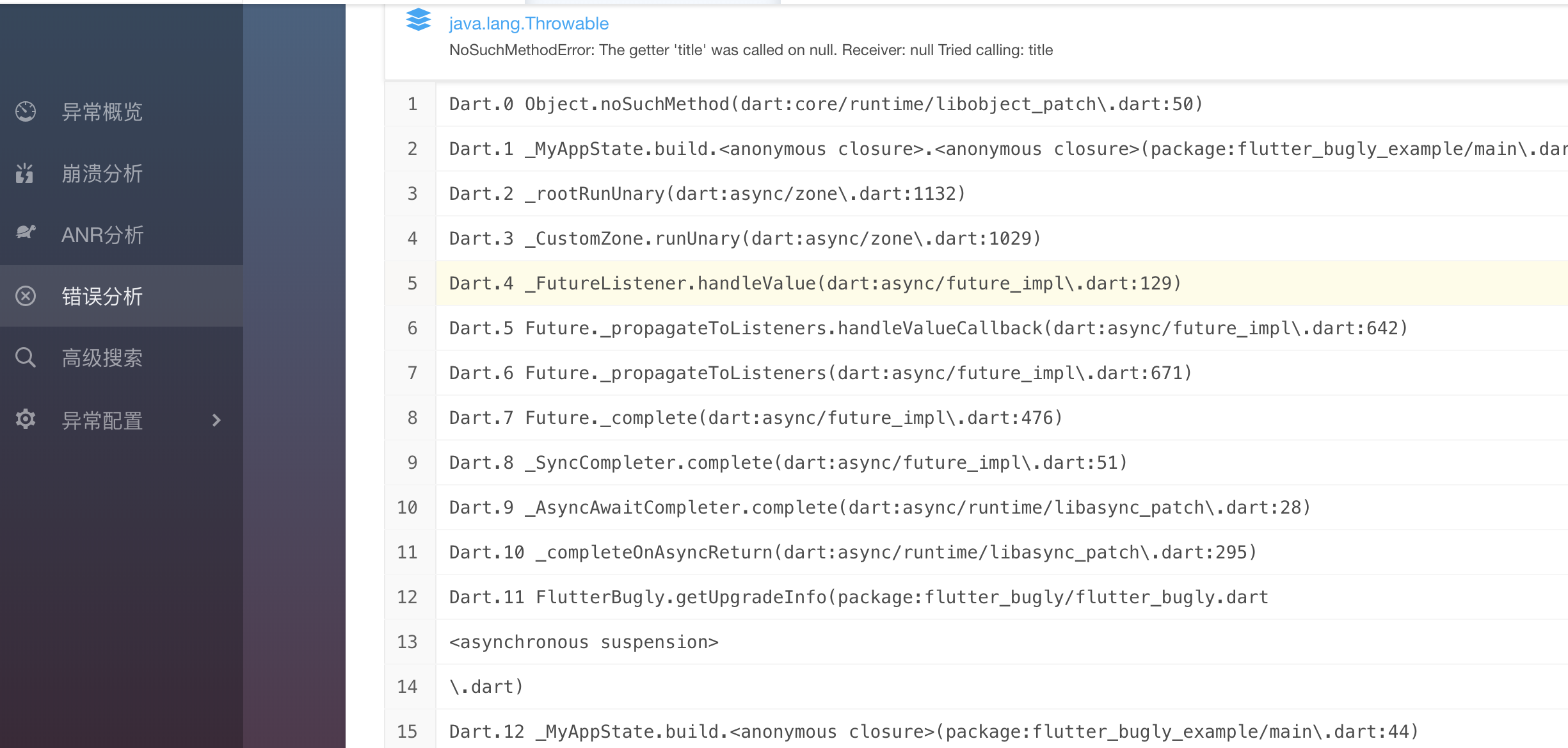
1、flutter异常上报不属于崩溃,所以如需查看 flutter 的异常上报,请在「错误分析」tab页查看

2、iOS的异常上报没有过多测试,如出现问题请 issue

Categories

Source repository

Projects using this package