Search packages, repositories and app categories

flutter_redux_dev_tools cover
Package detailsv0.5.2

flutter_redux_dev_tools

A Time Traveling Redux Debugger for Flutter

30-day downloads
2.2K
Likes
14
Pub points
60

Install package

flutter pub add flutter_redux_dev_tools

Package Overview

Package selection guidance compiled from public package information, community data, and project usage.

A time-traveling Redux debugger for Flutter that enables developers to inspect and replay state changes during app development. It integrates seamlessly with Redux, offering a visual interface to track actions, view state transitions, and debug issues by stepping backward and forward through the app's history. Ideal for complex state management workflows, it enhances debugging efficiency and promotes better understanding of state evolution. The tool supports both light and dark mode, aligning with Flutter’s theming capabilities.

Use cases

  • Debugging complex state transitions
  • Replaying user actions for issue reproduction
  • Visualizing state changes over time
  • Testing Redux middleware behavior
  • Improving team collaboration on state logic

Key features

  • Time-travel debugging
  • Real-time state inspection
  • Action replay capability
  • Light and dark mode support
  • Seamless Redux integration

Suitable for

  • Developers using Redux in Flutter
  • Teams working on state-heavy applications
  • Frontend engineers focused on debugging state issues
  • Flutter apps with complex business logic
  • Anyone seeking enhanced debugging tools

Considerations

  • Requires Redux setup
  • Not suitable for production builds
  • Limited to development environment
  • May increase app startup time
  • Best used with well-structured state models

Original README

Original README snapshot from the linked source repository. Visit the repository for the latest content.

flutter_redux_dev_tools

Build Status codecov

A Widget you can use to show a Redux Time Travel UI. Simply put it in a part of your UI that makes sense (Such as a Dev Tools Drawer), pass it a DevToolsStore and you'll be good to go!

Note: This Widget does not work with a normal Redux Store. It is meant to work with the redux_dev_tools package, which provides a DevToolsStore. The DevToolsStore is a drop-in replacement for your Store during Development!

Demo

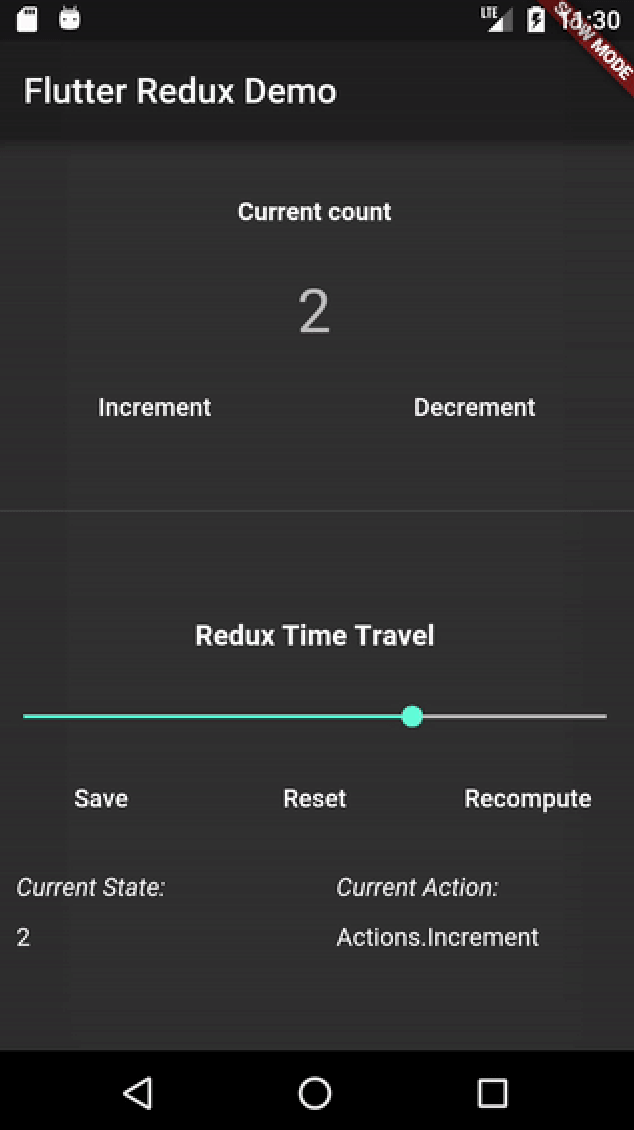
A simple Flutter app that allows you to Increment and Decrement a counter.

A screenshot of the Dev Tools in Action

Usage
  1. Create a main_dev.dart file
  2. In this file, create a DevToolsStore in place of a normal redux Store
  3. Create a ReduxDevTools widget, passing through the Store. You can place this Widget wherever makes sense in your app! One good suggestion: In a "Dev Tools Drawer." This is generally the endDrawer in your Scaffold, and can contain different types of tools for a Dev Build of your app.
Example

This example paints only a broad outline of how to use the ReduxDevTools. For a complete example, see the example folder.

int addReducer(int state, action) => state + 1;

// Create a DevToolsStore instead of a normal Store during Development
final store = DevToolsStore<int>(
  addReducer,
  initialState: 0,
);

// Finally, create your app with a Redux Dev Tools
main() { 
  runApp(MaterialApp(
    home: Scaffold(
      endDrawer: ReduxDevTools<int>(store),
    ),
  ));
}

Credits

All of this is inspired by the original Redux Devtools.

Categories

Dependencies

Dependency list 3 items

Source repository

Projects using this package