Package selection guidance compiled from public package information, community data, and project usage.
flutter_swipe_action_cell is a Flutter package that enables iOS-style swipe actions on list items, mimicking the interactive behavior found in native iOS table views. It allows users to reveal action buttons by swiping horizontally across a list cell, enhancing user interaction with intuitive gestures. The package supports multiple platforms including Android, iOS, Web, macOS, Windows, and Linux, making it ideal for cross-platform apps seeking a consistent, polished UI experience. Developers can customize the appearance and behavior of swipe actions to fit their app’s design language.
Use cases
Implementing iOS-style swipe-to-delete or swipe-to-action in lists
Creating interactive list items with contextual actions
Enhancing user experience in task management or messaging apps
Building responsive and gesture-driven interfaces
Adding swipe effects to chat or notification lists
Designing modern, native-like mobile UIs
Key features
iOS-style horizontal swipe actions
Customizable action buttons and colors
Support for multiple swipe directions
Cross-platform compatibility
Easy integration with ListView and other list widgets
Configurable animation and timing
Suitable for
Developers building iOS-inspired Flutter apps
Teams prioritizing native-like UX patterns
Apps requiring interactive list item behaviors
UI-focused projects with gesture-based interactions
Cross-platform developers targeting multiple operating systems
Considerations
May require additional styling for non-iOS platforms
Performance impact with large lists
Limited built-in accessibility features
Custom logic needed for complex action workflows
Not optimized for vertical swipe gestures
Requires careful handling of touch events in nested scroll contexts
Original README
Original README snapshot from the linked source repository. Visit the repository for the latest content.
And you can find full example code in example page
Examples
Example 1: Simple delete the item in ListView
Tip: put the code in the itemBuilder of your ListView
SwipeActionCell(
key: ObjectKey(list[index]), /// this key is necessary
trailingActions: <SwipeAction>[
SwipeAction(
title: "delete",
onTap: (CompletionHandler handler) async {
list.removeAt(index);
setState(() {});
},
color: Colors.red),
],
child: Padding(
padding: constEdgeInsets.all(8.0),
child: Text("this is index of ${list[index]}",
style: TextStyle(fontSize: 40)),
),
);
Example 2: Perform first action when full swipe
SwipeActionCell(
/// this key is necessary
key: ObjectKey(list[index]),
trailingActions: <SwipeAction>[
SwipeAction(
/// this is the same as iOS native
performsFirstActionWithFullSwipe: true,
title: "delete",
onTap: (CompletionHandler handler) async {
list.removeAt(index);
setState(() {});
},
color: Colors.red),
],
child: Padding(
padding: constEdgeInsets.all(8.0),
child: Text("this is index of ${list[index]}",
style: TextStyle(fontSize: 40)),
),
);
Example 3: Delete with animation
SwipeActionCell(
key: ObjectKey(list[index]),
trailingActions: <SwipeAction>[
SwipeAction(
title: "delete",
onTap: (CompletionHandler handler) async {
/// await handler(true) : will delete this row/// And after delete animation,setState will called to /// sync your data source with your UIawaithandler(true);
list.removeAt(index);
setState(() {});
},
color: Colors.red),
],
child: Padding(
padding: constEdgeInsets.all(8.0),
child: Text("this is index of ${list[index]}",
style: TextStyle(fontSize: 40)),
),
);
Example 4: More than one action:
SwipeActionCell(
key: ObjectKey(list[index]),
trailingActions: <SwipeAction>[
SwipeAction(
title: "delete",
onTap: (CompletionHandler handler) async {
awaithandler(true);
list.removeAt(index);
setState(() {});
},
color: Colors.red),
SwipeAction(
widthSpace: 120,
title: "popAlert",
onTap: (CompletionHandler handler) async {
/// false means that you just do nothing,it will close/// action buttons by defaulthandler(false);
showCupertinoDialog(
context: context,
builder: (c) {
returnCupertinoAlertDialog(
title: Text('ok'),
actions: <Widget>[
CupertinoDialogAction(
child: Text('confirm'),
isDestructiveAction: true,
onPressed: () {
Navigator.pop(context);
},
),
],
);
});
},
color: Colors.orange),
],
child: Padding(
padding: constEdgeInsets.all(8.0),
child: Text(
"this is index of ${list[index]}",
style: TextStyle(fontSize: 40)),
),
);
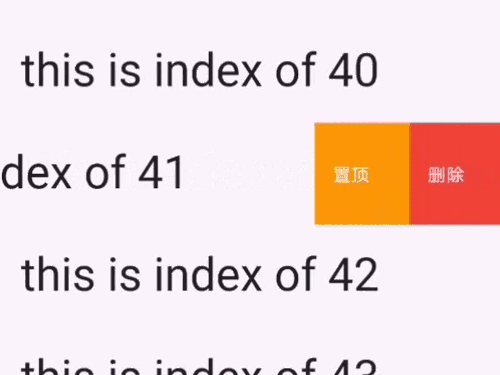
Example 5:Delete like WeChat message page(need to confirm it:
returnSwipeActionCell(
key: ValueKey(list[index]),
trailingActions: <SwipeAction>[
SwipeAction(
////// This attr should be passed to first action///
nestedAction: SwipeNestedAction(title: "确认删除"),
title: "删除",
onTap: (CompletionHandler handler) async {
awaithandler(true);
list.removeAt(index);
setState(() {});
},
color: Colors.red,
),
SwipeAction(
title: "置顶",
onTap: (CompletionHandler handler) async {
/// false means that you just do nothing,it will close/// action buttons by defaulthandler(false);
},
color: Colors.grey),
],
child: Padding(
padding: constEdgeInsets.all(8.0),
child: Text("this is index of ${list[index]}",
style: TextStyle(fontSize: 40)),
),
);
Example 6:Edit mode(just like iOS native effect)
/// To controller edit modeSwipeActionEditController controller;
/// 在initState@overridevoidinitState() {
super.initState();
controller = SwipeActionController();
}
/// To get the selected rows indexList<int> selectedIndexes = controller.getSelectedIndexes();
/// open cell
controller.openCellAt(index: 2, trailing: true, animated: true);
/// close cell
controller.closeAllOpenCell();
/// whether any cell is currently open (e.g. to let a back gesture close it first)bool hasOpen = controller.hasAnyOpenCell;
/// toggleEditingMode
controller.toggleEditingMode()
/// startEditMode
controller.startEditingMode()
/// stopEditMode
controller.stopEditingMode()
/// select cell
controller.selectCellAt(indexPaths:[1,2,3])
controller.deselectCellAt(indexPaths:[1,2,3])
/// pass your data length to selectedAll
controller.selectAll(30
)
/// deselect all cell
controller deselectAll()
ListView.builder(
itemBuilder: (c, index) {
return_item(index);
},
itemCount: list.length,
);
Widget_item(int index) {
returnSwipeActionCell(
/// controller
controller: controller,
/// index is required if you want to enter edit mode
index: index,
key: ValueKey(list[index]),
trailingActions: [
SwipeAction(
/// this is the same as iOS native
performsFirstActionWithFullSwipe: true,
onTap: (handler) async {
awaithandler(true);
list.removeAt(index);
setState(() {});
},
title: "delete"),
],
child: Padding(
padding: constEdgeInsets.all(15.0),
child: Text("This is index of ${list[index]}",
style: TextStyle(fontSize: 35)),
),
);
}
Example 7:customize shape
Widget_item(int index) {
returnSwipeActionCell(
key: ValueKey(list[index]),
trailingActions: [
SwipeAction(
nestedAction: SwipeNestedAction(
/// customize your nested action content
content: Container(
decoration: BoxDecoration(
borderRadius: BorderRadius.circular(30),
color: Colors.red,
),
width: 130,
height: 60,
child: OverflowBox(
maxWidth: double.infinity,
child: Row(
mainAxisAlignment: MainAxisAlignment.center,
children: [
Icon(
Icons.delete,
color: Colors.white,
),
Text('确认删除',
style: TextStyle(color: Colors.white, fontSize: 20)),
],
),
),
),
),
/// you should set the default bg color to transparent
color: Colors.transparent,
/// set content instead of title of icon
content: _getIconButton(Colors.red, Icons.delete),
onTap: (handler) async {
list.removeAt(index);
setState(() {});
}),
SwipeAction(
content: _getIconButton(Colors.grey, Icons.vertical_align_top),
color: Colors.transparent,
onTap: (handler) {}),
],
child: Padding(
padding: constEdgeInsets.all(15.0),
child: Text(
"This is index of ${list[index]},Awesome Swipe Action Cell!! I like it very much!",
style: TextStyle(fontSize: 25)),
),
);
}
Widget_getIconButton(color, icon) {
returnContainer(
width: 50,
height: 50,
decoration: BoxDecoration(
borderRadius: BorderRadius.circular(25),
/// set you real bg color in your content
color: color,
),
child: Icon(
icon,
color: Colors.white,
),
);
}
Example 8:Close opening cell when navigator change its routes.
Add a SwipeActionNavigatorObserver in MaterialApp's navigatorObservers
About CompletionHandler in onTap function of SwipeAction
it means how you want control this cell after you tap it. If you don't want any animation, just don't call it and update
your data and UI with setState()
If you want some animation:
handler(true) : Means this row will be deleted(You should call setState after it)
await handler(true) : Means that you will await the animation to complete(you should call setState after it so that
you will get an animation)
handler(false) : means it will not delete this row.By default, it just close this cell's action buttons.
await handler(false) : means it will wait the close animation to complete.
About all parameter:
I wrote them in my code with dart doc comments. You can read them in source code.