Search packages, repositories and app categories

Package detailsv0.0.3

flutter_time_range

A fully customizable flutter widget that allowing users to choose time range (from - to)

AndroidiOSWebmacOSWindowsLinux
30-day downloads
45
Likes
24
Pub points
140

Install package

flutter pub add flutter_time_range

Package Overview

Package selection guidance compiled from public package information, community data, and project usage.

A fully customizable Flutter widget designed to let users select a time range, from a start time to an end time. It supports intuitive time selection with smooth UI interactions across multiple platforms. The widget is ideal for scheduling, booking, or any application requiring time interval input. Built with flexibility in mind, it allows developers to customize appearance, behavior, and validation rules. Compatible with Android, iOS, Web, macOS, Windows, and Linux, making it suitable for cross-platform applications.

Use cases

  • Scheduling appointments
  • Booking systems
  • Event planning
  • Time tracking tools
  • Custom time input forms

Key features

  • Customizable time range picker
  • Supports multiple platforms
  • Configurable start/end time limits
  • Smooth UI interactions
  • Extensible styling options
  • Built-in validation

Suitable for

  • Cross-platform apps
  • Appointment booking features
  • Time-based data entry
  • Developers needing flexible time inputs
  • UI-heavy scheduling interfaces

Considerations

  • Requires manual handling of time logic
  • Limited built-in time zone support
  • May need additional validation for edge cases
  • Not optimized for very large time ranges

Original README

Original README snapshot from the linked source repository. Visit the repository for the latest content.

flutter_time_range Build Status

A fully customizable flutter widget that allowing users to choose time range (from - to)

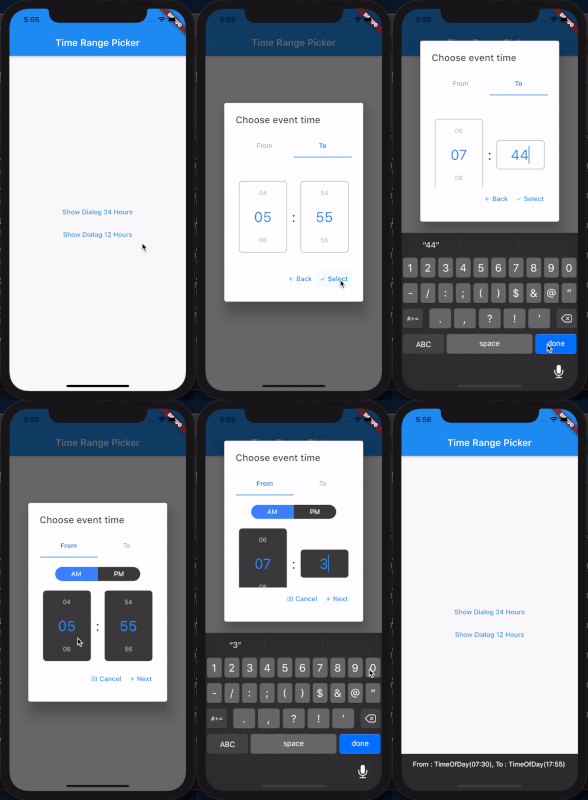
Showcase

ezgif com-gif-maker

Example

(See example for more detail)

  @override
  Widget build(BuildContext context) {
    return MaterialApp(
        navigatorKey: _navigatorKey,
        scaffoldMessengerKey: _messangerKey,
        title: 'Test Time Range Picker',
        home: Scaffold(
          appBar: AppBar(
            title: Text("Time Range Picker"),
          ),
          body: TextButton(
            child: Text("Show Dialog"),
            onPressed: () {
              showTimeRangePicker(_navigatorKey.currentState.overlay.context);
            },
          ),
        ));
  }

  // 24 Hour Format
  Future<void> showTimeRangePicker(BuildContext context) {
    return showDialog(
        context: context,
        builder: (BuildContext context) {
          return AlertDialog(
            title: Text("Choose event time"),
            content: TimeRangePicker(
              initialFromHour: DateTime.now().hour,
              initialFromMinutes: DateTime.now().minute,
              initialToHour: DateTime.now().hour,
              initialToMinutes: DateTime.now().minute,
              backText: "Back",
              nextText: "Next",
              cancelText: "Cancel",
              selectText: "Select",
              editable: true,
              is24Format: true,
              disableTabInteraction: true,
              iconCancel: Icon(Icons.cancel_presentation, size: 12),
              iconNext: Icon(Icons.arrow_forward, size: 12),
              iconBack: Icon(Icons.arrow_back, size: 12),
              iconSelect: Icon(Icons.check, size: 12),
              separatorStyle: TextStyle(color: Colors.grey[900], fontSize: 30),
              onSelect: (from, to) {
                _messangerKey.currentState.showSnackBar(
                    SnackBar(content: Text("From : $from, To : $to")));
                Navigator.pop(context);
              },
              onCancel: () => Navigator.pop(context),
            ),
          );
        });
  }

  // 12 Hour Format and custom style
  Future<void> showTimeRangePicker12Hour(BuildContext context) {
    return showDialog(
        context: context,
        builder: (BuildContext context) {
          return AlertDialog(
            title: Text("Choose event time"),
            content: TimeRangePicker(
              initialFromHour: DateTime.now().hour,
              initialFromMinutes: DateTime.now().minute,
              initialToHour: DateTime.now().hour,
              initialToMinutes: DateTime.now().minute,
              backText: "Back",
              nextText: "Next",
              cancelText: "Cancel",
              selectText: "Select",
              editable: true,
              is24Format: false,
              disableTabInteraction: true,
              iconCancel: Icon(Icons.cancel_presentation, size: 12),
              iconNext: Icon(Icons.arrow_forward, size: 12),
              iconBack: Icon(Icons.arrow_back, size: 12),
              iconSelect: Icon(Icons.check, size: 12),
              inactiveBgColor: Colors.grey[800],
              timeContainerStyle: BoxDecoration(
                  color: Colors.grey[800],
                  borderRadius: BorderRadius.circular(7)),
              separatorStyle: TextStyle(color: Colors.grey[900], fontSize: 30),
              onSelect: (from, to) {
                _messangerKey.currentState.showSnackBar(
                    SnackBar(content: Text("From : $from, To : $to")));
                Navigator.pop(context);
              },
              onCancel: () => Navigator.pop(context),
            ),
          );
        });
  }

TODOS

need feedback

Categories

Dependencies

Dependency list 2 items

Source repository

Projects using this package

No data available yet.