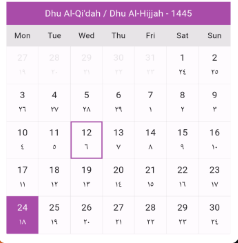
Islamic Hijri Calendar widget displays dates in Arabic and English numerals, shows Hijri month names and years, and allows effortless month navigation.
Package selection guidance compiled from public package information, community data, and project usage.
The Islamic Hijri Calendar package provides a customizable widget for displaying Islamic lunar dates in both Arabic and English numerals. It accurately shows Hijri month names and years, supports bidirectional text for Arabic, and enables smooth month navigation. Ideal for apps targeting Muslim users or those requiring Islamic calendar integration, it works across all major platforms including mobile, web, and desktop. The package is lightweight and easy to implement with minimal setup.
Use cases
Islamic prayer time apps
Religious event scheduling
Muslim community platforms
Educational apps about Islamic culture
Calendar-based Islamic reminders
Key features
Displays Hijri dates in Arabic and English
Supports bidirectional Arabic text
Accurate Hijri month and year labels
Effortless month navigation
Cross-platform compatibility
Customizable UI
Suitable for
Apps for Muslim users
Islamic education tools
Cultural or religious applications
International date display needs
Developers needing lunar calendar support
Considerations
Requires manual handling of Hijri date calculations
Limited to visual representation, not date arithmetic
May need additional localization for non-Arabic speakers
Depends on accurate system time for correct display
Not suitable for complex calendar operations
Original README
Original README snapshot from the linked source repository. Visit the repository for the latest content.
Introducing our Islamic Hijri Calendar widget, offering a comprehensive date display with both Arabic and English numerals. Easily view Hijri month names alongside the year and navigate through months effortlessly.
Features
Users can set only the English calendar or show it with the Hijri calendar.
Shows both english day & arabic day.
Shows the Hijri month names along with the year.
set custom font families manually & google font as well.
Support for both light and dark modes for better visibility and user preference.
Users can customize the colors to match their preferences or app theme.
Users can easily change the month and year to navigate through the calendar.
Getting started
Add dependency to your pubspec.yaml file & run Pub get
IslamicHijriCalendar(
isHijriView: true, // allowing users to set either the English calendar only or display the Hijri calendar alongside the English calendar
highlightBorder : Theme.of(context).colorScheme.primary, // Set selected date border color
defaultBorder : Theme.of(context).colorScheme.onBackground.withValues(alpha:0.1), // Set default date border color
highlightTextColor : Theme.of(context).colorScheme.background, // Set today date text color
defaultTextColor : Theme.of(context).colorScheme.onBackground, //Set others dates text color
defaultBackColor : Theme.of(context).colorScheme.background, // Set default date background color
adjustmentValue: 0, // Set islamic hijri calendar adjustment value which is set by user side
isGoogleFont: true, // Set it true if you want to use google fonts else false
fontFamilyName: "Lato", // Set your custom font family name or google font name
getSelectedEnglishDate: (selectedDate){ // returns the date selected by userprint("English Date : $selectedDate");
},
getSelectedHijriDate: (selectedDate){ // returns the date selected by user in Hijri formatprint("Hijri Date : $selectedDate");
},
isDisablePreviousNextMonthDates: true, // Set dates which are not included in current month should show disabled or enabled
),
Properties
Property
Types
Description
isHijriView
bool?
allowing users to set either the English calendar only or display the Hijri calendar alongside the English calendar
highlightBorder
Color?
Set selected date border color
defaultBorder
Color?
Set default date border color
highlightTextColor
Color?
Set today date text color
defaultTextColor
Color?
Set others dates text color
defaultBackColor
Color?
Set default date background color
adjustmentValue
int
Set hijri calendar adjustment value which is set by user side
isGoogleFont
bool?
Set it true if you want to use google fonts else false
fontFamilyName
String?
Set your custom font family name or google font name
getSelectedEnglishDate
return selectedDate
returns the date selected by user
getSelectedHijriDate
return selectedDate
returns the date selected by user in Hijri format
isDisablePreviousNextMonthDates
bool?
Set dates which are not included in current month should show disabled or enabled