Search packages, repositories and app categories

liquid_container cover
Package detailsv1.1.1

liquid_container

Liquid button container with Hover effect. Easily add liquid effect to your application

AndroidiOSWebmacOSWindowsLinux
30-day downloads
93
Likes
15
Pub points
160

Install package

flutter pub add liquid_container

Package Overview

Package selection guidance compiled from public package information, community data, and project usage.

LiquidContainer is a Flutter package that adds a fluid, liquid-like hover effect to container widgets. It enhances UI interactivity by simulating a ripple or wave motion when users hover over the container, ideal for modern, dynamic interfaces. The package is lightweight and easy to integrate, supporting all major platforms including Android, iOS, Web, macOS, Windows, and Linux. Perfect for buttons, cards, or any interactive UI element where visual feedback improves user experience.

Use cases

  • Interactive buttons
  • Animated UI elements
  • Modern app interfaces
  • Hover-based navigation
  • Gamified app components
  • Visual feedback in forms

Key features

  • Smooth liquid hover animation
  • Cross-platform compatibility
  • Simple integration with existing widgets
  • Customizable ripple effects
  • Lightweight and performant
  • Supports touch and mouse interactions

Suitable for

  • Designers seeking fluid animations
  • Developers building interactive apps
  • Apps with modern aesthetic goals
  • Prototypes requiring engaging UI
  • Educational or gaming applications

Considerations

  • May impact performance on low-end devices
  • Limited customization options for complex effects
  • Best suited for subtle animations
  • Not recommended for high-frequency interaction zones
  • Requires careful design to avoid visual clutter

Original README

Original README snapshot from the linked source repository. Visit the repository for the latest content.

liquid_container

Platform Pub Package License: MIT Donate


Demo

Liquid button container. The physics of the Hover effect is not indistinguishable from a drop of water

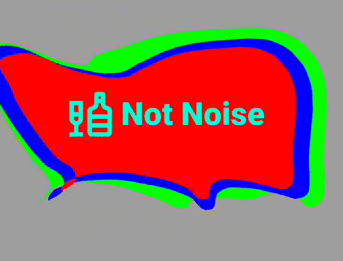
png

Video of the application

Video

Features

  • easy to use
  • has many parameters for fine tuning
  • fully native dart

Getting started

  • Add this to your pubspec.yaml

    dependencies:
      liquid_container: ^1.0.4
    
  • Get the package from Pub:

    flutter packages get
    
  • Import it in your file

    import 'package:liquid_container/liquid_container.dart';
    

Usage

  • Create options
  final optionsParam = Options(
    layers: [
      LayerModel(
        points: [],
        viscosity: 0.9,
        touchForce: 30,
        forceLimit: 15,
        color: const Color(0xFF00FF00),
      ),
      LayerModel(
        points: [],
        viscosity: 0.9,
        touchForce: 50,
        forceLimit: 10,
        color: const Color(0xFFFF0000),
      ),
    ],
    gap: 30,
    noise: 30,
    forceFactorBuild: 10,
    forceFactorOnTap: 150,
  );
  • Add BoxDecoration to customize the container shape (optional)
  BoxDecoration _borderForm() {
    return const BoxDecoration(
        borderRadius: BorderRadius.only(
      topLeft: Radius.circular(40),
      topRight: Radius.circular(80),
      bottomLeft: Radius.circular(150),
      bottomRight: Radius.circular(20),
    ));
  }
  • Use the pretty hover button
  Widget _buildLiquidButton() {
    return LiquidContainer(
      onTap: () {
        // same code
      },
      optionsParam: optionsParam,
      boxDecorationLabel: _borderForm(),
      child: _buildSomeChild(),
    );
  }
Full example
import 'package:flutter/material.dart';

void main() {
  runApp(const LiquidApp());
}

class LiquidApp extends StatelessWidget {
  static const title = 'Liquid Container';

  const LiquidApp({
    super. key,
  });

  @override
  Widget build(BuildContext context) {
    return MaterialApp(
      title: title,
      home: Scaffold(
        appBar: AppBar(
          title: const Text(title),
        ),
        body: Container(
          color: Colors.grey,
          child: ListView(
            children: const [
              BigNoiseLiquidWidget(),
              SizedBox(height: 300),
            ],
          ),
        ),
      ),
    );
  }
}


class BigNoiseLiquidWidget extends StatefulWidget {
  const BigNoiseLiquidWidget({super.key});

  @override
  _BigNoiseLiquidWidgetState createState() => _BigNoiseLiquidWidgetState();
}

class _BigNoiseLiquidWidgetState extends State<BigNoiseLiquidWidget> {
  static const _label = 'Big Noise';
  final optionsParam = Options(
    layers: [
      LayerModel(
        points: [],
        viscosity: 0.9,
        touchForce: 30,
        forceLimit: 15,
        color: const Color(0xFF00FF00),
      ),
      LayerModel(
        points: [],
        viscosity: 0.9,
        touchForce: 50,
        forceLimit: 10,
        color: const Color(0xFF0000FF),
      ),
      LayerModel(
        points: [],
        viscosity: 0.9,
        touchForce: 50,
        forceLimit: 10,
        color: const Color(0xFFFF0000),
      ),
    ],
    gap: 30,
    noise: 30,
    forceFactorBuild: 10,
    forceFactorOnTap: 150,
    scaleOptionLayer: [1, 0.9, 0.8],
  );
  @override
  Widget build(BuildContext context) {
    return Container(
      height: 200,
      margin: const EdgeInsets.only(left: 10, right: 30, top: 100),
      child: LiquidContainer(
        onTap: _onTapToLiquidButton,
        optionsParam: optionsParam,
        boxDecorationLabel: _borderForm(),
        child: _buildForegroundChild(),
      ),
    );
  }

  BoxDecoration _borderForm() {
    return const BoxDecoration(
        borderRadius: BorderRadius.only(
      topLeft: Radius.circular(40),
      topRight: Radius.circular(80),
      bottomLeft: Radius.circular(150),
      bottomRight: Radius.circular(20),
    ));
  }

  void _onTapToLiquidButton() {
    ScaffoldMessenger.of(context).showSnackBar(
      SnackBar(
        content: Padding(
          padding: const EdgeInsets.symmetric(horizontal: 5, vertical: 20),
          child: Row(
            mainAxisAlignment: MainAxisAlignment.spaceBetween,
            children: [
              const Text(
                _label,
                style: TextStyle(
                  fontSize: 20,
                  fontWeight: FontWeight.w900,
                  color: Color(0xFF00FFD5),
                ),
              ),
              IconButton(
                onPressed: ScaffoldMessenger.of(context).clearSnackBars,
                icon: const Icon(
                  Icons.close,
                  size: 30,
                  color: Colors.redAccent,
                ),
              ),
            ],
          ),
        ),
      ),
    );
  }

  Row _buildForegroundChild() {
    return Row(
      mainAxisAlignment: MainAxisAlignment.center,
      children: const <Widget>[
        Icon(
          Icons.liquor_outlined,
          color: Color(0xFF00FFD5),
          size: 60,
        ),
        SizedBox(width: 5),
        Text(
          _label,
          style: TextStyle(
            fontSize: 36,
            fontWeight: FontWeight.w900,
            color: Color(0xFF00FFD5),
          ),
        ),
      ],
    );
  }
}

Author

Okladnoj

Categories

Dependencies

Dependency list 1 items

Source repository

Projects using this package

No data available yet.

