
Search categories, packages and repositories

mask cover
Package detailsv1.0.5

mask

This project is for you to be able to make validations and formatting in a simple and easy way in your projects

AndroidiOSWebmacOSWindowsLinux
30-day downloads
177
Likes
35
Pub points
160

Install package

flutter pub add mask

Package Overview

Package selection guidance compiled from public package information, community data, and project usage.

The mask package provides a simple and efficient way to apply formatting and validation to user input in Flutter applications. It supports autoformatting for text fields, such as phone numbers, CPF/CNPJ, dates, and custom patterns, ensuring data consistency. With minimal setup, developers can enhance form inputs with real-time masking and validation logic across multiple platforms. The package is ideal for forms requiring structured input, improving both usability and data integrity.

Use cases

  • Form input formatting
  • Phone number masking
  • CPF/CNPJ validation
  • Date and time formatting
  • Custom pattern application
  • Real-time input validation

Key features

  • Easy integration with TextFormField
  • Supports multiple predefined masks
  • Custom mask creation
  • Cross-platform compatibility
  • Real-time input processing
  • Lightweight and performant

Suitable for

  • Flutter apps with form inputs
  • Applications requiring data validation
  • Developers seeking simple masking solutions
  • Projects targeting Android, iOS, Web, macOS, Windows, and Linux
  • Apps needing consistent user input formatting

Considerations

  • Requires manual configuration for complex patterns
  • Limited built-in masks beyond common formats
  • May need additional validation logic for edge cases
  • Not designed for non-text input types
  • Depends on correct usage of TextController and onChanged
Original README

Original README snapshot from the linked source repository. Visit the repository for the latest content.

Mask

- validations

  • Mask.validation.cpf
  • Mask.validation.cnpj
  • Mask.validation.cpfOrCnpj
  • Mask.validation.email
  • Mask.validation.money
  • Mask.validation.date
  • Mask.validation.dateTime
  • Mask.validation.time
  • Mask.validation.money
  • Mask.validation.phone
  • Mask.validation.generic

- Description

Validations are for you to be able to simply validate your field

- Masks

  • Mask.creditCard
  • Mask.cpf
  • Mask.cnpj
  • Mask.cpfOrCnpj
  • Mask.money
  • Mask.date
  • Mask.phone
  • Mask.generic

- Description

The masks are for you to be able to customize your field, according to that information

- Examples

// money mask and validation
TextFormField(
  autovalidateMode: AutovalidateMode.onUserInteraction,
  validator: (value) => Mask.validations.money(
    value, 
    min: 100.0, // optional field
  ),
  inputFormatters: [Mask.money()],
),

// cpf or cnpj mask and validation
TextFormField(
  validator: Mask.validations.cpfOrCnpj,
  inputFormatters: [Mask.cpfOrCnpj()],
),

// your custom mask and validation
TextFormField(
  validator: (value) => Mask.validations.generic(value, min:8, error: 'info erro'),
  inputFormatters: [
    Mask.generic(
      masks: ['##-##-##'], 
      hashtag: Hashtag.numbers, // optional field
    ),
  ),
)
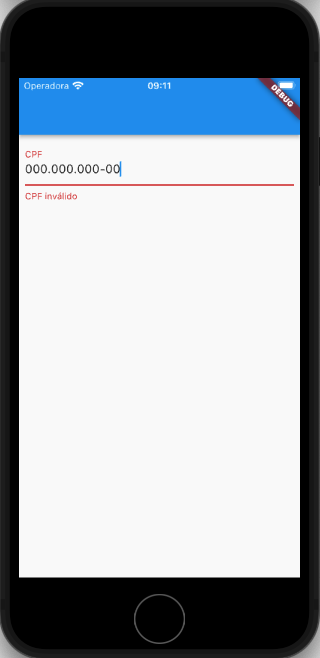
screenshot - cpf validation example


Feito com ❤️ by Weliton Sousa

Categories

Source repository

Projects using this package