Search packages, repositories and app categories

modal_progress_hud_nsn cover
Package detailsv0.5.1

modal_progress_hud_nsn

A modal progress indicator widget with Sound Null Safety. A fork of https://github.com/mmcc007/modal_progress_hud

AndroidiOSWebmacOSWindowsLinux
30-day downloads
12.5K
Likes
302
Pub points
160

Install package

flutter pub add modal_progress_hud_nsn

Package Overview

Package selection guidance compiled from public package information, community data, and project usage.

A Flutter package providing a modal progress indicator widget with Sound Null Safety, designed to display a loading overlay on top of existing UI elements. It is a maintained fork of the original modal_progress_hud, optimized for modern Dart practices. The widget blocks user interaction during loading and can be easily controlled via a boolean flag. Ideal for showing loading states during network requests or long-running operations across multiple platforms.

Use cases

  • Showing loading state during API calls
  • Blocking UI during form submission
  • Displaying progress in background tasks
  • Enhancing UX during data fetching
  • Providing visual feedback in login flows

Key features

  • Sound Null Safety support
  • Simple boolean control for visibility
  • Modal overlay that disables underlying UI
  • Cross-platform compatibility
  • Easy integration with existing widgets
  • Customizable loading indicator

Suitable for

  • Developers using Flutter with null safety
  • Apps requiring clear loading feedback
  • Projects needing lightweight progress indicators
  • Teams maintaining legacy codebases with updated dependencies
  • UI-heavy applications with frequent async operations

Considerations

  • May require manual handling of nested overlays
  • Not suitable for non-modal loading scenarios
  • Limited customization beyond basic styling
  • Depends on parent widget's layout constraints
  • Best used with single active loading state at a time

Original README

Original README snapshot from the linked source repository. Visit the repository for the latest content.

modal_progress_hud_nsn

pub package

A simple widget wrapper to enable modal progress HUD (a modal progress indicator, HUD = Heads Up Display)

A fork of the original modal_progress_hud by mmcc007 with Null Safety and additional features.

Usage

Add the modal_progress_hud_nsn to dependencies in pubspec.yaml.

dependencies:
    modal_progress_hud_nsn: ^0.5.1

Next, import the library into your app.

import 'package:modal_progress_hud_nsn/modal_progress_hud_nsn.dart';

Now, wrap your widget as a child of ModalProgressHUD, typically a form, together with a boolean variable that is maintained in local state.

...
bool _saving = false
...

@override
Widget build(BuildContext context) {
  return Scaffold(
     body: ModalProgressHUD(child: Container(
       Form(...)
     ), inAsyncCall: _saving),
  );
}

Options

Below parameters can be customised accordingly.

ModalProgressHUD(
  @required inAsyncCall: bool,
  @required child: Widget,
  opacity: double,
  color: Color,
  progressIndicator: CircularProgressIndicator,
  offset: double
  dismissible: bool,
  blur: double,
);

Example

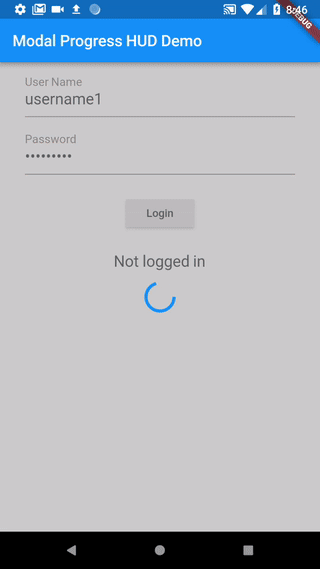
An example app that demonstrates the usage.

  1. On initial load, _saving defaults to false which causes your child widget to display.
  2. When the form is submitted, _saving is set to true, which will display the modal.
  3. Once the async call is complete, _saving is set back to false, hiding the modal.
Example Code
class SettingsPage extends StatefulWidget {
  @override
  _SettingsPageState createState() => new _SettingsPageState();
}

class _SettingsPageState extends State<SettingsPage> {
  bool _saving = false;

  void _submit() {

    setState(() {
      _saving = true;
    });

    //Simulate a service call
    print('submitting to backend...');
    new Future.delayed(new Duration(seconds: 4), () {
      setState(() {
        _saving = false;
      });
    });
  }

  Widget _buildWidget() {
    return new Form(
      child: new Column(
        children: [
          new SwitchListTile(
            title: const Text('Bedroom'),
            value: _bedroom,
            onChanged: (bool value) {
              setState(() {
                _bedroom = value;
              });
            },
            secondary: const Icon(Icons.hotel),
          ),
          new RaisedButton(
            onPressed: _submit,
            child: new Text('Save'),
          ),
        ],
      ),
    );
  }

  @override
  Widget build(BuildContext context) {
    return new Scaffold(
      appBar: new AppBar(
        title: new Text('Flutter Progress Indicator Demo'),
        backgroundColor: Colors.blue,
      ),
      body: ModalProgressHUD(child: _buildWidget(), inAsyncCall: _saving),
    );
  }
}

Similar Alternatives

Useful Resources

See this article on Medium about async form validation

See the example application source for a complete sample app using the modal progress HUD. Included in the example is a method for using a form's validators while making async calls (see flutter/issues/9688 for details).

Issues and feedback

Please file issues to send feedback, request features or report a bug. Thank you!

Categories

Source repository

Projects using this package