Search packages, repositories and app categories

pdf_thumbnail cover
Package detailsv0.1.6+1

pdf_thumbnail

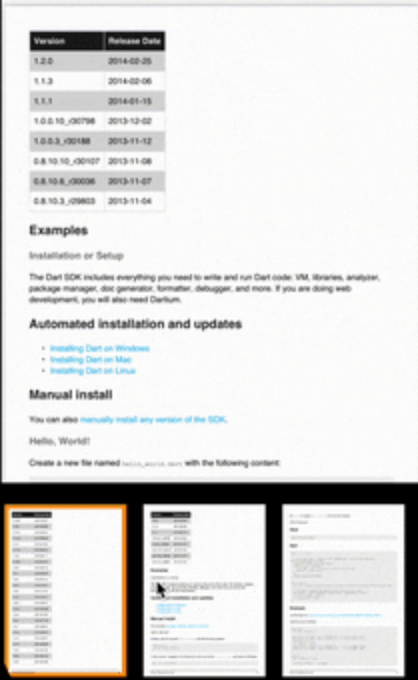
Thumbnail viewer for PDF files. Supports Android and iOS. Simply add widget and give the file path.

AndroidiOSWebmacOSWindows
30-day downloads
3
Likes
51
Pub points
150

Install package

flutter pub add pdf_thumbnail

Package Overview

Package selection guidance compiled from public package information, community data, and project usage.

A Flutter package for displaying PDF thumbnails on Android, iOS, Web, macOS, and Windows. It enables developers to easily integrate a thumbnail viewer into their apps by simply adding a widget and providing the file path. The package is lightweight and designed for seamless rendering of PDF page previews without requiring complex setup. Ideal for document management apps or any application needing quick visual access to PDF content.

Use cases

  • Document preview in mobile apps
  • PDF gallery interfaces
  • Quick file browsing
  • E-learning platforms
  • Digital library applications

Key features

  • Cross-platform support
  • Simple widget integration
  • File path input
  • Lightweight rendering
  • Responsive thumbnail layout

Suitable for

  • Developers building document viewers
  • Apps requiring PDF navigation
  • Educational or enterprise software
  • UI-focused PDF applications

Considerations

  • Requires valid PDF file paths
  • Limited to thumbnail-only display
  • No interactive PDF features
  • Not optimized for large PDFs
  • Depends on underlying platform rendering

Original README

Original README snapshot from the linked source repository. Visit the repository for the latest content.

Pdf Thumbnail

style: very good analysis Powered by Mason License: MIT

Thumbnail viewer for pdfs

Installation 💻

❗ In order to start using Pdf Thumbnail you must have the Flutter SDK installed on your machine.

Add pdf_thumbnail to your pubspec.yaml:

dependencies:
  pdf_thumbnail:

Install it:

flutter packages get

Example ✍️

 return Stack(
              children: [
                SizedBox(
                  height: MediaQuery.of(context).size.height,
                  width: MediaQuery.of(context).size.width,
                  child: PdfViewer(
                    filePath: snapshot.data!.path,
                  ),
                ),
                if (showThumbnail)
                  Positioned(
                    bottom: 0,
                    width: MediaQuery.of(context).size.width,
                    // Here's the thumbnail widget.
                    child: PdfThumbnail.fromFile(snapshot.data!.path),
                  ),
              ],
            );

There is a detailed example app in the repo, but I've deleted iOS and Android folders. Simple go to example folder, and run flutter create . inside the folder to add missing native files for the example app.

Demo

gif

Caching ⏲

I left caching part unopinionated to keep the package simple. Just create your own class from ImageThumbnailCacher and implement the read/write methods. Holding images as Uint8List, so Map<int, Uint8List> is what's need to be written to and read from the cache. It maps page numbers to the images.

class ThumbnailCacher implements ImageThumbnailCacher {
  @override
  Future<PageToImage?> read(String id) async {
    return api.localStorage.readThumbnails(id);
  }

  @override
  Future<bool> write({required String id, required PageToImage map}) {
    return api.localStorage.writeThumbnails(id: id, map: map);
  }
}

I'm using Hive to cache.

Roadmap 🗺️

  • [X] Customization for colors, decoration etc.
  • [X] onTap callback and page number.
  • [X] Caching.
  • [ ] Different layouts and scroll axises.
  • [ ] Lazy loading.

Categories

Dependencies

Dependency list 1 items

Source repository

Projects using this package

No data available yet.